How do I use the Y2K Aesthetic Bedroom Portrait template?
Edit the prompt in the box under the preview — the template's model and format are already selected — and press Generate. Your version appears right on this page.
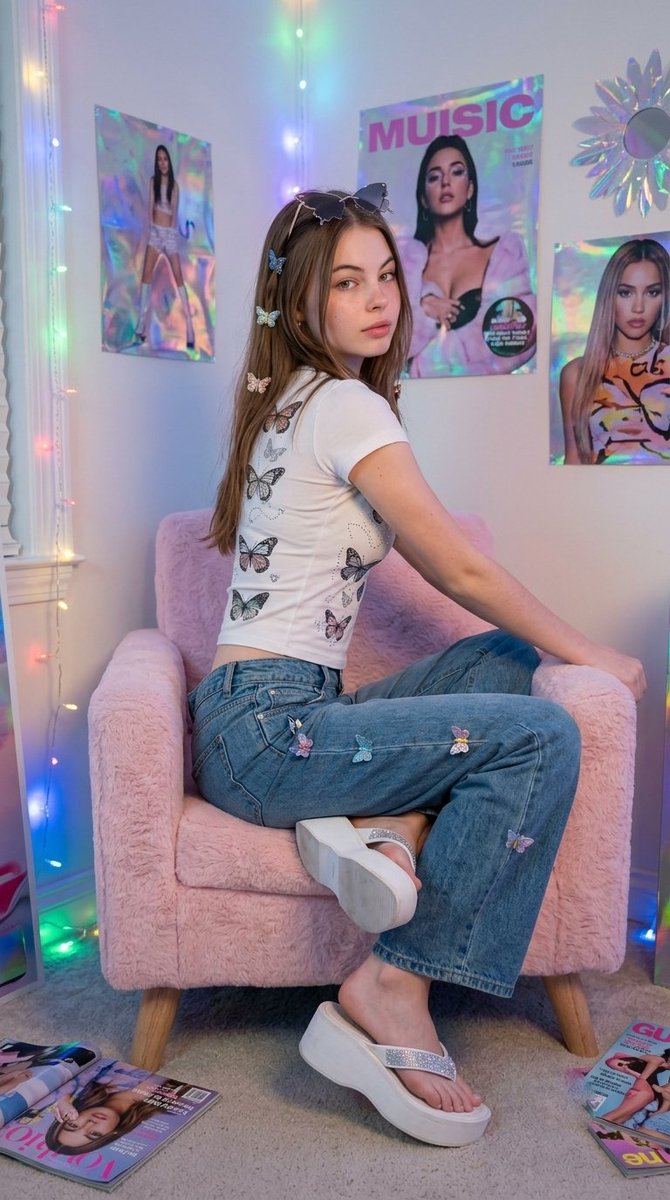
A nostalgic Y2K-inspired portrait prompt for gpt-image-2 featuring a woman in a butterfly-themed outfit within a retro decorated bedroom.

This template uses your photo — add one with the + button.
Create an ultra-realistic portrait of a young woman wearing a {argument name="clothing" default="fitted butterfly-print baby tee, baggy low-rise jeans with butterfly clips, butterfly-shaped sunglasses, and white platform flip-flops with rhinestones"}. Sitting cross-legged on a pastel pink fuzzy chair, looking over shoulder. Shot from the side at a 3/4 angle. {argument name="setting" default="Bedroom setting with colorful LED string lights, holographic posters, and iridescent wall decorations"}. Soft, dreamy lighting with cool-warm color balance. {argument name="aesthetic" default="Nostalgic Y2K bedroom aesthetic"}. Composition 9:16 aspect ratio.Use this reference photo and preserve the original face 100% without changing the face shape, eyes, nose, lips, or facial identity. Create a portrait of a young woman with an elegant and feminine premium Douyin aesthetic vibe.
Create an ultra-realistic portrait of a young woman wearing a {argument name="clothing" default="fitted butterfly-print baby tee, baggy low-rise jeans with butterfly clips, butterfly-shaped sunglasses, and white platform flip-flops with rhinestones"}. Sitting cross-legged on a pastel pink fuzzy chair, looking over shoulder. Shot from the side at a 3/4 angle. {argument name="setting" default="Bedroom setting with colorful LED string lights, holographic posters, and iridescent wall decorations"}. Soft, dreamy lighting with cool-warm color balance. {argument name="aesthetic" default="Nostalgic Y2K bedroom aesthetic"}. Composition 9:16 aspect ratio.Use this reference photo and preserve the original face 100% without changing the face shape, eyes, nose, lips, or facial identity. Create a portrait of a young woman with an elegant and feminine premium Douyin aesthetic vibe.
Y2K Aesthetic Bedroom Portrait needs input media to work. Open it in the studio and these load alongside the prompt — pick whichever ones your chosen model can take.
Edit the prompt in the box under the preview — the template's model and format are already selected — and press Generate. Your version appears right on this page.
Yes. You can change the subject, setting, lighting, mood, format, and available model controls before creating your image.
Opening and editing this template is free. Generating uses credits, shown on the Generate button when you are signed in.
Start with GPT Image 2, which is the model associated with this template. You can compare another compatible model for a different finish.
Follow a topic to a crawlable collection of related PicX Studio templates.