
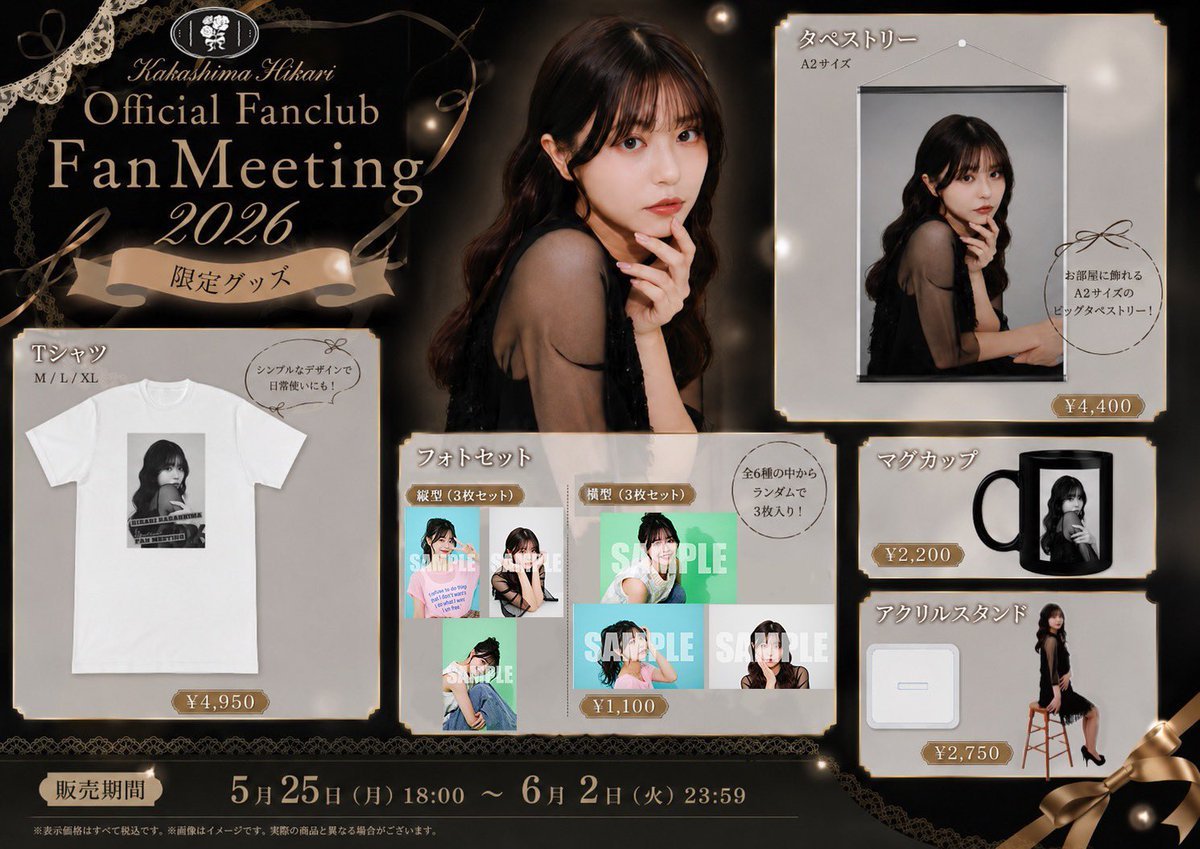
Elegant Fan Meeting Goods Flyer
Creates a premium black-and-gold Japanese fan club merchandise announcement flyer with five product panels and a clear sales period.
- Prompt included
- Model and format preset
- Premium template
The prompt behind this image
Copy the exact prompt behind Elegant Fan Meeting Goods Flyer, or open it in the studio and make it yours.
Goal: Create a luxury dark promotional merchandise flyer for {argument name="event name" default="Kakashima Hikari Official Fanclub Fan Meeting 2026"}, styled like an elegant Japanese fan club goods announcement. The design should look like a single finished advertisement image with all product information visible at a glance. Canvas: Landscape 16:10 flyer, approximately 1054×768 px. Use a black and charcoal background with warm gold highlights, lace ornaments, ribbons, pearl-like light orbs, and a refined vintage boutique atmosphere. Add thin gold borders and slightly aged cream product panels. Main visual: Place one large glamour portrait of a young woman in a black sleeveless dress at center-right, seated or leaning with long dark wavy hair, softly lit, with her face intentionally obscured by a soft rectangular blur. Use warm studio lighting and a dark brown/black backdrop. Header and title area: Upper left contains an oval floral crest logo, cursive Roman text, and a large elegant serif headline reading {argument name="headline text" default="Kakashima Hikari Official Fanclub Fan Meeting 2026"}. Below it, add a beige ribbon banner with Japanese text {argument name="limited goods label" default="限定グッズ"}. Decorative lace should appear in the top-left corner and along the bottom edge. Layout: Arrange exactly 5 product panels around the main portrait, each with cream-gray paper texture, thin gold trim, small ribbon or price badges, and Japanese product names. Product panel count and contents: 1. T-shirt panel, bottom-left: label {argument name="t shirt label" default="Tシャツ"}, size text “M / L / XL”, one white T-shirt mockup with a printed rectangular photo graphic on the chest, a speech bubble saying the design is simple and good for everyday use, and a gold price badge “¥4,950”. 2. Photo set panel, lower center: label “フォトセット”, show exactly 6 sample photo thumbnails arranged in a 2-row collage, divided into vertical set and horizontal set labels, with large translucent “SAMPLE” text stamped over several thumbnails, a speech bubble saying 3 random photos out of 6 total are included, and a gold price badge “¥1,100”. 3. Tapestry panel, upper-right: label “タペストリー”, sublabel “A2サイズ”, show one A2 wall-hanging tapestry mockup with the same woman’s portrait, hanging from a black rod and string, a circular note saying it is a large A2 tapestry to decorate a room, and a gold price badge “¥4,400”. 4. Mug panel, mid-right: label “マグカップ”, show one black-handled mug with a portrait print on the side, and a gold price badge “¥2,200”. 5. Acrylic stand panel, lower-right: label “アクリルスタンド”, show exactly 2 stand components: one small white base plate and one full-body acrylic stand of the woman sitting on a wooden stool in a black dress and heels, with a gold price badge “¥2,750”. Bottom information bar: Across the bottom, add a dark band with Japanese sales period label “販売期間” and large gold date text {argument name="sales period" default="5月25日(月)18:00 ~ 6月2日(火)23:59"}. Add tiny fine-print Japanese disclaimer text underneath, very small and subtle. Visual style: Elegant Japanese idol merchandise flyer, premium black and gold palette, serif typography mixed with cursive script, soft vignetting, glowing bokeh, lace flourishes, curled gold ribbon accents, and polished commercial layout. Keep product panels crisp and readable, with realistic mockups but slightly stylized lighting. Constraints: Use exactly 5 product panels and exactly 6 photo thumbnails in the photo set. Keep all faces softly blurred or obscured. Do not add extra products, extra dates, watermarks, QR codes, or social media icons.
How to use Elegant Fan Meeting Goods Flyer in 3 steps
- 1Upload ImagePNG, JPG or paste
Add your photo
Upload the photo the template builds on. The prompt, model and format are already set.
- 2…a portrait of your subject in softgolden-hour light, 85mm…
Personalize
Edit the subject and creative details for your destination.
- 3Generate
Generate
Press Generate — your image is created in PicX Studio, so you can compare it with the original and refine one variable at a time.
More like this
Templates with the same subject, style or setup. Open one to see its prompt.











Make it yours
Elegant Fan Meeting Goods Flyer works as-is. These are the safest ways to change it without losing the look.
Change one field
Copy a single group, rewrite it, and generate again so you can see what that field is doing.
Keep the frame, change the subject
Hold the composition and light of Elegant Fan Meeting Goods Flyer, then swap wardrobe, props or the person for a new take.
| If the result… | Why | Fix |
|---|---|---|
| The result drifts from the preview | Too many fields changed at once. | Reuse Elegant Fan Meeting Goods Flyer as-is first, then change one group — subject, light, or setting. |
| The model over-stylizes the scene | The prose prompt leaves finish and camera underspecified. | Add one camera or lighting sentence and stay on GPT Image 2. |
More GPT Image 2 templates
Other prompts made for GPT Image 2.

Six VTuber Japanese Logo Sheet

Realistic Portrait of Woman and Deer

The Vista Modular Condo Poster

AI Model Routing Comparison Infographic

2.5D Anime Art Board

Isometric Productivity Desk Scene

New York Double Exposure Poster

Four-Panel AI Landscape Comparison

Japanese Tatami Lifestyle Magazine Cover

NESCAFÉ Coffee Map Poster
More image prompts
Fresh picks from across the catalog.
Cinematic Chiaroscuro Portrait of a South Asian Man in a Library
Realistic Garden Fairy Editorial Portrait

Structured Bedroom Selfie Prompt
Bear Peering into a Deep Hole Illustration
Floral-Inspired Elegant Fashion
Candid Bedroom Portrait with Feet Up
Nano Banana Pro Cinematic Night Romcom Ride Prompt

Iridescent Liquid Ripple Wallpaper
Parisian Luxury Fashion Ad at Golden Hour
Monochrome Fine-Art Fashion Editorial with Horse
Browse template categories
Elegant Fan Meeting Goods Flyer questions
How do I use the Elegant Fan Meeting Goods Flyer template?
Add your photo if the template asks for one, edit the prompt if you like — the template's model and format are already selected — and press Generate. Your version opens in PicX Studio.
Can I customize the Elegant Fan Meeting Goods Flyer template?
Yes. You can change the subject, setting, lighting, mood, format, and available model controls before creating your image.
Is the Elegant Fan Meeting Goods Flyer template free?
Opening and editing this template is free. Generating uses credits, shown on the Generate button when you are signed in.
Which AI model should I use?
Start with GPT Image 2, which is the model associated with this template. You can compare another compatible model for a different finish.
Looking for something else? Browse all templates.

Your photo, any look
Thousands of ready templates for every top image and video model, from one credit balance.