
Candid Bedroom Portrait with Feet Up
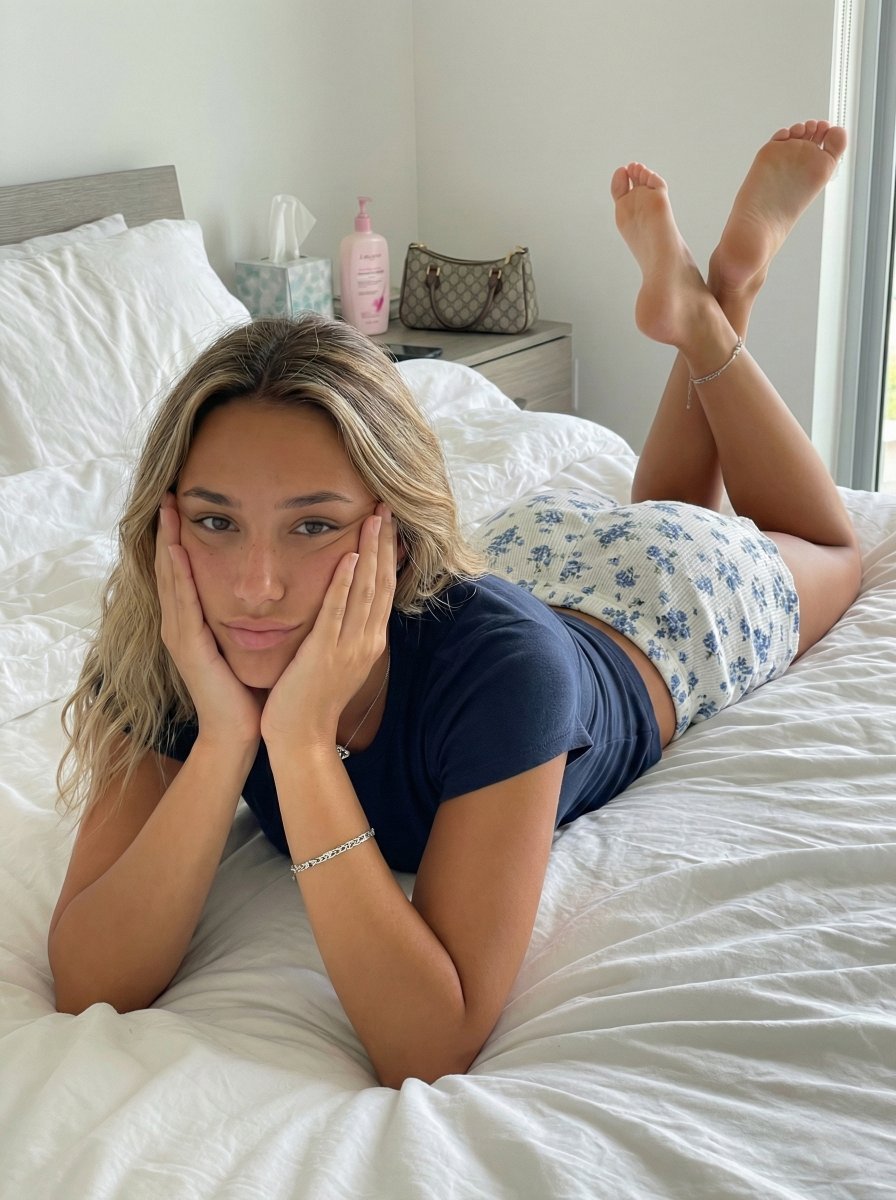
A detailed JSON prompt for generating a photorealistic, candid medium shot of a young woman lying prone on a rumpled bed, propped up on her elbows, with her legs bent and feet crossed in the air.
- Prompt included
- Model and format preset
- Free template
The prompt behind this image
Copy the exact prompt behind Candid Bedroom Portrait with Feet Up, or open it in the studio and make it yours.
- Subject › Description
- Young woman with tanned skin and long, wavy blonde-highlighted hair with dark roots, lying on her stomach on a bed.
- Subject › Face › Expression
- Neutral, relaxed, slightly bored or waiting, direct eye contact with the camera.
- Subject › Face › Details
- Chin resting in palms of hands, cheeks slightly squished by hands, minimal makeup, natural skin texture with visible pores and slight imperfections.
- Subject › Face › Hair
- Loose waves, balayage style with blonde highlights and darker roots, falling over shoulders.
- Subject › Body › Posture
- Prone position, upper body propped up on elbows.
- Subject › Body › Attire
- Navy blue fitted short-sleeve t-shirt, white pajama shorts with a small blue floral pattern and textured fabric.
- Subject › Body › Limbs
- Elbows resting on the mattress, hands cupping the face. Legs bent at the knees rising into the air, ankles crossed.
- Subject › Body › Feet
- Bare feet visible in the background, soles facing the camera, relaxed toes, silver chain anklet on the left ankle.
- Pose › Type
- Lying prone on bed, facing camera.
- Pose › Details
- Upper body elevated by elbows, creating a triangular composition with the arms. Legs are kicked up behind, crossing at the ankles. Weight distributed naturally on elbows and stomach.
- Pose › Orientation
- Front-facing relative to the upper body, feet visible in perspective behind.
- Environment › Setting
- Bedroom interior.
- Environment › Foreground
- White bed sheets and duvet, rumpled and textured.
- Environment › Background
- Grey upholstered headboard on the left. Wooden nightstand in the background holding a tissue box, a tall pink pump bottle (lotion), and a beige/brown monogrammed handbag. Plain white walls.
- Environment › Details
- Natural, lived-in clutter on the nightstand.
- Camera › Shot Type
- Medium shot, capturing the subject from head to raised feet.
- Camera › Angle
- Slightly elevated or eye-level relative to the bed surface.
- Camera › Focus
- Sharp focus on the subject's face and eyes, with natural depth of field slightly softening the feet and background.
- Camera › Lens
- Standard focal length, approx 35mm-50mm.
- Lighting › Source
- Natural daylight entering from a window on the right.
- Lighting › Quality
- Soft, diffused, directional.
- Lighting › Shadows
- Soft shadows cast on the left side of the face and bed sheets, highlighting the contours of the face and legs.
- Mood And Expression › Tone
- Casual, cozy, intimate, relaxed.
- Mood And Expression › Atmosphere
- Lazy morning or afternoon vibe.
Raw JSON
{
"subject": {
"description": "Young woman with tanned skin and long, wavy blonde-highlighted hair with dark roots, lying on her stomach on a bed.",
"face": {
"expression": "Neutral, relaxed, slightly bored or waiting, direct eye contact with the camera.",
"details": "Chin resting in palms of hands, cheeks slightly squished by hands, minimal makeup, natural skin texture with visible pores and slight imperfections.",
"hair": "Loose waves, balayage style with blonde highlights and darker roots, falling over shoulders."
},
"body": {
"posture": "Prone position, upper body propped up on elbows.",
"attire": "Navy blue fitted short-sleeve t-shirt, white pajama shorts with a small blue floral pattern and textured fabric.",
"limbs": "Elbows resting on the mattress, hands cupping the face. Legs bent at the knees rising into the air, ankles crossed.",
"feet": "Bare feet visible in the background, soles facing the camera, relaxed toes, silver chain anklet on the left ankle."
}
},
"pose": {
"type": "Lying prone on bed, facing camera.",
"details": "Upper body elevated by elbows, creating a triangular composition with the arms. Legs are kicked up behind, crossing at the ankles. Weight distributed naturally on elbows and stomach.",
"orientation": "Front-facing relative to the upper body, feet visible in perspective behind."
},
"environment": {
"setting": "Bedroom interior.",
"foreground": "White bed sheets and duvet, rumpled and textured.",
"background": "Grey upholstered headboard on the left. Wooden nightstand in the background holding a tissue box, a tall pink pump bottle (lotion), and a beige/brown monogrammed handbag. Plain white walls.",
"details": "Natural, lived-in clutter on the nightstand."
},
"camera": {
"shot_type": "Medium shot, capturing the subject from head to raised feet.",
"angle": "Slightly elevated or eye-level relative to the bed surface.",
"focus": "Sharp focus on the subject's face and eyes, with natural depth of field slightly softening the feet and background.",
"lens": "Standard focal length, approx 35mm-50mm."
},
"lighting": {
"source": "Natural daylight entering from a window on the right.",
"quality": "Soft, diffused, directional.",
"shadows": "Soft shadows cast on the left side of the face and bed sheets, highlighting the contours of the face and legs."
},
"mood_and_expression": {
"tone": "Casual, cozy, intimate, relaxed.",
"atmosphere": "Lazy morning or afternoon vibe."
},
"style_and_realism": {
"style": "Photorealistic, candid snapshot aesthetic.",
"fidelity": "High textural fidelity on skin, fabric, and bedding. No airbrushing or plastic smoothing.",
"texture": "Visible weave on the t-shirt and shorts, wrinkles in the bed sheets."
},
"colors_and_tone": {
"palette": "Cool whites (bedding), navy blue (shirt), warm tan (skin), touches of pink (lotion bottle) and beige (bag).",
"contrast": "Natural contrast, preserving the brightness of the white sheets against the"
}
}How to use Candid Bedroom Portrait with Feet Up in 3 steps
- 1
Open
The prompt is already in the box next to the preview, with the template's model and format selected.
- 2…a portrait of your subject in softgolden-hour light, 85mm…
Personalize
Edit the subject and creative details for your destination.
- 3Generate
Generate
Press Generate — your image is created in PicX Studio, so you can compare it with the original and refine one variable at a time.
More like this
Templates with the same subject, style or setup. Open one to see its prompt.











Make it yours
Candid Bedroom Portrait with Feet Up works as-is. These are the safest ways to change it without losing the look.
Swap the setting
Keep the rest of the prompt and replace the location block. The current setting is “Bedroom interior.”.
Swap the light
One lighting change is enough to compare takes. Current light: “Natural daylight entering from a window on the right.”.
Change one field
Copy a single group, rewrite it, and generate again so you can see what that field is doing.
| If the result… | Why | Fix |
|---|---|---|
| The result drifts from the preview | Too many fields changed at once. | Reuse Candid Bedroom Portrait with Feet Up as-is first, then change one group — subject, light, or setting. |
| Nano Banana 2 ignores part of the JSON | Some models flatten or skip nested keys. | Keep the same values and paste them as a short paragraph instead. |
More Nano Banana 2 templates
Other prompts made for Nano Banana 2.

Photorealistic Leaf Shaped Like a Dragon

K-Pop Idol Portrait Grid for Rapid Selection

Poetic Rain Forest Portrait During Golden Hour

Urban Street Portrait with Cartoon Inner Self Duo

Candid Nighttime Photo with Cat Prompt

High-Concept 3D Diorama Generation Prompt

Cinematic Futuristic Studio Portrait Template

Skincare Editorial Photography Collage Prompt

Hyper-Realistic Commercial Product Photography (Splash Effect)

Hyper-Realistic Nightclub Portrait Prompt
More image prompts
Fresh picks from across the catalog.

Ultra-Photorealistic Luxury Pop-Up Store Prompt
Cinematic Black & White Portrait with Face Match

Brutalist Poster Generation Prompt
85mm F1.4 Anime Portrait Comparison
Natural Sunlight Close-up Portrait Prompt for Nano Banana 2
Rainy Day Kitchen Life Portrait

Degree Panoramic Photography Prompt
Split-Time Birthday Portrait
Jomon Pottery Museum Exhibit Mashup
Tattooed Woman Mirror Selfie Prompt
Browse template categories
Candid Bedroom Portrait with Feet Up questions
How do I use the Candid Bedroom Portrait with Feet Up template?
Add your photo if the template asks for one, edit the prompt if you like — the template's model and format are already selected — and press Generate. Your version opens in PicX Studio.
Can I customize the Candid Bedroom Portrait with Feet Up template?
Yes. You can change the subject, setting, lighting, mood, format, and available model controls before creating your image.
Is the Candid Bedroom Portrait with Feet Up template free?
Opening and editing this template is free. Generating uses credits, shown on the Generate button when you are signed in.
Which AI model should I use?
Start with Nano Banana 2, which is the model associated with this template. You can compare another compatible model for a different finish.
Looking for something else? Browse all templates.

Your photo, any look
Thousands of ready templates for every top image and video model, from one credit balance.