How do I use the Watercolor Cyberpunk Rooftop Girl template?
Edit the prompt in the box under the preview — the template's model and format are already selected — and press Generate. Your version appears right on this page.
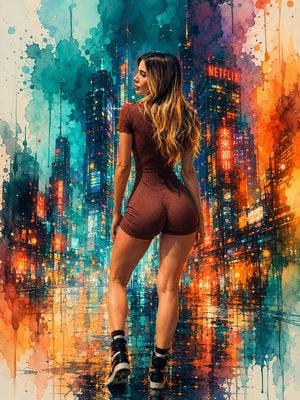
A neon watercolor cyberpunk scene of a lone woman overlooking a rainy futuristic city, useful for atmospheric sci-fi illustration prompts.

This template uses your photo — add one with the + button.
Create a vertical cyberpunk watercolor illustration of one young woman seen from behind on a high rooftop balcony, overlooking a vast rainy futuristic city at night. The mood is soft and welcoming despite the dystopian setting, with luminous neon magenta, cyan, violet, and deep indigo washes, visible watercolor paper texture, ink-like edges, rain streaks, splatters, and glowing reflections. The woman has extremely long windblown {argument name="hair color" default="hot pink hair with cyan-blue underside streaks"}, a bare shoulder, dangling earrings, and a glossy black off-shoulder tech jacket covered in neon circuitry; her transparent iridescent skirt and straps glow with blue-pink light. Add exactly one visible flying drone or hovercraft in the sky. The skyline is dense with countless skyscrapers, holographic screens, vertical neon signs, and wet rooftops; include exactly three prominent readable Japanese text elements: 「未来都市」 on the largest magenta tower billboard, 「ホテル」 on a smaller right-side sign, and 「未来」 on the woman’s sleeve. Include exactly two opaque privacy/censor blocks as part of the composition: one dark plum square covering the woman’s face area, and one pink vertical rectangle covering the center of the giant billboard on the right. Use {argument name="art style" default="delicate watercolor cyberpunk anime concept art"}, dramatic back lighting, high detail, romantic rain, no photorealism, no clean vector look, no extra characters, and no watermark.
Create a vertical cyberpunk watercolor illustration of one young woman seen from behind on a high rooftop balcony, overlooking a vast rainy futuristic city at night. The mood is soft and welcoming despite the dystopian setting, with luminous neon magenta, cyan, violet, and deep indigo washes, visible watercolor paper texture, ink-like edges, rain streaks, splatters, and glowing reflections. The woman has extremely long windblown {argument name="hair color" default="hot pink hair with cyan-blue underside streaks"}, a bare shoulder, dangling earrings, and a glossy black off-shoulder tech jacket covered in neon circuitry; her transparent iridescent skirt and straps glow with blue-pink light. Add exactly one visible flying drone or hovercraft in the sky. The skyline is dense with countless skyscrapers, holographic screens, vertical neon signs, and wet rooftops; include exactly three prominent readable Japanese text elements: 「未来都市」 on the largest magenta tower billboard, 「ホテル」 on a smaller right-side sign, and 「未来」 on the woman’s sleeve. Include exactly two opaque privacy/censor blocks as part of the composition: one dark plum square covering the woman’s face area, and one pink vertical rectangle covering the center of the giant billboard on the right. Use {argument name="art style" default="delicate watercolor cyberpunk anime concept art"}, dramatic back lighting, high detail, romantic rain, no photorealism, no clean vector look, no extra characters, and no watermark.
Edit the prompt in the box under the preview — the template's model and format are already selected — and press Generate. Your version appears right on this page.
Yes. You can change the subject, setting, lighting, mood, format, and available model controls before creating your image.
Opening and editing this template is free. Generating uses credits, shown on the Generate button when you are signed in.
Start with GPT Image 2, which is the model associated with this template. You can compare another compatible model for a different finish.
Follow a topic to a crawlable collection of related PicX Studio templates.