How do I use the Dalí-Style Surreal Coastal Transformation template?
Edit the prompt in the box under the preview — the template's model and format are already selected — and press Generate. Your version appears right on this page.
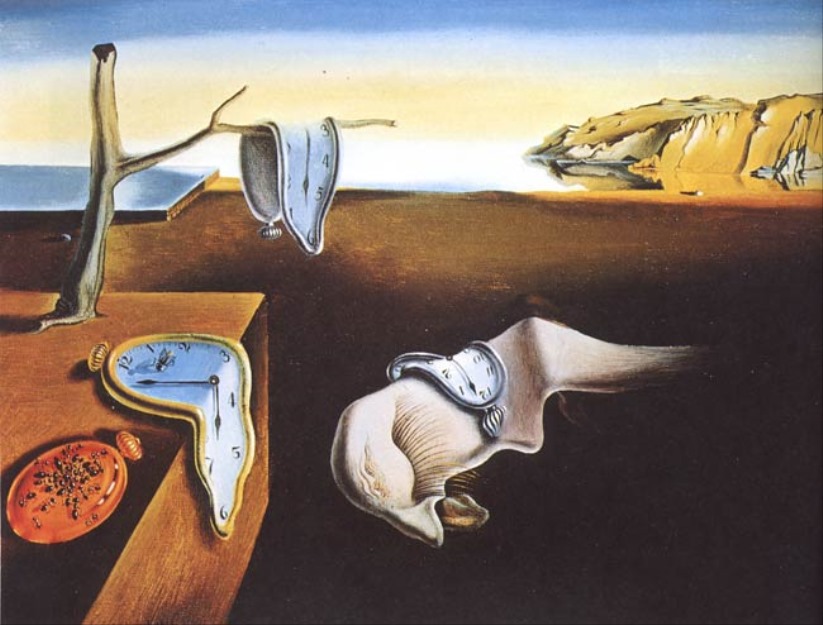
Transforms a Dalí reference painting into a new surreal coastal oil-painting scene with architectural forms, floating objects, and masked rectangular overlays.

This template uses your photo — add one with the + button.
Using the provided reference image as the stylistic base, transform it into a new surreal Salvador Dalí-inspired coastal dreamscape rather than copying the melting-clock composition. Keep the same oil-painting feel, warm desert-seaside horizon, long shadows, and uncanny realism, but replace the original clock scene with an ornate architectural still-life arrangement: a tall eroded stone facade with multiple circular openings on the left, classical urns and small decorative figures on top, a distant garden/temple view framed through one opening, a draped white cloth at the base, and a large chalice-like reflective basin on the right containing a tiny island. Add a floating cracked egg/parachute form with dangling strings in the sky, a small suspended sphere, a rocky coastline in the distance, and a small pedestal with an egg and dark draped cloth in the lower right. Include exactly 2 flat opaque rectangular mask blocks over the image: 1 large vertical olive-gray rectangle covering the central structure and 1 smaller olive-gray rectangle near the upper-right floating object. Maintain a muted antique palette, precise surrealist lighting, and painterly canvas texture; avoid modern objects, text, or photorealistic digital effects.
Using the provided reference image as the stylistic base, transform it into a new surreal Salvador Dalí-inspired coastal dreamscape rather than copying the melting-clock composition. Keep the same oil-painting feel, warm desert-seaside horizon, long shadows, and uncanny realism, but replace the original clock scene with an ornate architectural still-life arrangement: a tall eroded stone facade with multiple circular openings on the left, classical urns and small decorative figures on top, a distant garden/temple view framed through one opening, a draped white cloth at the base, and a large chalice-like reflective basin on the right containing a tiny island. Add a floating cracked egg/parachute form with dangling strings in the sky, a small suspended sphere, a rocky coastline in the distance, and a small pedestal with an egg and dark draped cloth in the lower right. Include exactly 2 flat opaque rectangular mask blocks over the image: 1 large vertical olive-gray rectangle covering the central structure and 1 smaller olive-gray rectangle near the upper-right floating object. Maintain a muted antique palette, precise surrealist lighting, and painterly canvas texture; avoid modern objects, text, or photorealistic digital effects.
Dalí-Style Surreal Coastal Transformation needs input media to work. Open it in the studio and these load alongside the prompt — pick whichever ones your chosen model can take.
Edit the prompt in the box under the preview — the template's model and format are already selected — and press Generate. Your version appears right on this page.
Yes. You can change the subject, setting, lighting, mood, format, and available model controls before creating your image.
Opening and editing this template is free. Generating uses credits, shown on the Generate button when you are signed in.
Start with GPT Image 2, which is the model associated with this template. You can compare another compatible model for a different finish.
Follow a topic to a crawlable collection of related PicX Studio templates.