
Grok Imagine Video Prompt: Conan-esque Queen on a Volcano Throne
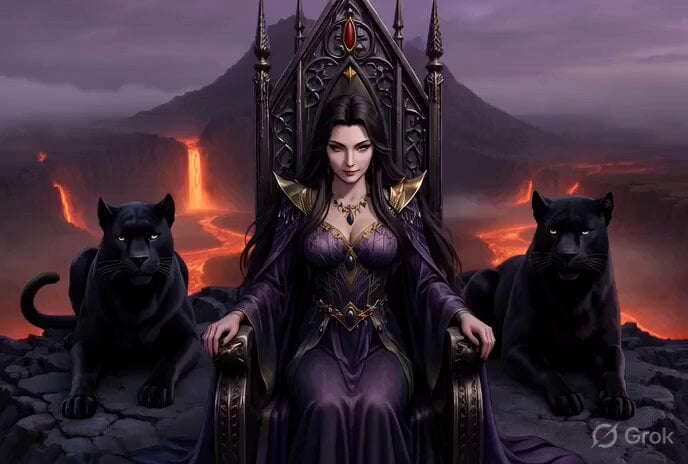
A detailed, grimdark concept art prompt for Grok Imagine, requesting a video of a powerful woman seated on a throne balanced on a volcano caldera, flanked by black panthers, rendered in a Dark Souls style with gothic…
- Prompt included
- Model and format preset
- Premium template
The prompt behind this video
Copy the exact prompt behind Grok Imagine Video Prompt: Conan-esque Queen on a Volcano Throne, or open it in the studio and make it yours.
In a majestic throne balanced on the rim of an erupting volcano caldera with rivers of molten fire below, reminiscent of Conan the Barbarian's epic fantasy world, a powerful and stunning woman exudes authority from atop a majestic throne. Her presence is both commanding and serene, evoking the untamed beauty and strength associated with Conan's universe. Flanking her on both the right and left are sleek black panthers, their muscular forms at rest yet brimming with potential energy. These majestic beasts serve not only as protectors but as symbols of her formidable power and connection to the wild. The air is charged with an ancient magic, as if the very scene is a gateway to realms untold, and she, its sovereign ruler, possesses the wisdom and ferocity of the ages. Dark Souls grimdark concept art style, somber atmospheric fog and embers, intricate gothic details, muted purple and ash palette, dramatic rim lighting, oppressive existential mood, ultra detailed, masterpiece quality. speaking japanese:「魔法の深淵を覗けば、宇宙の秘密が見える。でも戻る橋は燃え落ちた。」 Add subtitles in english.
How to use Grok Imagine Video Prompt: Conan-esque Queen on a Volcano Throne in 3 steps
- 1
Open
The prompt is already in the box next to the preview, with the template's model and format selected.
- 2…a portrait of your subject in softgolden-hour light, 85mm…
Personalize
Edit the subject and creative details for your destination.
- 3Generate
Generate
Press Generate — your video is created in PicX Studio, so you can compare it with the original and refine one variable at a time.
More like this
Templates with the same subject, style or setup. Open one to see its prompt.

Grok Imagine Prompt: Ultra Luxurious Romantic Warrior Queen
Grok-imagine 1.5 Digital Human Video Script
Grok Imagine Mechanical and Ethereal Creature Prompts
Grok Imagine Video of a Graceful Warrior
Grok Imagine prompt with negative constraints and scenario

Grok Imagine prompt for cinematic VFX scene (Scene 2 - Landing)

Grok Imagine video prompt part 1: Morning routine
Grok Imagine Prompt: Yurine Kingdom Apocalypse Day
Enchanting Forest Grok Imagine Video Prompt
Klimt-Inspired Impasto Painting of Lovers (Midjourney/Grok Imagine)

Grok Imagine prompt: Grok driving a cosmic hot rod spaceship

Grok Imagine Prompt: Linux, Containers/K8s, and OpenClaw OS Concepts
Make it yours
Grok Imagine Video Prompt: Conan-esque Queen on a Volcano Throne works as-is. These are the safest ways to change it without losing the look.
Change one field
Copy a single group, rewrite it, and generate again so you can see what that field is doing.
Keep the frame, change the subject
Hold the composition and light of Grok Imagine Video Prompt: Conan-esque Queen on a Volcano Throne, then swap wardrobe, props or the person for a new take.
| If the result… | Why | Fix |
|---|---|---|
| The result drifts from the preview | Too many fields changed at once. | Reuse Grok Imagine Video Prompt: Conan-esque Queen on a Volcano Throne as-is first, then change one group — subject, light, or setting. |
| The model over-stylizes the scene | The prose prompt leaves finish and camera underspecified. | Add one camera or lighting sentence and stay on Grok Imagine. |
More Grok Imagine templates
Other prompts made for Grok Imagine.

Kaleidoscopic Cosmic Dolphin Video

Horror Daffy Duck Video Transition

America 250th Anniversary Celebration

Glowing Water Forest Night Prompt

Soft Pink Roses Dreamer Prompt

Ninja Wizard Levitation Jump

Coffee Cup Interaction Motion

Voice Controlled Water Animation

Pterodactyl Transformation Journey

Candle Mandala Mirror Video
More video prompts
Fresh picks from across the catalog.
Cat Master Fairy Tale Thriller Video Prompt

Naples Pizzeria Animation

Early 2000s Asian Drama Hair Toss
Pixar-Style Boy and Fanta Machine Story
Intimate Future Conversation Couple

Realistic AI Influencer GRWM Beauty Video
Video Prompt for Stationary Camera and Model Movement
Ethereal Lunar Moth Transformation
Girl Struggling with Large Pumpkin Market Scene
Brutalist Sculpture Atrium Rap Video
Browse template categories
Grok Imagine Video Prompt: Conan-esque Queen on a Volcano Throne questions
How do I use the Grok Imagine Video Prompt: Conan-esque Queen on a Volcano Throne template?
Add your photo if the template asks for one, edit the prompt if you like — the template's model and format are already selected — and press Generate. Your version opens in PicX Studio.
Can I customize the Grok Imagine Video Prompt: Conan-esque Queen on a Volcano Throne template?
Yes. You can change the subject, setting, lighting, mood, format, and available model controls before creating your video.
Is the Grok Imagine Video Prompt: Conan-esque Queen on a Volcano Throne template free?
Opening and editing this template is free. Generating uses credits, shown on the Generate button when you are signed in.
Which AI model should I use?
Start with Grok Imagine, which is the model associated with this template. You can compare another compatible model for a different finish.
Looking for something else? Browse all templates.

Your photo, any look
Thousands of ready templates for every top image and video model, from one credit balance.