
Sleeping Forest Colossus Transformation
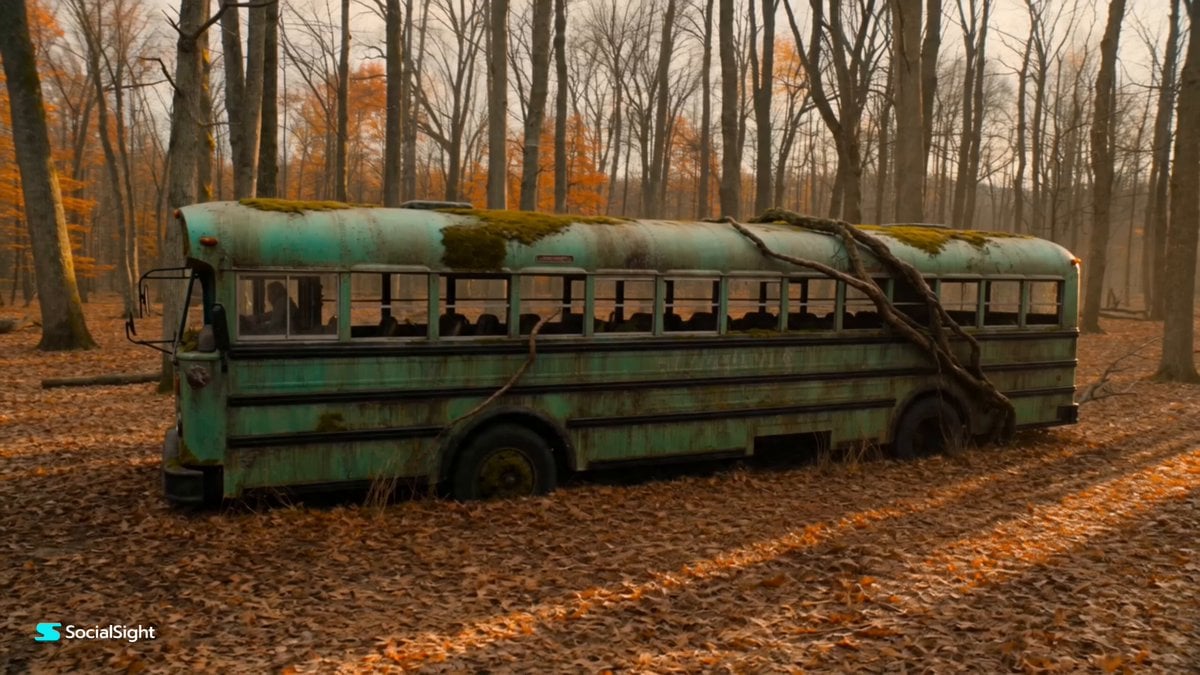
A complex technical prompt for a 15-second cinematic video depicting an abandoned forest bus transforming into a giant moss-covered ancient colossus.
- Prompt included
- Model and format preset
- Free template
The prompt behind this video
Copy the exact prompt behind Sleeping Forest Colossus Transformation, or open it in the studio and make it yours.
[Technical Specs] Generate a 15-second, 16:9, 720p cinematic video. The audio begins with immersive late-autumn forest ambience: dry leaves rustling, distant crows, soft wind through bare branches. The calm is suddenly broken by deep subterranean metal groans, grinding stone, snapping roots, hydraulic bursts, and an epic dark fantasy monster-movie soundtrack. [The Scene] The video opens in a quiet late-autumn forest covered with dead golden-brown leaves. At the center of the frame stands an abandoned moss-covered green bus, half-swallowed by nature, its windows cracked, its paint faded, vines and roots wrapped around its body. It looks forgotten, ancient, and harmless. [Awakening Action] A slow 360-degree orbital drone shot circles the bus as the forest begins to tremble. The ground beneath it cracks open. Thick tree roots pull away like living cables. The bus’s metal panels split apart, not mechanically clean, but violently—like something old and angry waking from inside. The windshield fractures into two glowing amber eyes. The wheels unfold into massive root-wrapped iron legs. The side panels expand outward into armored ribs, covered in moss, bark, rust, and jagged metal plates. The headlights ignite like molten fire as the bus rises from the forest floor, transforming into a gigantic ancient forest colossus part machine, part tree spirit, part forgotten war beast. [Environmental Impact] As the colossus stands upright, a brutal shockwave erupts from the ground. Dead leaves explode into the air like a storm. Nearby trees bend violently, branches snapping under the force. A terrified driver is thrown out of the bus door and launched high into the sky, spinning helplessly through the cloud of dust, leaves, and sparks. [Cinematography & Lighting] Golden late-afternoon sunlight pierces through the thin forest canopy, catching the glowing eyes and rusted armor of the creature. The camera drops into an extreme low-angle shot, making the colossus appear impossibly huge. Dust, leaves, sparks, and broken roots fill the frame as the creature raises its head and releases a deep, earth-shaking roar.
How to use Sleeping Forest Colossus Transformation in 3 steps
- 1
Open
The prompt is already in the box next to the preview, with the template's model and format selected.
- 2…a portrait of your subject in softgolden-hour light, 85mm…
Personalize
Edit the subject and creative details for your destination.
- 3Generate
Generate
Press Generate — your video is created in PicX Studio, so you can compare it with the original and refine one variable at a time.
More like this
Templates with the same subject, style or setup. Open one to see its prompt.

Magical Room Transformation - Seedance 2.5

Dark Tokusatsu Transformation - Seedance 2.5

RX-7 to Mech Transformation Cyberpunk

Forest Fantasy Girl Short Film
Civilization Timelapse — Centuries in One Shot
Mecha Transformation vs Kaiju — 4-Scene Epic
Daughter of the Forest Transformation
Surreal Apartment Forest Transformation
Pixar Style Sleeping Girl Animation
Forest Sword Fight Cinematography

Tranquil Forest Riverside Picnic Animation
Magical Glowing Forest Portal Journey
Make it yours
Sleeping Forest Colossus Transformation works as-is. These are the safest ways to change it without losing the look.
Change one field
Copy a single group, rewrite it, and generate again so you can see what that field is doing.
Keep the frame, change the subject
Hold the composition and light of Sleeping Forest Colossus Transformation, then swap wardrobe, props or the person for a new take.
| If the result… | Why | Fix |
|---|---|---|
| The result drifts from the preview | Too many fields changed at once. | Reuse Sleeping Forest Colossus Transformation as-is first, then change one group — subject, light, or setting. |
| The model over-stylizes the scene | The prose prompt leaves finish and camera underspecified. | Add one camera or lighting sentence and stay on Seedance 2.0. |
More Seedance 2.0 templates
Other prompts made for Seedance 2.0.

Comical Martial Arts Punch Scene

Maglev Train Action Sequence

Martial Arts Fight Sequence

Wuxia Protection and Trust Script

Vintage Korean Arcade MiniDV Vlog

Mercedes 190 SL Luxury Ad

Rainy Night Supernatural Reverse Comedy Video Script

Amazon Civilization Discovery

Futuristic South Asian City Transformation

Cozy Luxury Cafe Commercial
More video prompts
Fresh picks from across the catalog.

Early 2000s Asian Drama Hair Toss

3D Bakery Animation Sequence
Optimus Prime Police Chase
Raw iPhone Bystander Footage Template
Seoul Laundromat MiniDV Nostalgia
Cinematic Shanghai Megacity Sunset
Alien Tractor Ambush at Tea Estate

Psychological Thriller Cinematic Trailer
Cinematic Tokyo Travel Intro
Violet Lightning Storm Warrior
Browse template categories
Sleeping Forest Colossus Transformation questions
How do I use the Sleeping Forest Colossus Transformation template?
Add your photo if the template asks for one, edit the prompt if you like — the template's model and format are already selected — and press Generate. Your version opens in PicX Studio.
Can I customize the Sleeping Forest Colossus Transformation template?
Yes. You can change the subject, setting, lighting, mood, format, and available model controls before creating your video.
Is the Sleeping Forest Colossus Transformation template free?
Opening and editing this template is free. Generating uses credits, shown on the Generate button when you are signed in.
Which AI model should I use?
Start with Seedance 2.0, which is the model associated with this template. You can compare another compatible model for a different finish.
Looking for something else? Browse all templates.

Your photo, any look
Thousands of ready templates for every top image and video model, from one credit balance.