
Luxury Cycling Storyboard Animation
A specialized prompt for animating a multi-frame luxury cycling storyboard in Seedance 2.0, focusing on lighting and mechanical details.
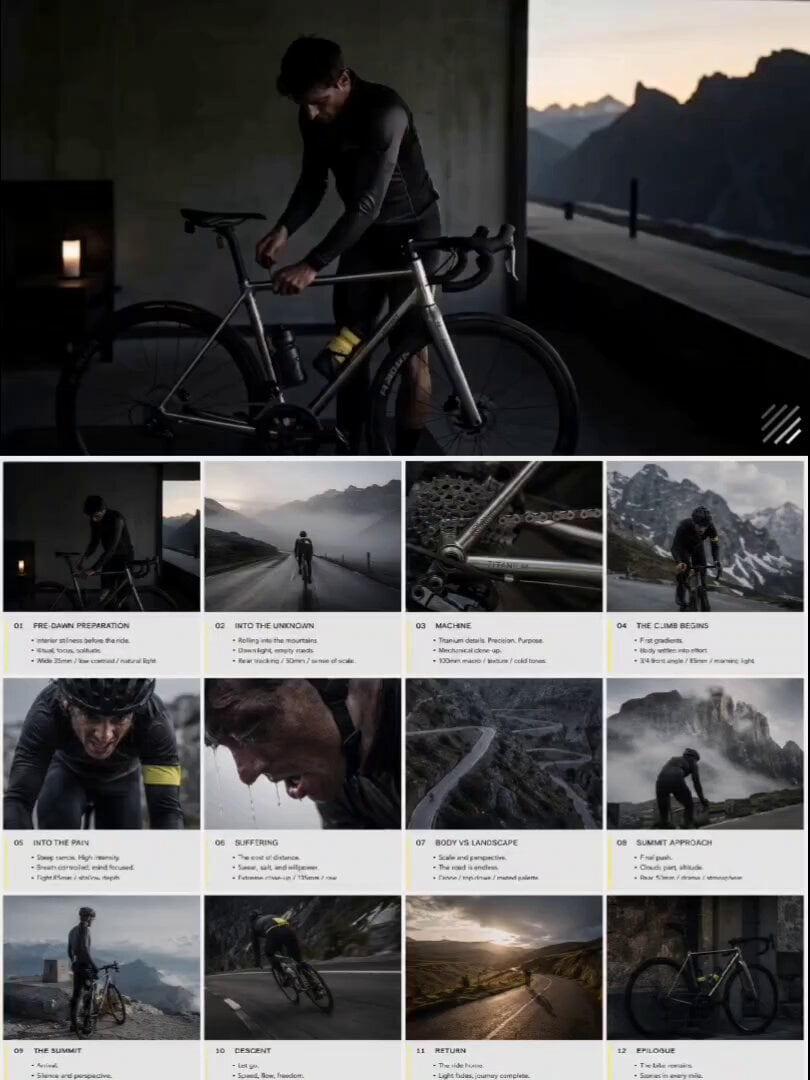
- Prompt included
- Model and format preset
- Premium template
The prompt behind this video
Copy the exact prompt behind Luxury Cycling Storyboard Animation, or open it in the studio and make it yours.
Create a high-end 4:3 luxury cycling pitch deck storyboard in 3x4 grid (12 frames), editorial layout, Rapha/Pas Normal Studios style, slate grey + electric yellow palette. Structured flow: dawn → climb → suffering → summit → descent closure. Each frame split: top cinematic image (no text) + bottom storyboard notes. European road cycling minimal aesthetic, solitary endurance mood, body against landscape. A titanium road bike is the emotional center throughout. Animate the provided 3x4 storyboard into a smooth cinematic video. Preserve exact shot order and continuity. Use slow wheel spoke blur, road surface skim, mountain mist drift, and handlebar grip close-up. Lighting transitions from cold blue pre-dawn to bright alpine summit light. Cycling editorial aesthetic, quiet suffering, earned freedom mood. No new shots, no reordering, titanium road bike remains emotional focus in all scenes.
How to use Luxury Cycling Storyboard Animation in 3 steps
- 1
Open
The prompt is already in the box next to the preview, with the template's model and format selected.
- 2…a portrait of your subject in softgolden-hour light, 85mm…
Personalize
Edit the subject and creative details for your destination.
- 3Generate
Generate
Press Generate — your video is created in PicX Studio, so you can compare it with the original and refine one variable at a time.
More like this
Templates with the same subject, style or setup. Open one to see its prompt.

Pigeon Nemesis Pixar Animation Storyboard
Apartment Arrival Storyboard Animation

3D Glossy Fairy Animation - Seedance 2.5

3x3 Grid Storyboard Racing — Kling 3.0 O3 Pro

Dragon Rider Cinematic Flight — Seedance 2.5

Silk Road Pomegranate Folk Animation

Multilingual Creative Typography Loop

Sneaker Product Commercial

Cinematic Portrait Study 3

Cinematic Portrait Study
Skincare Product Commercial
Luxury Fashion Coastal Drive Storyboard
Make it yours
Luxury Cycling Storyboard Animation works as-is. These are the safest ways to change it without losing the look.
Change one field
Copy a single group, rewrite it, and generate again so you can see what that field is doing.
Keep the frame, change the subject
Hold the composition and light of Luxury Cycling Storyboard Animation, then swap wardrobe, props or the person for a new take.
| If the result… | Why | Fix |
|---|---|---|
| The result drifts from the preview | Too many fields changed at once. | Reuse Luxury Cycling Storyboard Animation as-is first, then change one group — subject, light, or setting. |
| The model over-stylizes the scene | The prose prompt leaves finish and camera underspecified. | Add one camera or lighting sentence and stay on Seedance 2.0. |
More Seedance 2.0 templates
Other prompts made for Seedance 2.0.

Comical Martial Arts Punch Scene

Maglev Train Action Sequence

Martial Arts Fight Sequence

Wuxia Protection and Trust Script

Vintage Korean Arcade MiniDV Vlog

Mercedes 190 SL Luxury Ad

Rainy Night Supernatural Reverse Comedy Video Script

Amazon Civilization Discovery

Futuristic South Asian City Transformation

Cozy Luxury Cafe Commercial
More video prompts
Fresh picks from across the catalog.
Cinematic Route Navigation Guide
High-Tempo 9-Image Glitch Edit
Western Bandit Raid IMAX Film
Eastern Wuxia Ultimate Showdown with Extreme Kinetic Energy
Cinematic Casino Card Handling
Romantic Kissing Scene Video
Rotating Coffee Cups Loop

Luxury Skincare Brand Video
Steampunk Fantasy Forest Path Video
Existential and dark video prompt
Browse template categories
Luxury Cycling Storyboard Animation questions
How do I use the Luxury Cycling Storyboard Animation template?
Add your photo if the template asks for one, edit the prompt if you like — the template's model and format are already selected — and press Generate. Your version opens in PicX Studio.
Can I customize the Luxury Cycling Storyboard Animation template?
Yes. You can change the subject, setting, lighting, mood, format, and available model controls before creating your video.
Is the Luxury Cycling Storyboard Animation template free?
Opening and editing this template is free. Generating uses credits, shown on the Generate button when you are signed in.
Which AI model should I use?
Start with Seedance 2.0, which is the model associated with this template. You can compare another compatible model for a different finish.
Looking for something else? Browse all templates.

Your photo, any look
Thousands of ready templates for every top image and video model, from one credit balance.