
Chai Ritual Stop Motion
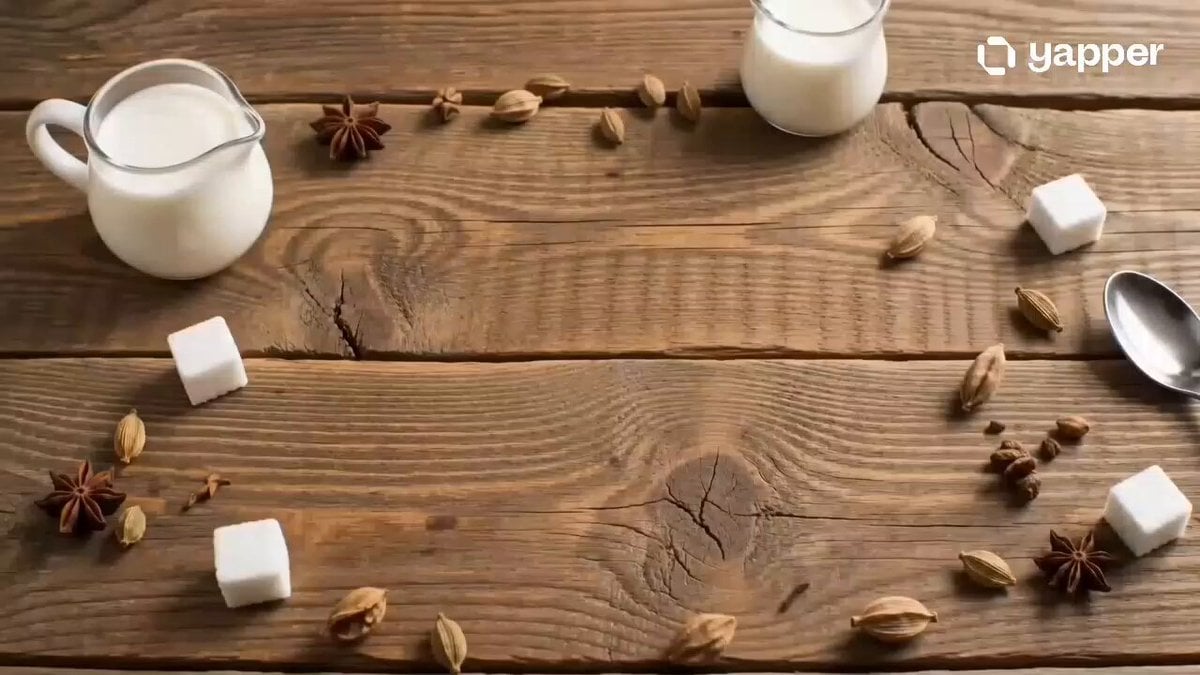
A comprehensive structured prompt for a cozy stop-motion video of a chai-making morning ritual, featuring a clock face formed by ingredients.
- Prompt included
- Model and format preset
- Free template
The prompt behind this video
Copy the exact prompt behind Chai Ritual Stop Motion, or open it in the studio and make it yours.
- Title
- Chai O’Clock
- Description
- Stop-motion morning ritual where loose chai leaves and spices form a clock face. A traditional cup slides into the center as hot chai pours in. Doodh (milk) is added to draw creamy chai swirls forming clock hands pointing to 8, while sugar cubes pop in as markers. No text.
- Style
- cozy premium stop motion, desi dhaba/cafe aesthetic
- Camera
- static top-down with slight push-in
- Lighting
- soft warm morning light
- Environment
- rustic wooden table with desi chai setup
- Elements
- chai leaves, elaichi (cardamom), ceramic or glass cup, chai, milk, sugar cubes, spoon
- Motion › Type
- stop motion choreography
- Motion › Details
- chai leaves and spices form circle, cup slides center, milk creates chai swirl clock hands, sugar cubes snap into place
- Ending
- Clock completes, spoon taps cup once. No text.
- Audio › Music
- light desi instrumental (flute/tabla fusion)
- Audio › Sfx
- tea pour sound, spoon stir, soft tap
- Text Overlay
- none
- Format
- 16:9
- Duration
- 8s
- Keywords
- chai, stop motion, desi tea, clock, morning
Raw JSON
{
"title": "Chai O’Clock",
"description": "Stop-motion morning ritual where loose chai leaves and spices form a clock face. A traditional cup slides into the center as hot chai pours in. Doodh (milk) is added to draw creamy chai swirls forming clock hands pointing to 8, while sugar cubes pop in as markers. No text.",
"style": "cozy premium stop motion, desi dhaba/cafe aesthetic",
"camera": "static top-down with slight push-in",
"lighting": "soft warm morning light",
"environment": "rustic wooden table with desi chai setup",
"elements": ["chai leaves", "elaichi (cardamom)", "ceramic or glass cup", "chai", "milk", "sugar cubes", "spoon"],
"motion": {
"type": "stop motion choreography",
"details": "chai leaves and spices form circle, cup slides center, milk creates chai swirl clock hands, sugar cubes snap into place"
},
"ending": "Clock completes, spoon taps cup once. No text.",
"audio": {
"music": "light desi instrumental (flute/tabla fusion)",
"sfx": "tea pour sound, spoon stir, soft tap"
},
"text_overlay": "none",
"format": "16:9",
"duration": "8s",
"keywords": ["chai", "stop motion", "desi tea", "clock", "morning"]
}How to use Chai Ritual Stop Motion in 3 steps
- 1
Open
The prompt is already in the box next to the preview, with the template's model and format selected.
- 2…a portrait of your subject in softgolden-hour light, 85mm…
Personalize
Edit the subject and creative details for your destination.
- 3Generate
Generate
Press Generate — your video is created in PicX Studio, so you can compare it with the original and refine one variable at a time.
More like this
Templates with the same subject, style or setup. Open one to see its prompt.
Coffee Stop-Motion Morning Ritual
Slow-Motion 90s Diner Explosion - Seedance 2.5
Nano Banana Seedance Environment Render Walk
Seedance Wind Guides Path

Stop-Motion Claymation Nutella Cafe

Stone Humanoid Stop Motion Animation
Food Summoning POV Stop-Motion Video
Stop-Motion Chip Stacking Animation
Stop Motion Playing Card Art Film

Hand-Painted Stop-Motion Blizzard Scene

Stop-Motion Wolf Attack Sequence
Cinematic Kinetic Sculpture Stop-Motion
Make it yours
Chai Ritual Stop Motion works as-is. These are the safest ways to change it without losing the look.
Swap the setting
Keep the rest of the prompt and replace the location block. The current setting is “rustic wooden table with desi chai setup”.
Swap the light
One lighting change is enough to compare takes. Current light: “soft warm morning light”.
Change one field
Copy a single group, rewrite it, and generate again so you can see what that field is doing.
| If the result… | Why | Fix |
|---|---|---|
| The result drifts from the preview | Too many fields changed at once. | Reuse Chai Ritual Stop Motion as-is first, then change one group — subject, light, or setting. |
| Seedance 2.0 ignores part of the JSON | Some models flatten or skip nested keys. | Keep the same values and paste them as a short paragraph instead. |
More Seedance 2.0 templates
Other prompts made for Seedance 2.0.

Comical Martial Arts Punch Scene

Maglev Train Action Sequence

Martial Arts Fight Sequence

Wuxia Protection and Trust Script

Vintage Korean Arcade MiniDV Vlog

Mercedes 190 SL Luxury Ad

Rainy Night Supernatural Reverse Comedy Video Script

Amazon Civilization Discovery

Futuristic South Asian City Transformation

Cozy Luxury Cafe Commercial
More video prompts
Fresh picks from across the catalog.

Audience POV Cinema Video

Childhood Conversation Video Prompt

Battle of Salamis Surrealist Sequence
Grok Imagine Prompt: Woman with Blooming Branches
Smoky Ethereal Profile Animation
Cinematic Gymnastics Balance Beam
Fantasy Comedy Slap From Painting
Late Night Kitchen Phone Recording - Seedance 2.5
Library Candlelight Reading Video
Tiny Figure Climbing a Giant — Low Angle Seedance
Browse template categories
Chai Ritual Stop Motion questions
How do I use the Chai Ritual Stop Motion template?
Add your photo if the template asks for one, edit the prompt if you like — the template's model and format are already selected — and press Generate. Your version opens in PicX Studio.
Can I customize the Chai Ritual Stop Motion template?
Yes. You can change the subject, setting, lighting, mood, format, and available model controls before creating your video.
Is the Chai Ritual Stop Motion template free?
Opening and editing this template is free. Generating uses credits, shown on the Generate button when you are signed in.
Which AI model should I use?
Start with Seedance 2.0, which is the model associated with this template. You can compare another compatible model for a different finish.
Looking for something else? Browse all templates.

Your photo, any look
Thousands of ready templates for every top image and video model, from one credit balance.