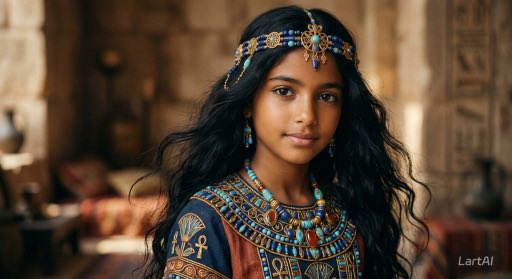


How do I use the Ancient Egyptian Royal Portrait template?
Choose the primary action to open PicX Studio with the available template settings. Review the model and format, personalize the creative direction, and generate when ready.
A cinematic and ultra-realistic portrait prompt of a young girl inspired by ancient Egyptian royalty, featuring intricate jewelry and palace settings. (free to use) — Free AI image template on PicX Studio.
Create a cinematic, ultra-realistic portrait of a {argument name="subject" default="young girl"} inspired by {argument name="culture" default="ancient Egyptian royalty"}. She has long, naturally wavy black hair, warm brown skin, expressive dark brown eyes, and a serene, confident expression while looking directly at the camera. She wears an intricate blue-and-gold Egyptian headpiece decorated with {argument name="jewelry" default="lapis lazuli, turquoise, and gold ornaments"}, matching earrings, an ornate broad collar necklace with colorful gemstones, and a richly embroidered royal garment featuring authentic ancient Egyptian motifs and hieroglyphic-inspired patterns. The setting is inside an ancient Egyptian palace with sandstone columns, carved hieroglyphs, pottery, and warm golden sunlight streaming through the hall. Use a shallow depth of field with a softly blurred background, cinematic lighting, realistic skin texture, natural colors, fine fabric details, and highly detailed jewelry. Capture the image as if shot on a full-frame camera with an 85mm portrait lens at f/1.8, resulting in a premium cinematic look, ultra-high resolution, photorealistic, museum-quality detail. No text, logos, or watermarks
Use Ancient Egyptian Royal Portrait to plan an AI image around nano-banana-2 generation. Match the preview's composition first, then personalize the subject, setting, and mood for your own project.
Use the primary action to load the template settings in PicX Studio.
Adjust the subject and creative details for your destination.
Create the image, compare the result with the preview, and refine one variable at a time.
A continuous mix — similar concepts first, woven with same-model prompts and fresh picks from the catalog.
Choose the primary action to open PicX Studio with the available template settings. Review the model and format, personalize the creative direction, and generate when ready.
Yes. You can change the subject, setting, lighting, mood, format, and available model controls before creating your image.
This template is free to open and customize. Generation usage is shown in PicX Studio before you create.
Start with nano-banana-2, which is the model associated with this template. You can compare another compatible model for a different finish.
A continuous mix — similar concepts first, woven with same-model prompts and fresh picks from the catalog.
Follow a topic to a crawlable collection of related PicX Studio templates.
32,032 public templates available. Verified via the PicX Studio public templates API; refreshed hourly.


