How do I use the Minimalist Fashion Portrait with Doodle template?
Edit the prompt in the box under the preview — the template's model and format are already selected — and press Generate. Your version appears right on this page.
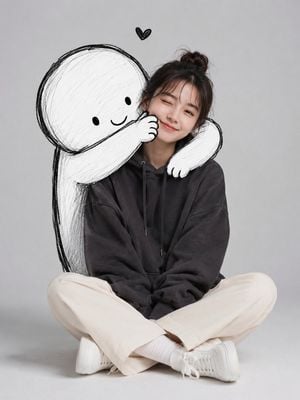
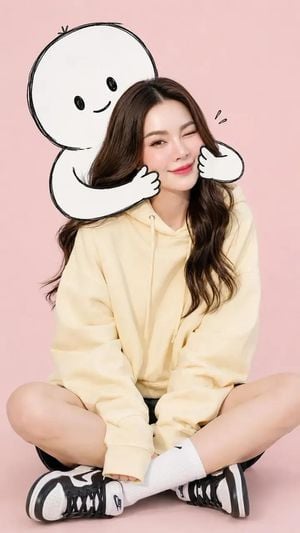
A playful and minimalist fashion portrait prompt featuring a young woman and a hand-drawn doodle character in a studio setting.

A cute minimalist portrait of a {argument name="subject" default="young woman"} sitting casually on the floor in a clean studio setting with a light grey background. She wears an {argument name="outfit" default="oversized dark charcoal hoodie, cream straight-leg pants, white socks, and chunky white sneakers"}. Relaxed seated pose with crossed legs, one eye slightly closed in a playful wink and a soft smile. Behind her, a large {argument name="character style" default="black-and-white doodle character"} hugs her from behind, wrapping its cartoon arms around her shoulders and gently squeezing her cheek.The doodle figure has a simple round head, tiny eyes, and a hand-drawn sketch style. Soft studio lighting, modern aesthetic, playful and wholesome mood, minimalist composition, high-quality fashion portrait, realistic photography, subtle shadows, ultra-detailed, clean background, candid expression.
A cute minimalist portrait of a {argument name="subject" default="young woman"} sitting casually on the floor in a clean studio setting with a light grey background. She wears an {argument name="outfit" default="oversized dark charcoal hoodie, cream straight-leg pants, white socks, and chunky white sneakers"}. Relaxed seated pose with crossed legs, one eye slightly closed in a playful wink and a soft smile. Behind her, a large {argument name="character style" default="black-and-white doodle character"} hugs her from behind, wrapping its cartoon arms around her shoulders and gently squeezing her cheek.The doodle figure has a simple round head, tiny eyes, and a hand-drawn sketch style. Soft studio lighting, modern aesthetic, playful and wholesome mood, minimalist composition, high-quality fashion portrait, realistic photography, subtle shadows, ultra-detailed, clean background, candid expression.
Edit the prompt in the box under the preview — the template's model and format are already selected — and press Generate. Your version appears right on this page.
Yes. You can change the subject, setting, lighting, mood, format, and available model controls before creating your image.
Opening and editing this template is free. Generating uses credits, shown on the Generate button when you are signed in.
Start with Nano Banana 2, which is the model associated with this template. You can compare another compatible model for a different finish.
Follow a topic to a crawlable collection of related PicX Studio templates.