How do I use the Realistic Redhead Lifestyle Portrait template?
Choose the primary action to open PicX Studio with the available template settings. Review the model and format, personalize the creative direction, and generate when ready.
A detailed prompt for generating a photorealistic lifestyle portrait of a woman in a lavender tracksuit during golden hour at a riverfront. (free to use) — Free AI image template on PicX Studio.
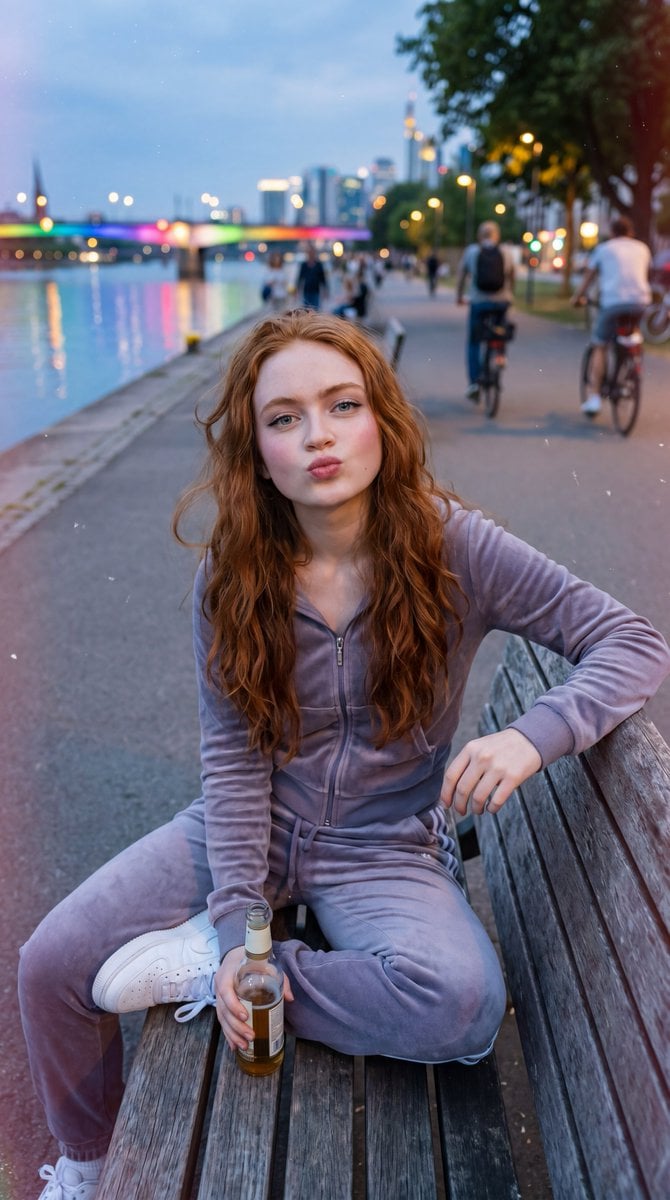
{ "prompt": "Ultra-realistic lifestyle portrait of a {argument name=\"subject\" default=\"young woman with long wavy red hair\"} sitting casually on a wooden riverside bench during golden hour. She wears a {argument name=\"outfit\" default=\"soft lavender velour tracksuit\"} (zip-up hoodie and joggers) with clean white sneakers. She is smiling warmly at the camera with her head resting gently on one hand. The scene takes place on a {argument name=\"location\" default=\"modern waterfront promenade\"} with cyclists and pedestrians in the background. A city skyline rises across the river, featuring a tall telecommunications tower. Warm sunset light creates beautiful rim lighting in her hair and long shadows across the pavement. Subtle film-burn effect along the left edge of the frame, shallow depth of field, natural skin texture, realistic facial features, editorial travel photography, candid urban lifestyle aesthetic, highly detailed, photorealistic.", "negative_prompt": "blurry, low quality, distorted face, extra limbs, extra fingers, bad anatomy, overprocessed skin, cartoon, anime, CGI, painting, watermark, text, logo, motion blur, noise, duplicate people, cropped feet, unnatural pose", "style": "photorealistic", "camera": { "lens": "85mm", "aperture": "f/2.0", "angle": "slightly low eye-level portrait", "depth_of_field": "shallow" }, "lighting": { "type": "golden hour sunlight", "direction": "backlit with warm side fill", "mood": "friendly, relaxed, cinematic" }, "composition": { "framing": "vertical portrait", "subject_position": "center foreground seated on bench", "background": "riverfront promenade, cyclists, skyline, telecommunications tower" }, "quality": { "resolution": "8k", "detail": "ultra high", "realism": "maximum" } }
Use Realistic Redhead Lifestyle Portrait to plan an AI image around nano-banana-2 generation. Match the preview's composition first, then personalize the subject, setting, and mood for your own project.
Use the primary action to load the template settings in PicX Studio.
Adjust the subject and creative details for your destination.
Create the image, compare the result with the preview, and refine one variable at a time.
A continuous mix — similar concepts first, woven with same-model prompts and fresh picks from the catalog.
Choose the primary action to open PicX Studio with the available template settings. Review the model and format, personalize the creative direction, and generate when ready.
Yes. You can change the subject, setting, lighting, mood, format, and available model controls before creating your image.
This template is free to open and customize. Generation usage is shown in PicX Studio before you create.
Start with nano-banana-2, which is the model associated with this template. You can compare another compatible model for a different finish.
A continuous mix — similar concepts first, woven with same-model prompts and fresh picks from the catalog.
Follow a topic to a crawlable collection of related PicX Studio templates.
32,032 public templates available. Verified via the PicX Studio public templates API; refreshed hourly.