How do I use the Vintage 1970s Fashion Editorial template?
Choose the primary action to open PicX Studio with the available template settings. Review the model and format, personalize the creative direction, and generate when ready.
A Kodachrome-inspired fashion editorial photograph of a couple with a vintage convertible on a sun-drenched European street.
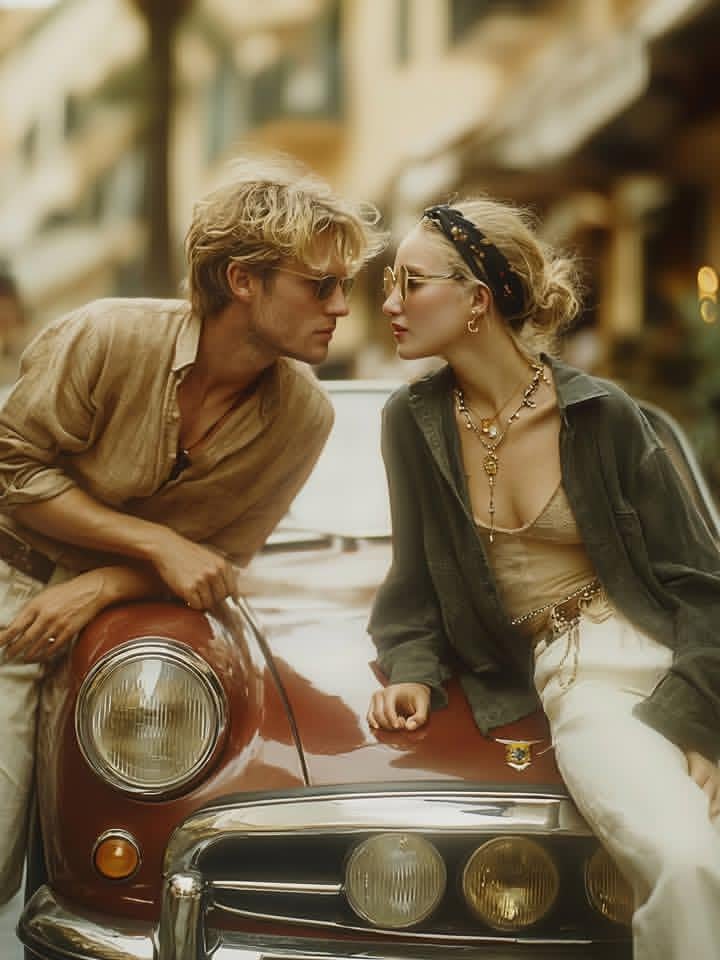
A cinematic, vintage-inspired fashion editorial photograph of a stylish {argument name="couple" default="blonde couple"} leaning against a {argument name="car" default="classic mahogany-red convertible"} on a sun-drenched European street. The man is wearing a tan linen shirt and gold-rimmed sunglasses, looking intently at the woman. The woman is sitting on the car's hood, wearing an oversized olive green shirt over a beige silk camisole, white trousers, a black patterned headband, and layered gold bohemian jewelry. The lighting is warm and hazy, reminiscent of 1970s Kodachrome film with soft grain and a shallow depth of field. The background features blurred Mediterranean architecture under a golden hour glow, creating a romantic, high-fashion travel atmosphere.
Choose the primary action to open PicX Studio with the available template settings. Review the model and format, personalize the creative direction, and generate when ready.
Yes. You can change the subject, setting, lighting, mood, format, and available model controls before creating your image.
This template is free to open and customize. Generation usage is shown in PicX Studio before you create.
Start with Nano Banana 2, which is the model associated with this template. You can compare another compatible model for a different finish.
Follow a topic to a crawlable collection of related PicX Studio templates.