How do I use the Gotham City Night Background template?
Choose the primary action to open PicX Studio with the available template settings. Review the model and format, personalize the creative direction, and generate when ready.
A detailed environmental prompt for generating a cinematic, rainy Gotham-style skyline at night with a bat-signal.
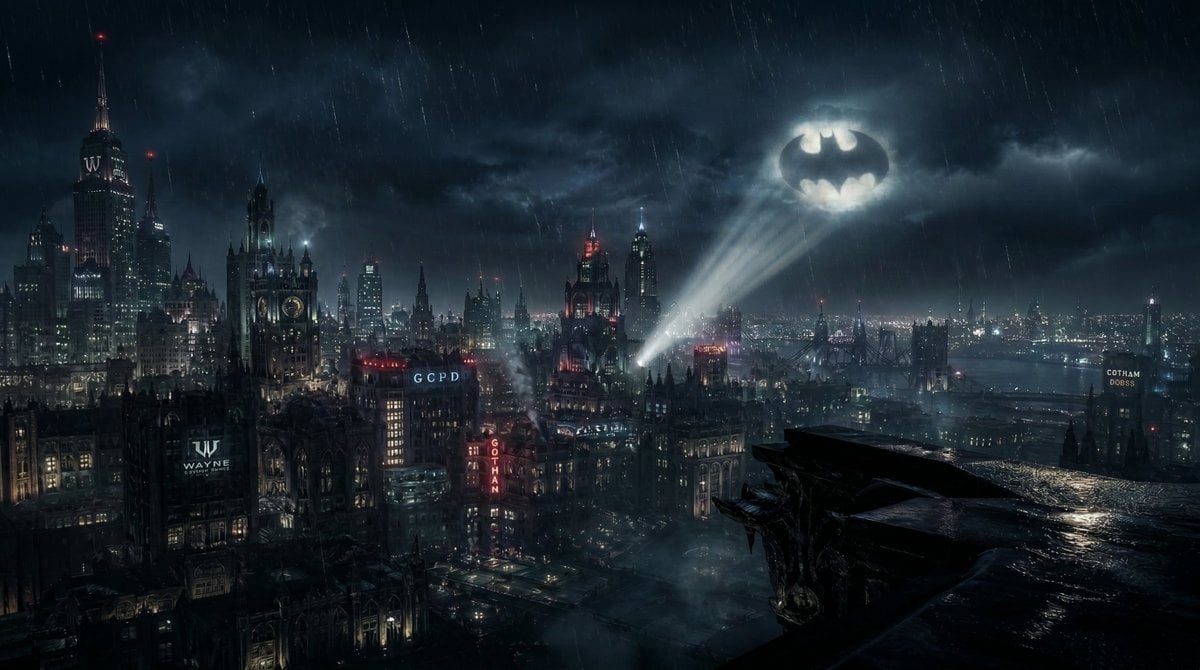
Ultra realistic cinematic {argument name="city style" default="Gotham-style city"} at night, wide angle 16:9 composition, viewed from a high rooftop perspective dense futuristic cityscape with gothic architecture, tall skyscrapers, neon signs, glowing windows, bridges and layered depth across the skyline heavy rain falling diagonally, wet surfaces reflecting light, atmospheric fog and volumetric haze creating depth lighting: dark moody scene with high contrast, deep blacks, cool blue-green color grading, subtle warm highlights from city lights sky: thick storm clouds with a soft glowing {argument name="sky signal" default="bat-shaped signal"} projected into the clouds, volumetric light beam, slightly diffused imperfect edges, realistic light scattering (not a sharp logo) composition: - bat signal positioned in upper right quadrant - dense skyline across middle - clear negative space in bottom-right foreground for a future character silhouette - visible gothic stone ledge in bottom-right corner with wet reflective surface camera: - slightly elevated cinematic angle - wide field of view - strong depth perspective (foreground, midground, background layers) style: photorealistic, hyper-detailed, Unreal Engine 5 quality, cinematic lighting, volumetric effects, high dynamic range important: no characters, no people, no superheroes visible no cartoon, no illustration, no comic style
Choose the primary action to open PicX Studio with the available template settings. Review the model and format, personalize the creative direction, and generate when ready.
Yes. You can change the subject, setting, lighting, mood, format, and available model controls before creating your image.
This template is free to open and customize. Generation usage is shown in PicX Studio before you create.
Start with Nano Banana 2, which is the model associated with this template. You can compare another compatible model for a different finish.
Follow a topic to a crawlable collection of related PicX Studio templates.