How do I use the Mixed Media Urban Fashion Editorial template?
Choose the primary action to open PicX Studio with the available template settings. Review the model and format, personalize the creative direction, and generate when ready.
A high-quality prompt for a fashion editorial that blends realistic urban photography with classic 2D cartoon characters like the Pink Panther and Oggy.
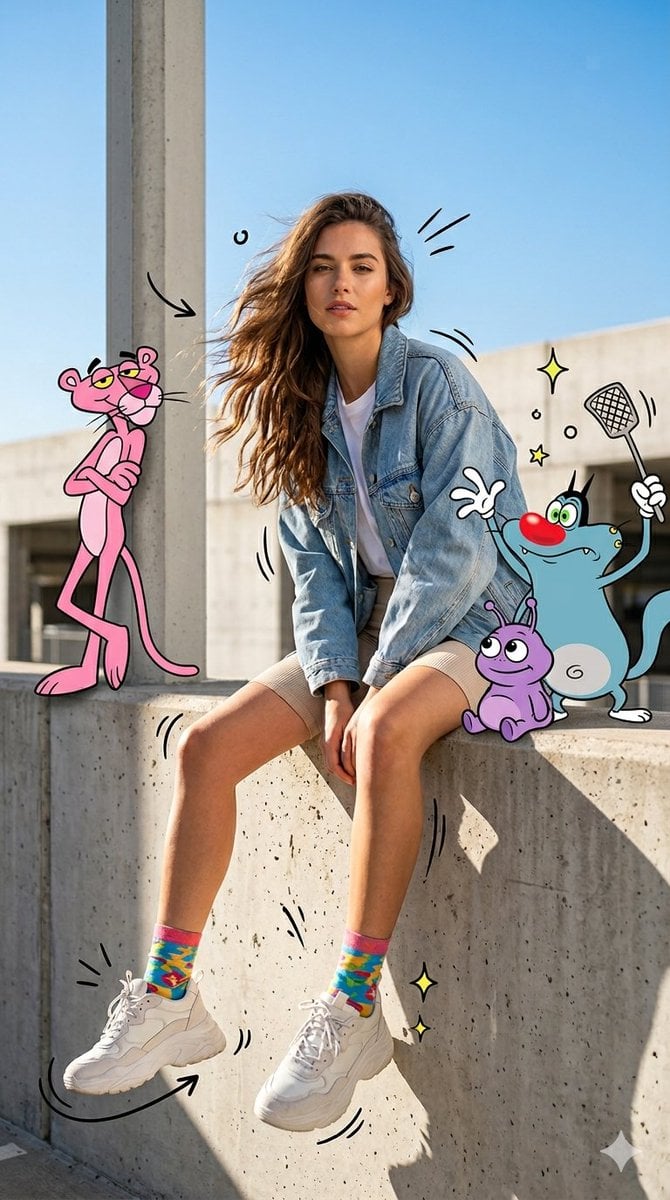
A full-body fashion editorial featuring a {argument name="subject" default="confident young woman with long, flowing brown hair"} sitting casually on a concrete ledge in a bright, sunlit urban environment. She is wearing {argument name="outfit" default="an oversized light blue denim jacket over a white t-shirt, beige fitted shorts, colorful patterned socks, and chunky white sneakers"}. The image is a mixed-media composition blending high-end photorealism with classic 2D animation. To her left, the Pink Panther leans coolly against a concrete pillar. To her right, {argument name="characters" default="Oggy (from Oggy and the Cockroaches) stands playfully holding a fly swatter, accompanied by the small purple alien Gaga sitting on the ledge"}. The scene is accented with hand-drawn graphic elements, including black motion lines around her legs, hand-drawn arrows, and sparkling yellow stars. The lighting is crisp with strong natural shadows, set against a clear blue sky, creating a vibrant, high-contrast, magazine-quality aesthetic.
Choose the primary action to open PicX Studio with the available template settings. Review the model and format, personalize the creative direction, and generate when ready.
Yes. You can change the subject, setting, lighting, mood, format, and available model controls before creating your image.
This template is free to open and customize. Generation usage is shown in PicX Studio before you create.
Start with Nano Banana 2, which is the model associated with this template. You can compare another compatible model for a different finish.
Follow a topic to a crawlable collection of related PicX Studio templates.