How do I use the Futuristic Anime Leap template?
Choose the primary action to open PicX Studio with the available template settings. Review the model and format, personalize the creative direction, and generate when ready.
A dynamic vertical anime illustration of a sporty young woman leaping through a colorful futuristic architectural cityscape.
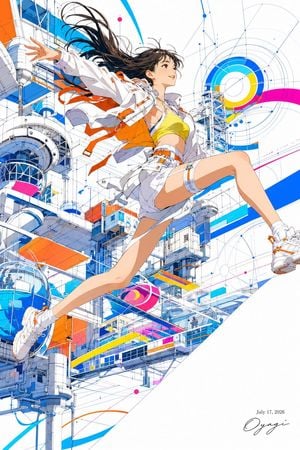
Create a high-energy vertical anime illustration of a cheerful young woman leaping through a bright futuristic architectural cityscape. The subject is {argument name="character age and vibe" default="a cheerful young adult woman with an adventurous, sporty vibe"}, shown full body in a dynamic diagonal pose from lower left to upper right, one arm stretched outward and one knee raised as if jumping or flying. She has long flowing {argument name="hair color" default="dark brown hair"} with wind-swept strands, warm expressive eyes, and a smiling face looking upward to the right. Outfit: a white cropped techwear jacket with orange straps and small buckles, a yellow sports crop top, white short shorts with grey panels, orange harness details, white socks, and chunky white sneakers with orange accents; include exactly 6 clearly visible orange strap/ribbon pieces fluttering from the jacket and waist. Background: an intricate white-and-blue sci-fi infrastructure environment with modular towers, cylindrical pods, glass domes, sky bridges, scaffolding, rails, cables, and technical linework, like a clean futuristic space station or elevated urban lab. Add vivid graphic design accents in cyan, cobalt blue, orange, magenta, and yellow: exactly 5 large colored bands or panels, 2 circular target-like graphic motifs, and many fine blueprint arcs, dots, and construction lines. Use a mostly white canvas with crisp thin ink outlines, precise mechanical detail, cel-shaded anime rendering, bright daylight, airy composition, and a sense of motion and optimism. Place a small handwritten signature and date text {argument name="date text" default="July 17, 2026"} in the bottom-right corner. Avoid photorealism, dark mood, cluttered text, extra characters, or cropped limbs.
Choose the primary action to open PicX Studio with the available template settings. Review the model and format, personalize the creative direction, and generate when ready.
Yes. You can change the subject, setting, lighting, mood, format, and available model controls before creating your image.
This template is free to open and customize. Generation usage is shown in PicX Studio before you create.
Start with GPT Image 2, which is the model associated with this template. You can compare another compatible model for a different finish.
Follow a topic to a crawlable collection of related PicX Studio templates.