How do I use the Iridescent Bubble-Hair Bust Portrait template?
Edit the prompt in the box under the preview — the template's model and format are already selected — and press Generate. Your version appears right on this page.
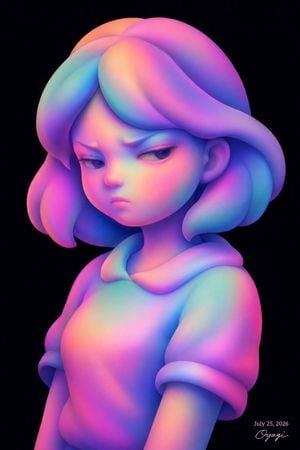
A prompt for generating a pastel rainbow 3D bust portrait of a serene doll-like girl with rounded bubble hair on a clean white background.

This template uses your photo — add one with the + button.
Create a clean 3D digital art bust portrait of a serene young girl or doll-like feminine character, centered on a pure white background. The figure is shown from the chest up, facing slightly left in a three-quarter view with her chin lifted and eyes gazing upward as if looking at something invisible above. Use a smooth clay-like sculptural style with soft subsurface shading, rounded forms, and no hard outlines. Her face has large almond eyes without detailed irises, a small nose, soft lips, rounded cheeks, and a calm, contemplative expression. Give her voluminous hair made from exactly 7 large rounded bubble-like lobes: one tall lobe on the upper left side, one central top lobe, one horizontal front lobe across the forehead, one right-side upper lobe, one long left-side vertical lobe, one long right-side vertical lobe, and one rear right lobe partly visible behind the head. Dress her in a simple stylized top with a wide rounded collar ring and exactly 2 short rolled sleeves, visible as a bust sculpture cropped at the lower chest. Apply an iridescent pastel rainbow gradient over the entire character, blending saturated pink, magenta, violet, cyan, aqua, soft blue, mint green, peach, and orange across skin, hair, and clothing, with gentle studio lighting and a glossy matte-plastic finish. Keep the background blank white with generous margins, no props, no scenery, no text except a small artist-style signature and date in the bottom right reading {argument name="date text" default="July 28, 2026"} and {argument name="signature text" default="Oyagi"}. Use a vertical portrait composition, polished generative 3D render, dreamy futuristic kawaii sculpture aesthetic, high resolution.
Create a clean 3D digital art bust portrait of a serene young girl or doll-like feminine character, centered on a pure white background. The figure is shown from the chest up, facing slightly left in a three-quarter view with her chin lifted and eyes gazing upward as if looking at something invisible above. Use a smooth clay-like sculptural style with soft subsurface shading, rounded forms, and no hard outlines. Her face has large almond eyes without detailed irises, a small nose, soft lips, rounded cheeks, and a calm, contemplative expression. Give her voluminous hair made from exactly 7 large rounded bubble-like lobes: one tall lobe on the upper left side, one central top lobe, one horizontal front lobe across the forehead, one right-side upper lobe, one long left-side vertical lobe, one long right-side vertical lobe, and one rear right lobe partly visible behind the head. Dress her in a simple stylized top with a wide rounded collar ring and exactly 2 short rolled sleeves, visible as a bust sculpture cropped at the lower chest. Apply an iridescent pastel rainbow gradient over the entire character, blending saturated pink, magenta, violet, cyan, aqua, soft blue, mint green, peach, and orange across skin, hair, and clothing, with gentle studio lighting and a glossy matte-plastic finish. Keep the background blank white with generous margins, no props, no scenery, no text except a small artist-style signature and date in the bottom right reading {argument name="date text" default="July 28, 2026"} and {argument name="signature text" default="Oyagi"}. Use a vertical portrait composition, polished generative 3D render, dreamy futuristic kawaii sculpture aesthetic, high resolution.
Edit the prompt in the box under the preview — the template's model and format are already selected — and press Generate. Your version appears right on this page.
Yes. You can change the subject, setting, lighting, mood, format, and available model controls before creating your image.
Opening and editing this template is free. Generating uses credits, shown on the Generate button when you are signed in.
Start with GPT Image 2, which is the model associated with this template. You can compare another compatible model for a different finish.
Follow a topic to a crawlable collection of related PicX Studio templates.