
These PNG Don’t Exist
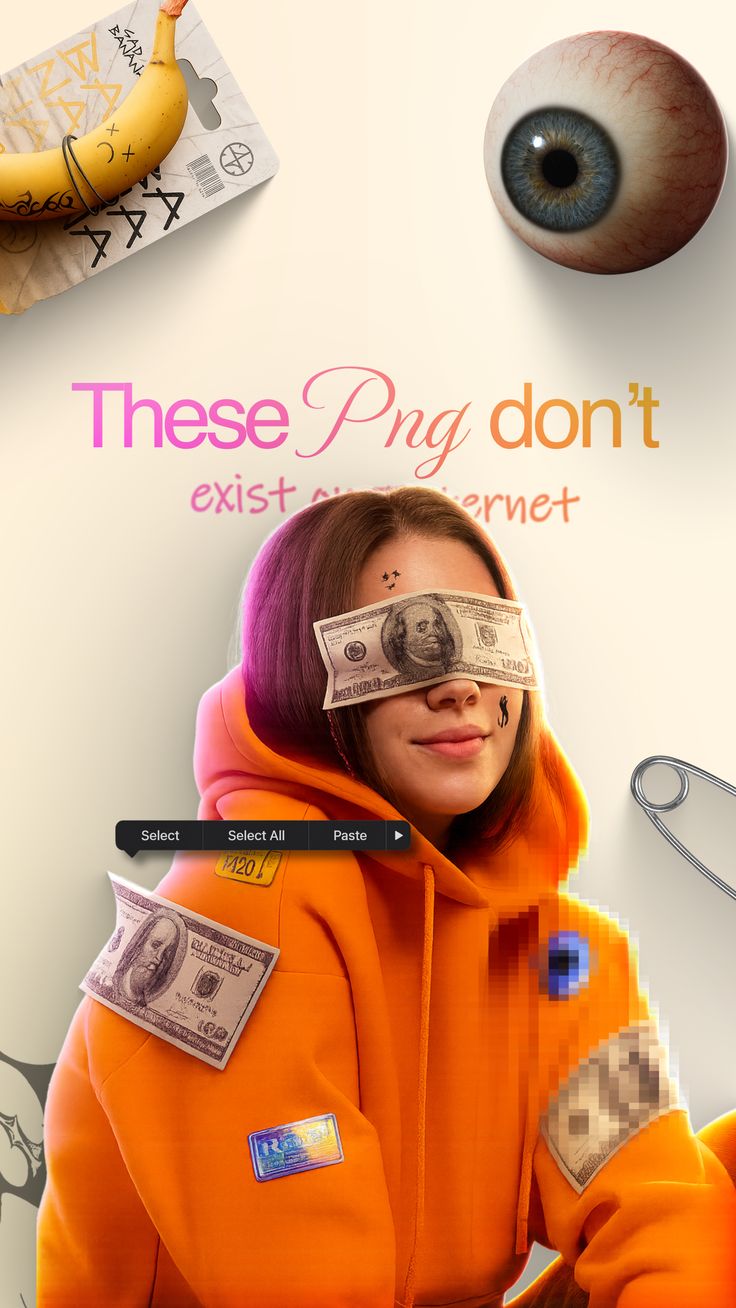
These PNG Don’t Exist is a ready photo look.
- Prompt included
- Model and format preset
- Premium template
The prompt behind this image
Copy the exact prompt behind These PNG Don’t Exist, or open it in the studio and make it yours.
- Prompt
- A surreal digital art portrait of a young woman wearing an oversized orange hoodie, with US dollar bills covering her eyes and attached to her clothing like stickers. The scene includes floating graphic elements such as a realistic human eyeball, a banana with doodle markings, and UI interface elements like 'Select', 'Select All', and 'Paste'. The background is clean and minimal with soft beige tones. Part of the image shows intentional pixelation and glitch effects, blending realism with internet aesthetics. High-detail skin texture, studio lighting, modern digital collage style.
- Negative Prompt
- low resolution, blurry, cartoonish style, bad anatomy, distorted face, extra limbs, messy lighting
- Style
- surreal digital collage, internet-core aesthetic
- Lighting
- soft studio lighting with subtle glow
- Camera › Angle
- medium close-up portrait
- Camera › Lens
- 50mm
- Composition
- centered subject with floating elements arranged around the head and upper body
- Background
- minimal beige studio backdrop
- Mood
- playful, surreal, digital, rebellious
- Effects
- pixelation, glitch artifacts, floating objects, UI overlay elements
- Quality
- ultra high resolution, photorealistic with surreal elements, editorial ready
Raw JSON
{
  "prompt": "A surreal digital art portrait of a young woman wearing an oversized orange hoodie, with US dollar bills covering her eyes and attached to her clothing like stickers. The scene includes floating graphic elements such as a realistic human eyeball, a banana with doodle markings, and UI interface elements like 'Select', 'Select All', and 'Paste'. The background is clean and minimal with soft beige tones. Part of the image shows intentional pixelation and glitch effects, blending realism with internet aesthetics. High-detail skin texture, studio lighting, modern digital collage style.",
  "negative_prompt": "low resolution, blurry, cartoonish style, bad anatomy, distorted face, extra limbs, messy lighting",
  "style": "surreal digital collage, internet-core aesthetic",
  "lighting": "soft studio lighting with subtle glow",
  "camera": {
    "angle": "medium close-up portrait",
    "lens": "50mm"
  },
  "composition": "centered subject with floating elements arranged around the head and upper body",
  "background": "minimal beige studio backdrop",
  "mood": "playful, surreal, digital, rebellious",
  "effects": [
    "pixelation",
    "glitch artifacts",
    "floating objects",
    "UI overlay elements"
  ],
  "quality": "ultra high resolution, photorealistic with surreal elements, editorial ready"
}How to use These PNG Don’t Exist in 3 steps
- 1Upload ImagePNG, JPG or paste
Add your photo
Upload the photo the template builds on. The prompt, model and format are already set.
- 2…a portrait of your subject in softgolden-hour light, 85mm…
Personalize
Edit the subject and creative details for your destination.
- 3Generate
Generate
Press Generate — your image is created in PicX Studio, so you can compare it with the original and refine one variable at a time.
More like this
Templates with the same subject, style or setup. Open one to see its prompt.
Cinematic Academic Signaling Thumbnail
Blueberry Energy Drink Mockup

Minimalist Fashion Editorial Split Layout

Delicate Japanese Café Lifestyle Illustration

Minimalist Golden Hour Selfie

Mirror Selfie Chibi Characters Pixar Style

A k.pop idol on the stage with mic
Minimal Modern Bedroom Lifestyle Photography

Japanese Architectural Concrete Studio Fashion Campaign

Quiet Luxury Black and White Fashion Editorial Portrait

Premium Editorial Branding Poster Charcoal Green

Warm Window Side Café Studio Portrait
Make it yours
These PNG Don’t Exist works as-is. These are the safest ways to change it without losing the look.
Swap the setting
Keep the rest of the prompt and replace the location block. The current setting is “minimal beige studio backdrop”.
Swap the light
One lighting change is enough to compare takes. Current light: “soft studio lighting with subtle glow”.
Change one field
Copy a single group, rewrite it, and generate again so you can see what that field is doing.
| If the result… | Why | Fix |
|---|---|---|
| The result drifts from the preview | Too many fields changed at once. | Reuse These PNG Don’t Exist as-is first, then change one group — subject, light, or setting. |
| PicX Studio ignores part of the JSON | Some models flatten or skip nested keys. | Keep the same values and paste them as a short paragraph instead. |
More image prompts
Fresh picks from across the catalog.
Invisible Character Scene Generation

Anime Samurai Character Poster
Parisian Sidewalk Fashion Editorial
Horned Seven-Tailed Mountain Beast
Seedance - Romantic Comedy Scene

Humorous Game Character Caricature
Fox Girl Bubble Dream

Blood-Red Western Gunslinger Poster

Pamplets

1980s Japanese Film Style Storyboard
Browse template categories
These PNG Don’t Exist questions
How do I use the These PNG Don’t Exist template?
Add your photo if the template asks for one, edit the prompt if you like — the template's model and format are already selected — and press Generate. Your version opens in PicX Studio.
Can I customize the These PNG Don’t Exist template?
Yes. You can change the subject, setting, lighting, mood, format, and available model controls before creating your image.
Is the These PNG Don’t Exist template free?
Opening and editing this template is free. Generating uses credits, shown on the Generate button when you are signed in.
Which AI model should I use?
Choose a compatible model in PicX Studio based on the style, speed, and output controls your project needs.
Looking for something else? Browse all templates.

Your photo, any look
Thousands of ready templates for every top image and video model, from one credit balance.