How do I use the Bohemian Turquoise and Floral Portrait template?
Choose the primary action to open PicX Studio with the available template settings. Review the model and format, personalize the creative direction, and generate when ready.
A detailed photorealistic prompt for a dual-panel portrait featuring a woman in elaborate turquoise feathers and bohemian floral embroidery.
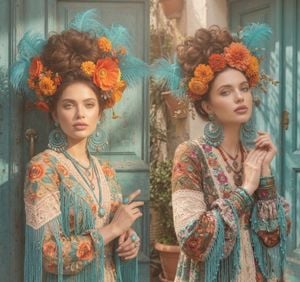
A highly detailed photorealistic portrait of a beautiful young woman with fair skin, soft features, full lips, and warm brown eyes, shown in a dual side-by-side composition. She has rich chestnut-brown hair styled in a voluminous high messy bun/updo. On her head she wears an {argument name="headress" default="elaborate festive headdress made of large vibrant turquoise-blue ostrich feathers"} mixed with {argument name="flowers" default="bright orange, yellow, and marigold-like flowers"}, plus smaller green leaves. She wears large circular turquoise beaded chandelier earrings with dangling turquoise beads, multiple layered necklaces of turquoise beads and silver/metal accents, turquoise stone rings, and matching turquoise beaded bracelets. Her outfit is a {argument name="clothing" default="richly embroidered bohemian/folk-style blouse"} featuring intricate floral embroidery in orange, teal, red, and gold on a sheer and lace base, with long turquoise beaded fringe hanging from the sleeves and bodice, and delicate white lace details. Left panel: she faces the camera directly with a soft neutral expression, one hand lightly touching her chin, the other pointing gently. Right panel: she looks slightly to the side with a serene expression, both hands gently clasped near her chest. Background: weathered turquoise-blue wooden doors with peeling paint and metal handles, set in a sunlit rustic Mediterranean or Mexican courtyard with potted plants and soft natural daylight. Cinematic lighting, ultra-detailed textures on feathers, flowers, embroidery, beads and skin, warm golden hour tones, high fashion editorial style, 8k resolution.
Choose the primary action to open PicX Studio with the available template settings. Review the model and format, personalize the creative direction, and generate when ready.
Yes. You can change the subject, setting, lighting, mood, format, and available model controls before creating your image.
This template is free to open and customize. Generation usage is shown in PicX Studio before you create.
Start with GPT Image 2, which is the model associated with this template. You can compare another compatible model for a different finish.
Follow a topic to a crawlable collection of related PicX Studio templates.