How do I use the Anime Character Waking Up POV template?
Choose the primary action to open PicX Studio with the available template settings. Review the model and format, personalize the creative direction, and generate when ready.
A highly detailed prompt designed for GPT models to create a 'candid morning' photo of an anime character.
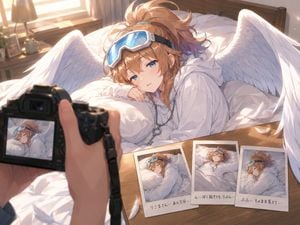
以下の要件で画像生成。 ➝({argument name="キャラクター名" default="キャラの名前"}) 重要:キャラの見た目(髪型/髪色/性別/目/年齢感/服/装飾/雰囲気/種族要素/翼の有無と形)は添付画像に厳密に合わせること。勝手に別キャラ化しないこと。 パジャマは参照画像の服装をアレンジ。 また、カメラ背面の液晶に映っている“画面内のキャラ”と、机上のチェキ3枚(ポラロイド)内の“写真のキャラ”も、同一キャラクターとして添付画像の特徴を同様に反映すること(翼があるキャラなら翼も必ず写す。翼が無いキャラなら翼を勝手に生やさない)。 ▼生成シーン仕様(固定) - 画面比率:aspect ratio 4:3 - 画風:anime style / official art - 品質タグ:Score 9, Score 8+, Score 7+, masterpiece, best quality, ultra detailed, 8k resolution, Sharp focus, (Masterpiece: 1.2), (Highest Quality: 1.2), (Highly Aesthetic: 1.2), (Absurd: 1.2), (Detailed Background) - 光:c cinematic lighting, soft morning light, warm sunlight through curtains, shallow depth of field, gentle bokeh - 主体:寝ている(or 起きかけ)キャラの「上半身のみ」、顔にクローズアップ、寝ぼけまなこ(drowsy half-open eyes / sleepy unfocused gaze) - 構図:first-person POV, intimate close range, candid morning shot - 前景:撮影者の手(feminine hand でも neutral hand でも可。顔や全身は出さない)+“実物のカメラ”を持っている。カメラのストラップが見える - カメラ背面:camera’s rear LCD screen が見えていて、そこに“同じキャラの寝ぼけ顔(同シーン)”がライブビューとして映る(screen glareは薄く、UIは最小) - 机上:bedside table の上に「チェキ3枚(three polaroid instant photos ONLY)」が重なって置かれている - チェキ内の写真:同じキャラだが、寝相が3枚でバラバラ(ランダムポーズ・角度も違う)で明確に差がある 例:横向きで枕抱き / 仰向けで布団蹴り / 顔を背けて手が口元+布団を顎まで - チェキ枠のメモ:各チェキの白フチに、日本語手書きメモ(readable Japanese handwritten memo, JPfont, black ink, short neat handwriting) メモ文は短く、判読優先。キャラらしい寝言を3つ選ぶ。**キャラの口調にすること**。 - 背景:clean cozy bedroom background, tidy but lived-in, wooden bedside table,(羽/羽根が“添付画像にある場合のみ”)subtle feathers in frame (few only) - 追加:instant film texture, slight glare reflection, realistic polaroid frames ▼禁止(固定) - チェキが3枚以上に増える - 撮影者の顔や全身が映る - 文字が崩れて読めない(可能な限り抑制) - キャラ特徴の改変(髪色・目色・服・種族要素・翼の有無 等)
Choose the primary action to open PicX Studio with the available template settings. Review the model and format, personalize the creative direction, and generate when ready.
Yes. You can change the subject, setting, lighting, mood, format, and available model controls before creating your image.
This template is free to open and customize. Generation usage is shown in PicX Studio before you create.
Start with GPT Image 2, which is the model associated with this template. You can compare another compatible model for a different finish.
Follow a topic to a crawlable collection of related PicX Studio templates.