How do I use the Summer Night Fireworks and Meteor Shower template?
Edit the prompt in the box under the preview — the template's model and format are already selected — and press Generate. Your version appears right on this page.
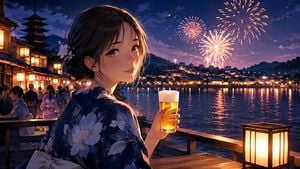
A cinematic Japanese prompt depicting a woman in a yukata holding sparklers at a summer festival under a sky filled with fireworks and meteors.

主題: {argument name="主題" default="流星を灯す夜"} 主体: 縦長2:3の夏祭りポートレート。濡れた石畳の上で、浴衣姿の女性が低くしゃがみ、左右の手に線香花火を一本ずつ持っている。人物は画面中央やや左から下半分を占め、広く残した夜空に色彩の異なる大輪の花火と、明瞭な流星が広がる。 人物・表情: 自然で現実感のある若い女性。黒髪を低めのゆるいまとめ髪にし、薄い前髪と頬にかかる後れ毛を残す。耳の後ろに淡い桃色と白の花飾りを添える。顔を画面右からカメラへ静かに振り向け、穏やかな目線と控えめな微笑みを見せる。線香花火と提灯の光が頬、鼻筋、唇に柔らかく触れる。 服装・ポーズ: 乳白色に近い淡い桜色の浴衣。桃色、薄紫、灰青色の小花と葉を散らした可憐な柄で、背中にはくすみピンクの大きな文庫結びの帯。足元は赤茶色の鼻緒を付けた木製の下駄。両足を揃えて深くしゃがみ、体は画面右へ向けながら上半身だけをカメラ側へひねる。人物自身の右手を胸の前へ少し高く上げ、左手を膝の横へ低く伸ばす。それぞれの手に線香花火を一本だけ自然につまみ、指の本数、握り方、手首の角度を正確に描く。 背景・光: 深い紺色の星空。左上には花びらのように湾曲して開く大きな桃色の花火、右上には金色と淡い青白色が放射状に伸びる大輪、左中段には青と桃色が混じる小さな花火を配置する。周囲には控えめな小型花火を数輪だけ散らし、密集させない。空を斜めに横切る流星を4〜5本描き、白く鋭い光点と長く透明感のある尾をはっきり見せる。画面左奥には暖色の提灯が遠近に沿って並び、右奥の水辺には朱色の鳥居と暗い山並みが見える。濡れた石畳に提灯、花火、線香花火の金色や桃色が長く反射する。主光は手元の線香花火、左側から提灯の暖かな補助光、上方から花火の淡い輪郭光を加える。 構図・カメラ: 縦2:3。低い位置から人物の目線付近を見上げるローアングルで、全身と下駄まで収める。人物の頭頂は画面中央付近、上半分以上を夜空の余白として確保する。左の提灯列が奥へ導く斜線を作り、右奥の鳥居と釣り合う構成。35mm相当の自然な広角感。人物と手元の線香花火に正確にピントを合わせ、背景は輪郭が分かる程度に柔らかくぼかす。 質感・スタイル: 実写感の高い映画的な夜景写真。自然な肌理、浴衣の薄い綿布の織り、帯の立体的な折り目、濡れた石の光沢を丁寧に表現する。深い紺、淡い桃色、金色を中心に、彩度は上品に抑える。微細なフィルム粒子、滑らかな階調、透明感のある発光表現。過度な美肌補正を避け、現実的な光量と反射を保つ。
主題: {argument name="主題" default="流星を灯す夜"} 主体: 縦長2:3の夏祭りポートレート。濡れた石畳の上で、浴衣姿の女性が低くしゃがみ、左右の手に線香花火を一本ずつ持っている。人物は画面中央やや左から下半分を占め、広く残した夜空に色彩の異なる大輪の花火と、明瞭な流星が広がる。 人物・表情: 自然で現実感のある若い女性。黒髪を低めのゆるいまとめ髪にし、薄い前髪と頬にかかる後れ毛を残す。耳の後ろに淡い桃色と白の花飾りを添える。顔を画面右からカメラへ静かに振り向け、穏やかな目線と控えめな微笑みを見せる。線香花火と提灯の光が頬、鼻筋、唇に柔らかく触れる。 服装・ポーズ: 乳白色に近い淡い桜色の浴衣。桃色、薄紫、灰青色の小花と葉を散らした可憐な柄で、背中にはくすみピンクの大きな文庫結びの帯。足元は赤茶色の鼻緒を付けた木製の下駄。両足を揃えて深くしゃがみ、体は画面右へ向けながら上半身だけをカメラ側へひねる。人物自身の右手を胸の前へ少し高く上げ、左手を膝の横へ低く伸ばす。それぞれの手に線香花火を一本だけ自然につまみ、指の本数、握り方、手首の角度を正確に描く。 背景・光: 深い紺色の星空。左上には花びらのように湾曲して開く大きな桃色の花火、右上には金色と淡い青白色が放射状に伸びる大輪、左中段には青と桃色が混じる小さな花火を配置する。周囲には控えめな小型花火を数輪だけ散らし、密集させない。空を斜めに横切る流星を4〜5本描き、白く鋭い光点と長く透明感のある尾をはっきり見せる。画面左奥には暖色の提灯が遠近に沿って並び、右奥の水辺には朱色の鳥居と暗い山並みが見える。濡れた石畳に提灯、花火、線香花火の金色や桃色が長く反射する。主光は手元の線香花火、左側から提灯の暖かな補助光、上方から花火の淡い輪郭光を加える。 構図・カメラ: 縦2:3。低い位置から人物の目線付近を見上げるローアングルで、全身と下駄まで収める。人物の頭頂は画面中央付近、上半分以上を夜空の余白として確保する。左の提灯列が奥へ導く斜線を作り、右奥の鳥居と釣り合う構成。35mm相当の自然な広角感。人物と手元の線香花火に正確にピントを合わせ、背景は輪郭が分かる程度に柔らかくぼかす。 質感・スタイル: 実写感の高い映画的な夜景写真。自然な肌理、浴衣の薄い綿布の織り、帯の立体的な折り目、濡れた石の光沢を丁寧に表現する。深い紺、淡い桃色、金色を中心に、彩度は上品に抑える。微細なフィルム粒子、滑らかな階調、透明感のある発光表現。過度な美肌補正を避け、現実的な光量と反射を保つ。
Edit the prompt in the box under the preview — the template's model and format are already selected — and press Generate. Your version appears right on this page.
Yes. You can change the subject, setting, lighting, mood, format, and available model controls before creating your image.
Opening and editing this template is free. Generating uses credits, shown on the Generate button when you are signed in.
Start with GPT Image 2, which is the model associated with this template. You can compare another compatible model for a different finish.
Follow a topic to a crawlable collection of related PicX Studio templates.