How do I use the Luxury Beach Editorial Portrait template?
Choose the primary action to open PicX Studio with the available template settings. Review the model and format, personalize the creative direction, and generate when ready.
A cinematic golden-hour portrait of a woman on the beach wearing a flowing silk halter gown with a soft lens flare and creamy bokeh.
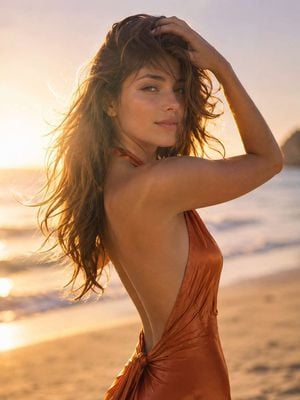
Golden-hour luxury editorial {argument name="setting" default="beach portrait"}, breathtakingly beautiful woman with sun-kissed luminous skin, dark silky hair swept by a gentle breeze, wearing a {argument name="clothing" default="flowing backless burnt-orange silk halter gown"} clinging to her feminine curves, one arm lifted brushing hair from face revealing an {argument name="expression" default="elegant side profile, soft knowing half-smile"}, eyes half-closed, barefoot on warm sand, ocean horizon blurred into creamy amber-and-lavender bokeh, warm backlight creating a luminous hair halo, large silver reflector filling face, lens flare at frame edge, Contax 645 medium format 80mm f/2.0 Portra 400 emulation, 8k resolution, photorealistic, cinematic composition, high detail, no harsh lighting, no over-saturated skin, no plastic retouching, no blown highlights, no cluttered background.
Choose the primary action to open PicX Studio with the available template settings. Review the model and format, personalize the creative direction, and generate when ready.
Yes. You can change the subject, setting, lighting, mood, format, and available model controls before creating your image.
This template is free to open and customize. Generation usage is shown in PicX Studio before you create.
Start with GPT Image 2, which is the model associated with this template. You can compare another compatible model for a different finish.
Follow a topic to a crawlable collection of related PicX Studio templates.