How do I use the High Fashion Editorial Portrait template?
Choose the primary action to open PicX Studio with the available template settings. Review the model and format, personalize the creative direction, and generate when ready.
A high-fashion commercial portrait prompt featuring a blonde model in a burgundy denim jacket.
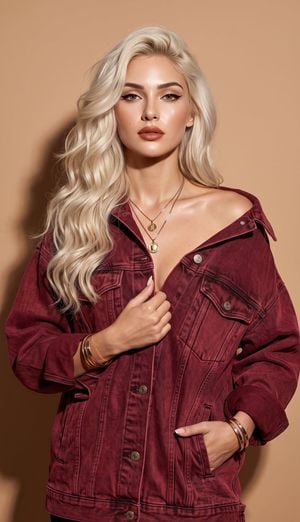
A high-fashion commercial editorial portrait of a {argument name="model" default="stunning blonde model"} with voluminous, wavy platinum-blonde hair cascading gracefully over one shoulder.She wears an {argument name="outfit" default="oversized, rich burgundy-red washed denim jacket"} styled casually off one shoulder, holding the lapel with one manicured hand. Her makeup is refined with sharp jet-black winged eyeliner, radiant dewy skin, and satin terracotta lips. Crisp direct-flash studio lighting casts a defined,high-contrast hard shadow against a {argument name="background" default="seamless, solid warm-beige background"}. Shot on an 85mm f/1.8 prime lens, hyper-realistic commercial photography aesthetic, realistic skin texture, authentic fabric weave, sharp focus, 8k resolution, text watermark placed subtly in the bottom center. --ar 9:16
Choose the primary action to open PicX Studio with the available template settings. Review the model and format, personalize the creative direction, and generate when ready.
Yes. You can change the subject, setting, lighting, mood, format, and available model controls before creating your image.
This template is free to open and customize. Generation usage is shown in PicX Studio before you create.
Start with GPT Image 2, which is the model associated with this template. You can compare another compatible model for a different finish.
Follow a topic to a crawlable collection of related PicX Studio templates.