How do I use the Luxury Glasshouse Editorial Portrait template?
Choose the primary action to open PicX Studio with the available template settings. Review the model and format, personalize the creative direction, and generate when ready.
A high-end professional fashion editorial prompt designed to maintain facial identity while placing a subject in a lush, sunlit contemporary glasshouse.
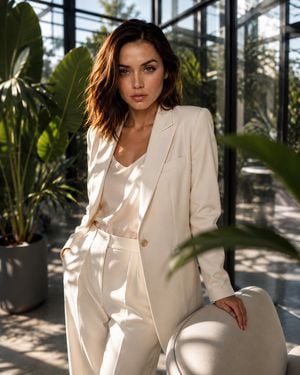
Use the uploaded image as the primary facial and identity reference. Preserve her natural facial structure, eyes, nose, lips, proportions, skin tone, hair color and recognizable likeness. Do not alter or beautify her face. Create a high-end professional fashion editorial portrait of the woman inside an elegant contemporary {argument name="setting" default="glasshouse filled with oversized tropical plants"}. She wears a perfectly tailored {argument name="clothing" default="ivory cream blazer with matching wide-leg trousers and a minimal silk top underneath"}. Her styling is sophisticated, understated and luxurious. She stands beside a sculptural modern chair, body angled slightly toward the camera, one hand resting naturally on the chair while she looks directly into the lens with a calm, confident expression. Floor-to-ceiling glass walls surround the space, with dramatic late-afternoon sunlight streaming through the glass and creating beautiful geometric shadows across the floor, clothing and background. Large green leaves create subtle foreground framing and depth. Luxury fashion campaign photography, editorial composition, sophisticated minimalism, natural skin texture, realistic pores, individual hair strands, realistic fabric texture, cinematic sunlight, controlled highlights, soft shadows, subtle atmospheric depth, shallow depth of field, 85mm professional portrait lens, f/2, studio-quality color grading, ultra-photorealistic, premium magazine aesthetic, 8K detail, vertical 4:5. No plastic skin, no excessive retouching, no facial reshaping, no exaggerated makeup, no artificial-looking eyes, no distorted hands, no extra fingers, no text, no watermark.
Choose the primary action to open PicX Studio with the available template settings. Review the model and format, personalize the creative direction, and generate when ready.
Yes. You can change the subject, setting, lighting, mood, format, and available model controls before creating your image.
This template is free to open and customize. Generation usage is shown in PicX Studio before you create.
Start with GPT Image 2, which is the model associated with this template. You can compare another compatible model for a different finish.
Follow a topic to a crawlable collection of related PicX Studio templates.