
Tiny Dragon Rainbow Flame Storyboard
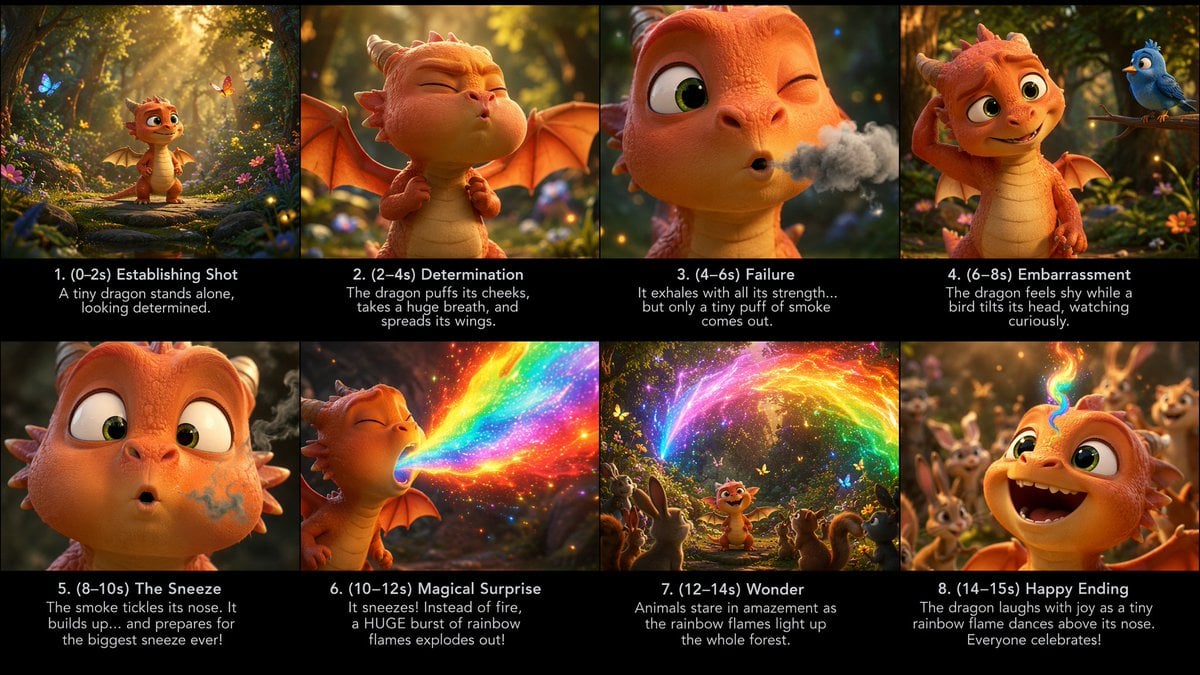
A cinematic eight-panel animated storyboard showing a baby dragon accidentally sneezing rainbow flames in an enchanted forest.
- Prompt included
- Model and format preset
- Free template
The prompt behind this image
Copy the exact prompt behind Tiny Dragon Rainbow Flame Storyboard, or open it in the studio and make it yours.
Goal: Create a polished cinematic storyboard sheet for a short animated fantasy scene about {argument name="character name" default="a tiny dragon"} discovering an unexpected magical ability. Canvas: Wide 16:9 storyboard board, eight panels arranged in a clean 4-by-2 grid. Each panel has a vivid image area on top and a black caption strip beneath it. Use thin black dividers between panels. Overall look: high-end 3D animated family-film style, warm forest lighting, shallow depth of field, expressive character acting, glowing particles, lush flowers, moss, butterflies, and soft golden sunbeams. Main subject details: The main character is a cute small orange baby dragon with a cream belly, big green eyes, tiny horns, small bat wings, rounded snout, soft scales, and childlike proportions. The story takes place in an enchanted woodland clearing full of flowers, mossy stones, firefly-like sparkles, and friendly animals. The dragon is trying to breathe fire, but instead creates {argument name="magical breath effect" default="rainbow flame"}. Layout and exact panel count: Use exactly 8 storyboard panels, numbered 1 through 8, with these visible captions and actions: Panel 1 caption: “1. (0–2s) Establishing Shot” with subcaption “A tiny dragon stands alone, looking determined.” Image: wide establishing shot of the dragon standing on a forest path in a glowing magical clearing, butterflies and flowers around it. Panel 2 caption: “2. (2–4s) Determination” with subcaption “The dragon puffs its cheeks, takes a huge breath, and spreads its wings.” Image: medium close-up of the dragon squeezing its eyes shut, cheeks inflated, wings open, preparing dramatically. Panel 3 caption: “3. (4–6s) Failure” with subcaption “It exhales with all its strength… but only a tiny puff of smoke comes out.” Image: close-up of one winking eye and puckered mouth releasing a small gray smoke cloud. Panel 4 caption: “4. (6–8s) Embarrassment” with subcaption “The dragon feels shy while a bird tilts its head, watching curiously.” Image: the dragon scratches its head sheepishly while a cute blue bird perches on a branch nearby. Panel 5 caption: “5. (8–10s) The Sneeze” with subcaption “The smoke tickles its nose. It builds up… and prepares for the biggest sneeze ever!” Image: extreme close-up of the dragon’s face, wide eyes, smoky swirl around its nostril, about to sneeze. Panel 6 caption: “6. (10–12s) Magical Surprise” with subcaption “It sneezes! Instead of fire, a HUGE burst of rainbow flames explodes out!” Image: side view of the dragon sneezing a massive sparkling rainbow blast, bright saturated colors, glittering embers. Panel 7 caption: “7. (12–14s) Wonder” with subcaption “Animals stare in amazement as the rainbow flames light up the whole forest.” Image: wider shot with the dragon in the center, surrounded by exactly 5 visible woodland animals watching in awe: a rabbit, a squirrel, a deer-like fawn, a hedgehog, and a small bird. Rainbow fire arcs above them through the trees. Panel 8 caption: “8. (14–15s) Happy Ending” with subcaption “The dragon laughs with joy as a tiny rainbow flame dances above its nose. Everyone celebrates!” Image: joyful close-up of the dragon laughing open-mouthed, eyes sparkling, tiny rainbow flame curling above its nose, cheering forest animals blurred behind. Visual style: Cinematic 3D animation, cute Pixar-like character appeal, detailed scales and soft skin texture, warm orange-and-gold lighting, magical rainbow glow, volumetric sun rays, bokeh, expressive faces, high production value, family-friendly tone. Text constraints: Keep all captions in English exactly as written. Use clean white sans-serif text centered on each black caption strip. Maintain legibility. Do not add extra panels, logos, watermarks, UI elements, or unrelated text.
How to use Tiny Dragon Rainbow Flame Storyboard in 3 steps
- 1Upload ImagePNG, JPG or paste
Add your photo
Upload the photo the template builds on. The prompt, model and format are already set.
- 2…a portrait of your subject in softgolden-hour light, 85mm…
Personalize
Edit the subject and creative details for your destination.
- 3Generate
Generate
Press Generate — your image is created in PicX Studio, so you can compare it with the original and refine one variable at a time.
More like this
Templates with the same subject, style or setup. Open one to see its prompt.
Cinematic Flame Chef Storyboard

Minecraft Fantasy Kingdom Voxel Landscape

Headphones Lifestyle Nine Panel Grid
Sticker Art Style - Rainbow Girl

Sticker Art Style - Rainbow Girl v2
Sticker Art Style - Rainbow Girl
Seedance - Dragon vs Python Battle
Seedance - Storyboard to Movie
Starry Night Mermaid on Rainbow Reef
Toronto Tiny Planet Travel Poster
Couple in Rainy Rainbow Meadow
Floral Shirt Portrait with Rainbow Refractions
Make it yours
Tiny Dragon Rainbow Flame Storyboard works as-is. These are the safest ways to change it without losing the look.
Change one field
Copy a single group, rewrite it, and generate again so you can see what that field is doing.
Keep the frame, change the subject
Hold the composition and light of Tiny Dragon Rainbow Flame Storyboard, then swap wardrobe, props or the person for a new take.
| If the result… | Why | Fix |
|---|---|---|
| The result drifts from the preview | Too many fields changed at once. | Reuse Tiny Dragon Rainbow Flame Storyboard as-is first, then change one group — subject, light, or setting. |
| The model over-stylizes the scene | The prose prompt leaves finish and camera underspecified. | Add one camera or lighting sentence and stay on GPT Image 2. |
More GPT Image 2 templates
Other prompts made for GPT Image 2.

Six VTuber Japanese Logo Sheet

Realistic Portrait of Woman and Deer

The Vista Modular Condo Poster

AI Model Routing Comparison Infographic

2.5D Anime Art Board

Isometric Productivity Desk Scene

New York Double Exposure Poster

Four-Panel AI Landscape Comparison

Japanese Tatami Lifestyle Magazine Cover

NESCAFÉ Coffee Map Poster
More image prompts
Fresh picks from across the catalog.
Low-Angle Fashion Portrait with Light Rings
Ultra-Realistic Beauty Portrait Prompt
Tilt-Shift Tokyo Diorama at Sunset
Playful Tongue Out Lifestyle Portrait
Cinematic Portrait with Miniature Chibi Figurine
Panel Cinematic Storyboard Generation Prompt
Misty Medieval Village Establishing Shot
Vintage Film Style Portrait Transformation
Dynamic Black and White Street Fashion Prompt
Exaggerated Physique Gym Mirror Selfie Prompt (Spain Theme)
Browse template categories
Tiny Dragon Rainbow Flame Storyboard questions
How do I use the Tiny Dragon Rainbow Flame Storyboard template?
Add your photo if the template asks for one, edit the prompt if you like — the template's model and format are already selected — and press Generate. Your version opens in PicX Studio.
Can I customize the Tiny Dragon Rainbow Flame Storyboard template?
Yes. You can change the subject, setting, lighting, mood, format, and available model controls before creating your image.
Is the Tiny Dragon Rainbow Flame Storyboard template free?
Opening and editing this template is free. Generating uses credits, shown on the Generate button when you are signed in.
Which AI model should I use?
Start with GPT Image 2, which is the model associated with this template. You can compare another compatible model for a different finish.
Looking for something else? Browse all templates.

Your photo, any look
Thousands of ready templates for every top image and video model, from one credit balance.