
Candid Winter City Portrait during Snowfall
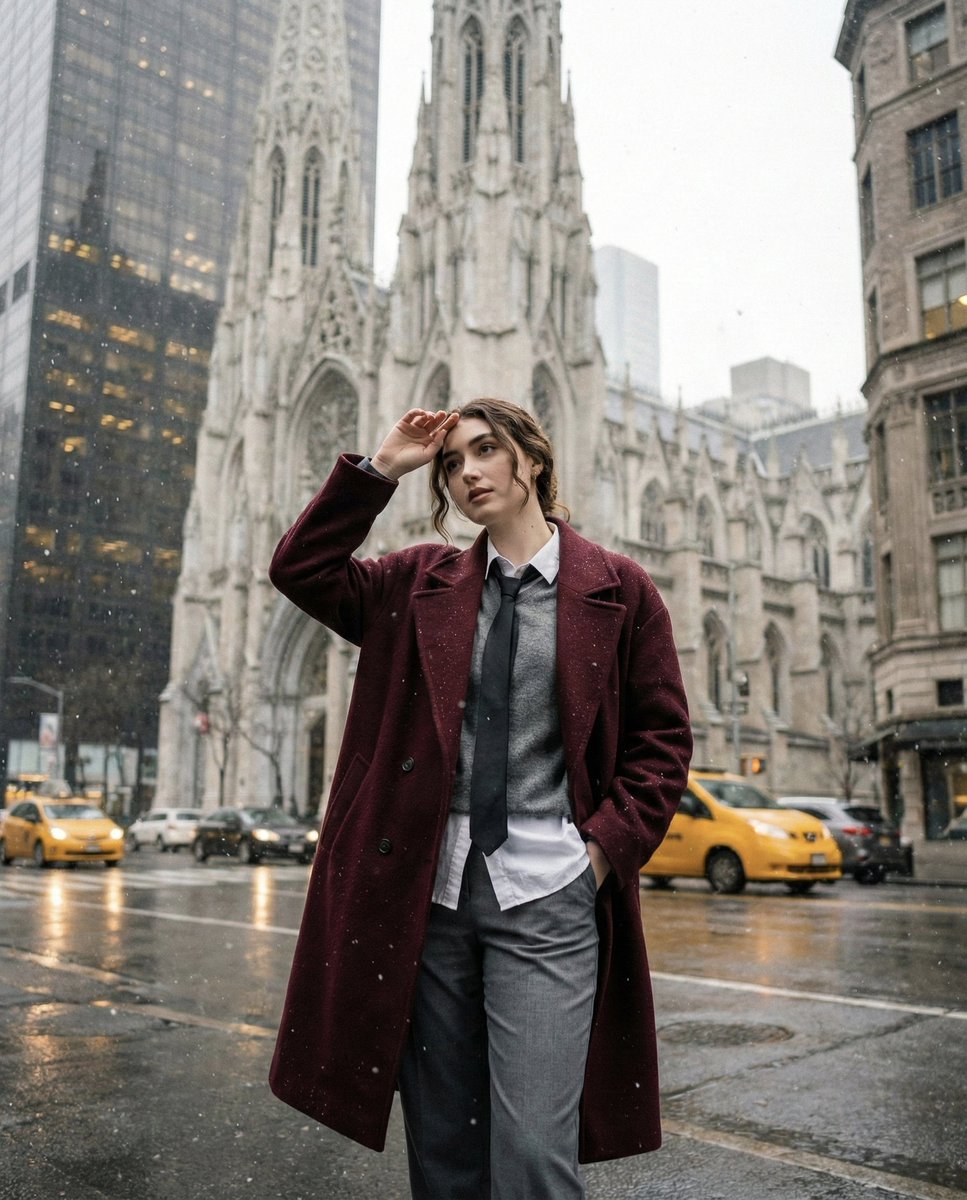
A structured JSON prompt for Gemini Nano Banana Pro to generate a candid, knees-up portrait of a young woman on a wet city street during gentle snowfall.
- Prompt included
- Model and format preset
- Premium template
The prompt behind this image
Copy the exact prompt behind Candid Winter City Portrait during Snowfall, or open it in the studio and make it yours.
- Image Prompt › Subject › Face Preservation
- true
- Image Prompt › Subject › Description
- young woman standing casually on a wet city street during gentle snowfall
- Image Prompt › Subject › Framing
- knees-up portrait, candid and unposed
- Image Prompt › Subject › Pose › Hand 1
- one hand in pocket
- Image Prompt › Subject › Pose › Hand 2
- other hand shielding her eyes from falling snow
- Image Prompt › Subject › Pose › Expression
- relaxed, natural expression
- Image Prompt › Subject › Pose › Body Position
- standing casually, weight slightly shifted
- Image Prompt › Subject › Appearance › Hair › Length
- slightly long-length
- Image Prompt › Subject › Appearance › Hair › Style
- messy, tucked behind ears
- Image Prompt › Subject › Appearance › Hair › Movement
- light snow causing subtle texture
- Image Prompt › Subject › Appearance › Outfit › Coat › Type
- oversized wool coat
- Image Prompt › Subject › Appearance › Outfit › Coat › Color
- burgundy
- Image Prompt › Subject › Appearance › Outfit › Layers
- soft grey sweater, crisp collared shirt, loosely tied black tie
- Image Prompt › Subject › Appearance › Outfit › Bottoms › Type
- tailored trousers
- Image Prompt › Subject › Appearance › Outfit › Bottoms › Color
- cool grey
- Image Prompt › Environment › Setting
- wet winter city street
- Image Prompt › Environment › Weather
- gentle snowfall
- Image Prompt › Environment › Background › Architecture
- grand historic skyscraper with detailed stonework and tall spires
- Image Prompt › Environment › Background › Lighting
- muted yellow city lights reflecting on wet asphalt
- Image Prompt › Environment › Background › Street Elements
- passing taxis, wet reflective road surface
- Image Prompt › Environment › Atmosphere › Daylight
- soft overcast winter lighting
- Image Prompt › Environment › Atmosphere › Mood
- cool, desaturated, cinematic
- Image Prompt › Environment › Atmosphere › Texture
- subtle film grain
- Image Prompt › Photography › Style
- intimate candid iPhone snapshot
Raw JSON
{
  "image_prompt": {
    "subject": {
      "face_preservation": true,
      "description": "young woman standing casually on a wet city street during gentle snowfall",
      "framing": "knees-up portrait, candid and unposed",
      "pose": {
        "hand_1": "one hand in pocket",
        "hand_2": "other hand shielding her eyes from falling snow",
        "expression": "relaxed, natural expression",
        "body_position": "standing casually, weight slightly shifted"
      },
      "appearance": {
        "hair": {
          "length": "slightly long-length",
          "style": "messy, tucked behind ears",
          "movement": "light snow causing subtle texture"
        },
        "outfit": {
          "coat": {
            "type": "oversized wool coat",
            "color": "burgundy"
          },
          "layers": [
            "soft grey sweater",
            "crisp collared shirt",
            "loosely tied black tie"
          ],
          "bottoms": {
            "type": "tailored trousers",
            "color": "cool grey"
          }
        }
      }
    },

    "environment": {
      "setting": "wet winter city street",
      "weather": "gentle snowfall",
      "background": {
        "architecture": "grand historic skyscraper with detailed stonework and tall spires",
        "lighting": "muted yellow city lights reflecting on wet asphalt",
        "street_elements": [
          "passing taxis",
          "wet reflective road surface"
        ]
      },
      "atmosphere": {
        "daylight": "soft overcast winter lighting",
        "mood": "cool, desaturated, cinematic",
        "texture": "subtle film grain"
      }
    },

    "photography": {
      "style": "intimate candid iPhone snapshot",
      "focus": "genuine textures of skin, snow, fabric, and wet environment",
      "color_tone": "cool winter hues with muted warm reflections",
      "shadows": "diffused, soft",
      "quality": "high resolution"
    },

    "composition": {
      "type": "casual handheld framing",
      "perspective": "eye-level",
      "negative_prompt": [
        "altered facial structure",
        "incorrect eye shape",
        "different hairstyle",
        "incorrect clothing colors",
        "no snow",
        "overly stylized lighting",
        "strong shadows",
        "AI distortions",
        "extra limbs"
      ]
    }
  }
}How to use Candid Winter City Portrait during Snowfall in 3 steps
- 1
Open
The prompt is already in the box next to the preview, with the template's model and format selected.
- 2…a portrait of your subject in softgolden-hour light, 85mm…
Personalize
Edit the subject and creative details for your destination.
- 3Generate
Generate
Press Generate — your image is created in PicX Studio, so you can compare it with the original and refine one variable at a time.
More like this
Templates with the same subject, style or setup. Open one to see its prompt.
Candid Winter Smartphone Portrait
Cinematic Winter Snowfall Portrait

Cinematic Winter Portrait with Snowfall

Gemini Nano Banana 2 Isometric 3d City D
Snowy Locations Views Winter Special

Sunday Afternoon, 1988

Found Photograph: Us, 1970

Our Song was on a Cassette

The Date After College

80s Couple Studio Portrait

80s College Gate

80s Bollywood Star
Make it yours
Candid Winter City Portrait during Snowfall works as-is. These are the safest ways to change it without losing the look.
Swap the setting
Keep the rest of the prompt and replace the location block. The current setting is “wet winter city street”.
Swap the light
One lighting change is enough to compare takes. Current light: “muted yellow city lights reflecting on wet asphalt”.
Change one field
Copy a single group, rewrite it, and generate again so you can see what that field is doing.
| If the result… | Why | Fix |
|---|---|---|
| The result drifts from the preview | Too many fields changed at once. | Reuse Candid Winter City Portrait during Snowfall as-is first, then change one group — subject, light, or setting. |
| Nano Banana 2 ignores part of the JSON | Some models flatten or skip nested keys. | Keep the same values and paste them as a short paragraph instead. |
More Nano Banana 2 templates
Other prompts made for Nano Banana 2.

Photorealistic Leaf Shaped Like a Dragon

K-Pop Idol Portrait Grid for Rapid Selection

Poetic Rain Forest Portrait During Golden Hour

Urban Street Portrait with Cartoon Inner Self Duo

Candid Nighttime Photo with Cat Prompt

High-Concept 3D Diorama Generation Prompt

Cinematic Futuristic Studio Portrait Template

Skincare Editorial Photography Collage Prompt

Hyper-Realistic Commercial Product Photography (Splash Effect)

Hyper-Realistic Nightclub Portrait Prompt
More image prompts
Fresh picks from across the catalog.
Dual Identity Surreal Portrait

Dark Fantasy RPG Key Visual Poster

Modern Heterogeneous Chinese Font Design

Cyber Anime Music Poster
Minimalist Product Advertisement
Shadow and Glitch Effect Prompt with Color Separation
Time Progression Image Generation

Medical Infographic Poster for Drug Information (Bento Grid Style)

Cybernetic Medical Visualization Prompt
Illustration based on the poem “Song of Everlasting Regret”
Browse template categories
Candid Winter City Portrait during Snowfall questions
How do I use the Candid Winter City Portrait during Snowfall template?
Add your photo if the template asks for one, edit the prompt if you like — the template's model and format are already selected — and press Generate. Your version opens in PicX Studio.
Can I customize the Candid Winter City Portrait during Snowfall template?
Yes. You can change the subject, setting, lighting, mood, format, and available model controls before creating your image.
Is the Candid Winter City Portrait during Snowfall template free?
Opening and editing this template is free. Generating uses credits, shown on the Generate button when you are signed in.
Which AI model should I use?
Start with Nano Banana 2, which is the model associated with this template. You can compare another compatible model for a different finish.
Looking for something else? Browse all templates.

Your photo, any look
Thousands of ready templates for every top image and video model, from one credit balance.