How do I use the Lunar New Year Street Graffiti Portrait Prompt template?
Edit the prompt in the box under the preview — the template's model and format are already selected — and press Generate. Your version appears right on this page.
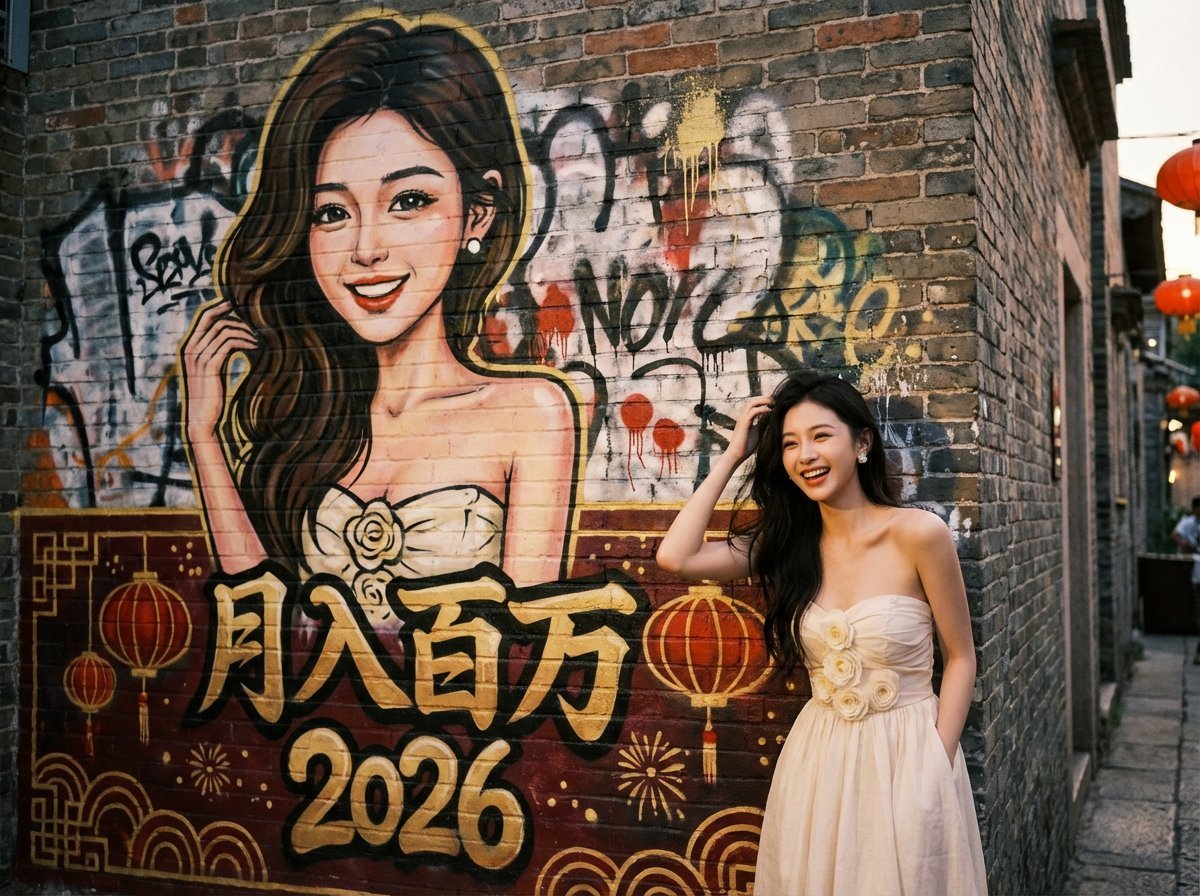
A complex, structured prompt for generating a natural street portrait of a person standing in front of a layered, messy graffiti wall with Lunar New Year (Year of the Horse) elements, featuring customizable text and…

{ "task_description": "Create a natural street portrait of a real person standing in front of a layered, messy graffiti wall. The wall features a spontaneous, hand-painted caricature of the person mixed with Year of the Horse elements.", "global_settings": { "aspect_ratio": "4:3", "overall_vibe": "Authentic urban street culture, vibrant Lunar New Year energy, raw and spicy" }, "variables": { "mural_main_text": "{argument name=\"主文本\" default=\"马上暴富\"}", "mural_secondary_text": "{argument name=\"副文本\" default=\"2026\"}", "theme": "Year of the Horse - Festive & Hot" }, "mural_aesthetics": { "rendering_style": "Hand-painted aerosol art, authentic street graffiti style", "messiness_factors": [ "Visible paint splatters and spontaneous drips in gold and red", "Soft, blurred spray edges over weathered concrete textures", "Layered effect: a stylized Horse zodiac silhouette and the subject's caricature painted over old, messy tags", "Imperfect, high-energy freehand strokes" ], "content": "A vibrant caricature based on the reference person's facial features, integrated with bold '2026' and horse-themed graffiti symbols." }, "style_scenarios": { "New_Year_Festive_Spicy": { "setting": "A bustling old city alleyway at dusk with warm ambient lighting", "palette": "Dominant imperial red, vibrant gold, and charcoal black accents", "details": "Faint glowing red lanterns blurred in the background, festive 'Chunlian' inspired graffiti tags" } }, "foreground_subject": { "logic": "Mirror the gender and facial features of the reference image.", "attire_strategy": "A spicy and festive fusion outfit: A form-fitting, modified modern Cheongsam (Qipao) with a daring deep V-neck and a large open-back design, rendered in glossy silk red with gold embroidery. The outfit should be provocative (high-slit to the hip), emphasizing a curvaceous silhouette.", "position": "Grounded in the frame, flexible positioning (center or right-third).", "camera_and_pose_options": [ { "angle": "Low-angle shot (worm's eye view)", "pose": "Standing tall with one foot forward, leaning slightly back to elongate the legs and emphasize the high-slit dress, looking down at the camera with a confident gaze.", "effect": "Powerful, statuesque, and dominant." }, { "angle": "High-angle close-up portrait", "pose": "Leaning against the wall with arms crossed behind the head, highlighting the curves of the upper body and the deep V-neck, looking up with a playful, sultry smile.", "effect": "Intimate and alluring." }, { "angle": "3/4 side-view / Dutch angle", "pose": "Walking past the wall but looking back over the shoulder (candid movement" } ] } } 最后记得补上你的选择:camera_and_pose_options choose {argument name="姿势选择" default="second one"}
{ "task_description": "Create a natural street portrait of a real person standing in front of a layered, messy graffiti wall. The wall features a spontaneous, hand-painted caricature of the person mixed with Year of the Horse elements.", "global_settings": { "aspect_ratio": "4:3", "overall_vibe": "Authentic urban street culture, vibrant Lunar New Year energy, raw and spicy" }, "variables": { "mural_main_text": "{argument name=\"主文本\" default=\"马上暴富\"}", "mural_secondary_text": "{argument name=\"副文本\" default=\"2026\"}", "theme": "Year of the Horse - Festive & Hot" }, "mural_aesthetics": { "rendering_style": "Hand-painted aerosol art, authentic street graffiti style", "messiness_factors": [ "Visible paint splatters and spontaneous drips in gold and red", "Soft, blurred spray edges over weathered concrete textures", "Layered effect: a stylized Horse zodiac silhouette and the subject's caricature painted over old, messy tags", "Imperfect, high-energy freehand strokes" ], "content": "A vibrant caricature based on the reference person's facial features, integrated with bold '2026' and horse-themed graffiti symbols." }, "style_scenarios": { "New_Year_Festive_Spicy": { "setting": "A bustling old city alleyway at dusk with warm ambient lighting", "palette": "Dominant imperial red, vibrant gold, and charcoal black accents", "details": "Faint glowing red lanterns blurred in the background, festive 'Chunlian' inspired graffiti tags" } }, "foreground_subject": { "logic": "Mirror the gender and facial features of the reference image.", "attire_strategy": "A spicy and festive fusion outfit: A form-fitting, modified modern Cheongsam (Qipao) with a daring deep V-neck and a large open-back design, rendered in glossy silk red with gold embroidery. The outfit should be provocative (high-slit to the hip), emphasizing a curvaceous silhouette.", "position": "Grounded in the frame, flexible positioning (center or right-third).", "camera_and_pose_options": [ { "angle": "Low-angle shot (worm's eye view)", "pose": "Standing tall with one foot forward, leaning slightly back to elongate the legs and emphasize the high-slit dress, looking down at the camera with a confident gaze.", "effect": "Powerful, statuesque, and dominant." }, { "angle": "High-angle close-up portrait", "pose": "Leaning against the wall with arms crossed behind the head, highlighting the curves of the upper body and the deep V-neck, looking up with a playful, sultry smile.", "effect": "Intimate and alluring." }, { "angle": "3/4 side-view / Dutch angle", "pose": "Walking past the wall but looking back over the shoulder (candid movement" } ] } } 最后记得补上你的选择:camera_and_pose_options choose {argument name="姿势选择" default="second one"}
Edit the prompt in the box under the preview — the template's model and format are already selected — and press Generate. Your version appears right on this page.
Yes. You can change the subject, setting, lighting, mood, format, and available model controls before creating your video.
Opening and editing this template is free. Generating uses credits, shown on the Generate button when you are signed in.
Start with Seedance 2.0, which is the model associated with this template. You can compare another compatible model for a different finish.
Follow a topic to a crawlable collection of related PicX Studio templates.