How do I use the Wounded Man Cinematic Film Still template?
Choose the primary action to open PicX Studio with the available template settings. Review the model and format, personalize the creative direction, and generate when ready.
A detailed cinematic prompt for a gritty film still featuring a wounded character, emphasizing lighting, lens type, and emotional atmosphere. Change the subject, setting, or lighting one variable at a time.
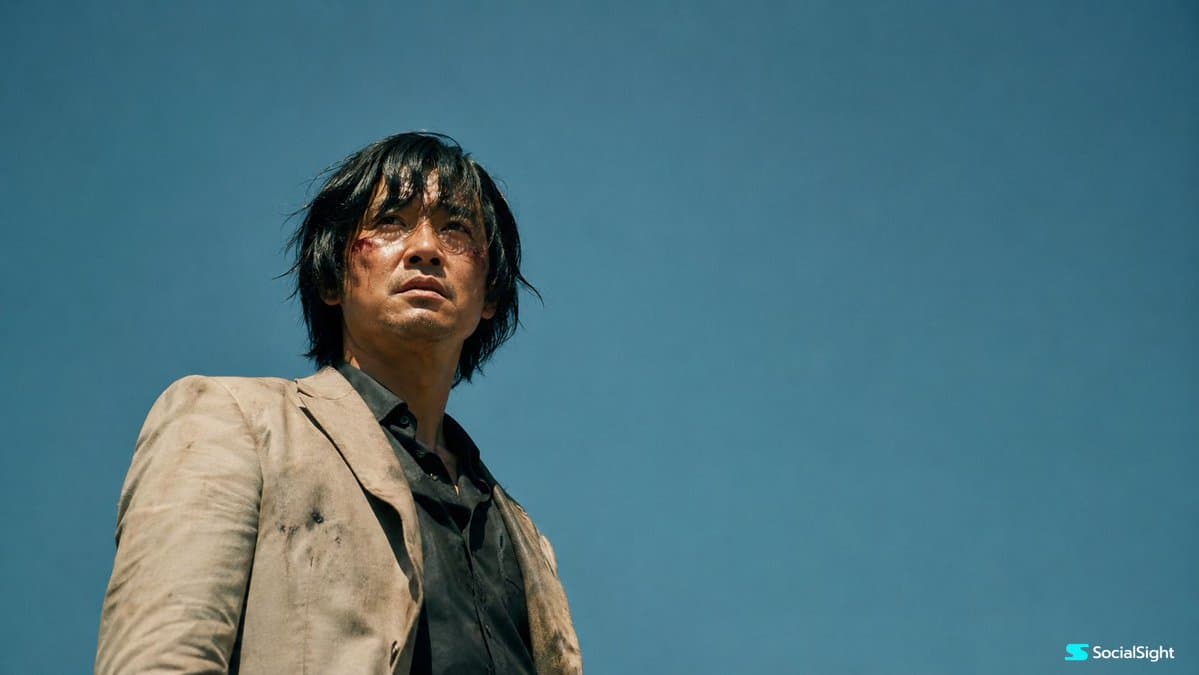
Create a cinematic realistic film still of a wounded {argument name="subject" default="Asian man"} standing under a vast clear blue sky, captured from a dramatic low-angle perspective as if the camera is looking up at him from below. He has messy medium-length black hair blown slightly by the wind, a tired but intense expression, and a small fresh cut on his cheek with subtle blood stains. He wears a dusty beige suit jacket over a dark shirt, the fabric slightly dirty and worn, suggesting he has just survived a violent confrontation or difficult journey. The composition should feel lonely, powerful, and cinematic, with the man positioned slightly left of center and a large amount of empty sky filling the background. Use natural harsh daylight, strong contrast, realistic skin texture, soft film grain, muted colors, and a raw cinematic atmosphere. The mood should feel tense, quiet, and emotionally heavy, like a moment after chaos. Shot on a vintage anamorphic lens, wide cinematic frame, shallow depth of field, realistic live-action movie still, no text, no logo, no extra characters.
Choose the primary action to open PicX Studio with the available template settings. Review the model and format, personalize the creative direction, and generate when ready.
Yes. You can change the subject, setting, lighting, mood, format, and available model controls before creating your image.
This template is free to open and customize. Generation usage is shown in PicX Studio before you create.
Start with GPT Image 2, which is the model associated with this template. You can compare another compatible model for a different finish.
© 2026 PicX Studio. All rights reserved.

Follow a topic to a crawlable collection of related PicX Studio templates.
43,474 public templates available. Verified via the PicX Studio public templates API; refreshed hourly.









![Minimalist Flat Vector Travel Poster — Premium minimalist flat-vector travel poster for {argument name="city name" default="[CITY_NAME]"}, 3:4 vertical format.](https://cms-assets.youmind.com/media/1787917359711_3ug846_HQX205cbMAA6F6S-300x400.jpg)