How do I use the Classy Concept Photoshoot Template template?
Choose the primary action to open PicX Studio with the available template settings. Review the model and format, personalize the creative direction, and generate when ready.
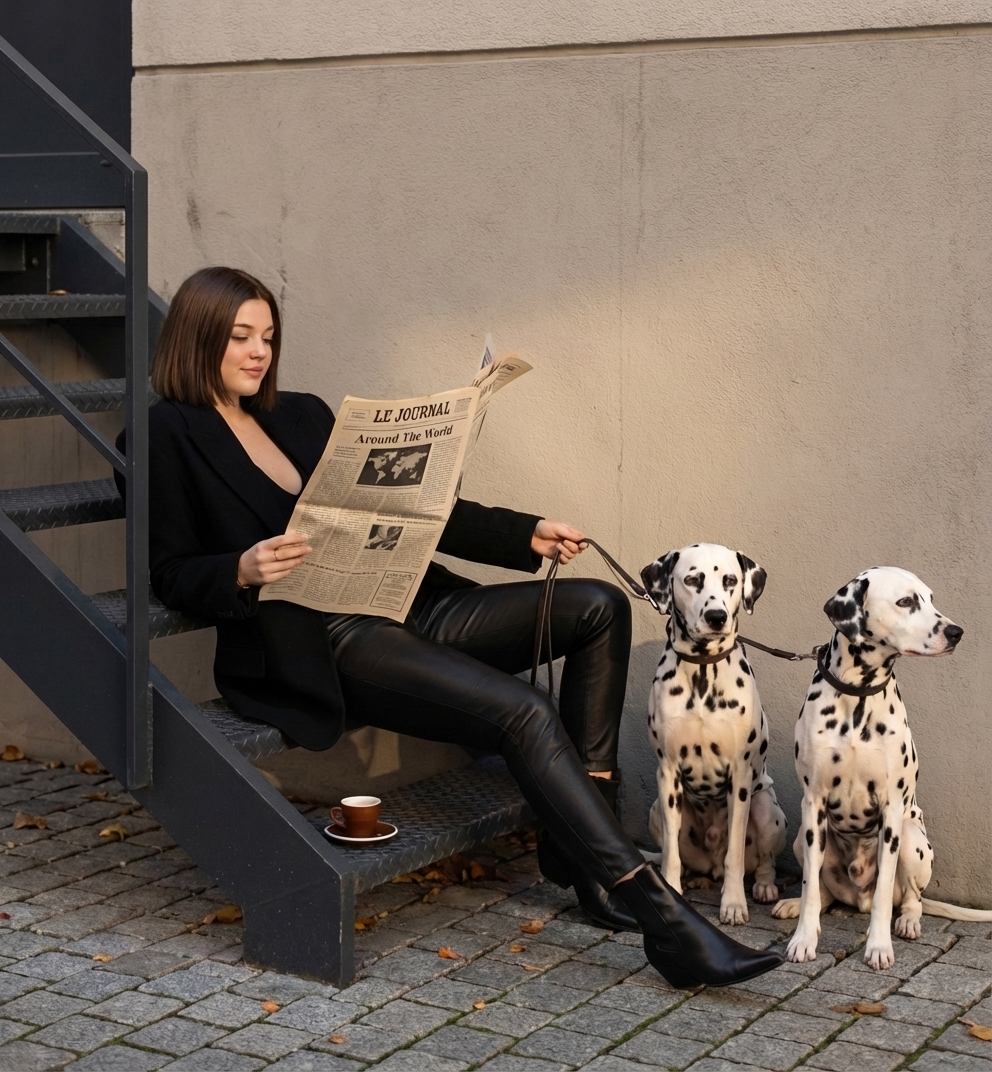
Use the Classy Concept Photoshoot Template AI image template on PicX Studio. Free template, no signup required.
A candid, medium full-shot inspired directly by the reference image: a stylish young woman sitting casually on dark gray industrial metal steps beside a neutral light-taupe concrete wall. She has a sharp, straight blonde bob and wears an all-black outfit — a structured oversized blazer layered over a low-cut top, fitted black leather trousers, and pointed black ankle boots. She holds a large vintage-style newspaper titled **“LE JOURNAL”** with the headline **“Around The World.”** To her right, two alert Dalmatians sit exactly as in the reference — still, attentive, and perfectly positioned — their black-and-white spotted coats contrasting sharply with the monochrome setting. They are connected to her with thin white leashes she holds loosely. The environment should match the reference image: an urban paved ground with neat gray cobblestones, soft diffused daylight, smooth and subtle shadows, and realistic textural detail on metal, leather, cobblestones, and the dogs’ fur. The shot should feel spontaneous and candid, capturing authentic iPhone-style lighting and hyperrealistic photographic clarity with a minimalistic, monochrome-inspired palette. Make sure the overall mood, posing, dog positions, outfit styling, and lighting follow the uploaded reference image precisely.
Treat Classy Concept Photoshoot Template as a focused AI image concept rather than a finished brief. Read the preview for composition, choose the intended destination, and then personalize one creative variable at a time.
Use the primary action to load the template settings in PicX Studio.
Adjust the subject and creative details for your destination.
Create the image, compare the result with the preview, and refine one variable at a time.
A continuous mix — similar concepts first, woven with same-model prompts and fresh picks from the catalog.
Choose the primary action to open PicX Studio with the available template settings. Review the model and format, personalize the creative direction, and generate when ready.
Yes. You can change the subject, setting, lighting, mood, format, and available model controls before creating your image.
This template is free to open and customize. Generation usage is shown in PicX Studio before you create.
Choose a compatible model in PicX Studio based on the style, speed, and output controls your project needs.
A continuous mix — similar concepts first, woven with same-model prompts and fresh picks from the catalog.
Follow a topic to a crawlable collection of related PicX Studio templates.
32,032 public templates available. Verified via the PicX Studio public templates API; refreshed hourly.


