
Isometric Science Concept Diorama Grid
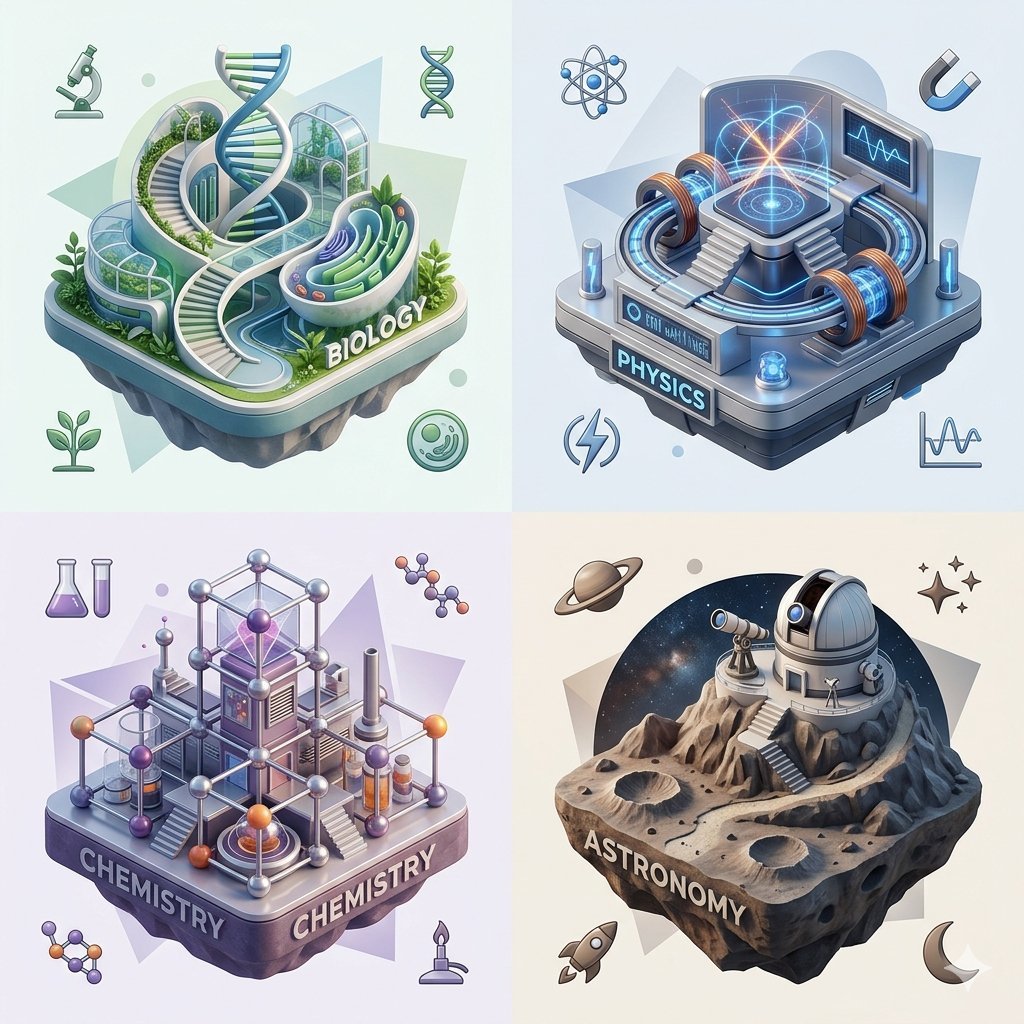
This prompt generates a polished four-panel isometric science infographic with miniature 3D dioramas for biology, physics, chemistry, and astronomy, ideal for concept visualization or educational social posts.
- Prompt included
- Model and format preset
- Free template
The prompt behind this image
Copy the exact prompt behind Isometric Science Concept Diorama Grid, or open it in the studio and make it yours.
A clean 2x2 conceptual entity model infographic on a soft light background, showing four separate floating isometric diorama tiles that personify branches of {argument name="theme" default="science"} in a polished 3D illustration style with pastel gradients, glossy materials, soft ambient lighting, subtle shadows, rounded futuristic forms, and high detail. Top left: BIOLOGY, a lush bio-lab island with a large central DNA double helix tower, curved glass greenhouse architecture, spiral stairways, layered organic pathways, greenery, plant beds, and fluid biomorphic structures; the word "BIOLOGY" is integrated on the front edge of the platform. Surrounding this tile are 4 small biology-related icons: a microscope, a DNA symbol, a sprouting plant, and a circular cell or petri-dish symbol. Top right: PHYSICS, a high-tech energy laboratory tile in cool blue tones with a central glowing platform, circular accelerator rings, copper-like electromagnetic coils, stairs leading up to the core, a monitor screen with waveform graphics, and a futuristic industrial base labeled "PHYSICS"; add 4 surrounding physics-themed icons: an atom, a horseshoe magnet, a lightning bolt, and a line graph waveform. Bottom left: CHEMISTRY, a modular molecular research structure in purple and silver, built from spheres-and-rods lattice frameworks, lab columns, beakers, flasks, and a glowing crystalline core; the platform prominently reads "CHEMISTRY" on two visible sides. Surrounding this tile are 4 chemistry-related icons: two molecular diagrams, a pair of lab test tubes or flasks, and a small burner. Bottom right: ASTRONOMY, a rocky lunar observatory island with cratered terrain, a dome observatory, a telescope, stairs carved into the rock, and a circular cosmic starfield backdrop behind it; the front edge reads "ASTRONOMY". Surrounding this tile are 4 astronomy-themed icons: a ringed planet, spark-like stars, a small rocket, and a crescent moon. Keep all 4 tiles evenly spaced in a quadrant layout, each with its own muted geometric backdrop shape, cohesive pastel palette tuned per discipline, and a premium gpt-image-2 style that makes each concept feel like a collectible miniature world. No people, no extra text beyond the four discipline labels.
How to use Isometric Science Concept Diorama Grid in 3 steps
- 1Upload ImagePNG, JPG or paste
Add your photo
Upload the photo the template builds on. The prompt, model and format are already set.
- 2…a portrait of your subject in softgolden-hour light, 85mm…
Personalize
Edit the subject and creative details for your destination.
- 3Generate
Generate
Press Generate — your image is created in PicX Studio, so you can compare it with the original and refine one variable at a time.
More like this
Templates with the same subject, style or setup. Open one to see its prompt.

Isometric Process Educational Diorama

Isometric Brand Store Diorama

Cozy Isometric Bathroom Miniature Diorama

Layered Paper Cut Forest Diorama

Soft Handcrafted Paper-Cut Layered Illustration

Korean Luxury Fashion Editorial 2x2 Grid Series

Minimalist Fashion Editorial Split Layout

Ultra-Realistic Vogue-Style Editorial Fashion Grid

Glass Brand Logo Volcanic Landscape

Blueprint Split Reality Archetype Prompt

Real Illustration Split Portrait Transition

Headphones Lifestyle Nine Panel Grid
Make it yours
Isometric Science Concept Diorama Grid works as-is. These are the safest ways to change it without losing the look.
Change one field
Copy a single group, rewrite it, and generate again so you can see what that field is doing.
Keep the frame, change the subject
Hold the composition and light of Isometric Science Concept Diorama Grid, then swap wardrobe, props or the person for a new take.
| If the result… | Why | Fix |
|---|---|---|
| The result drifts from the preview | Too many fields changed at once. | Reuse Isometric Science Concept Diorama Grid as-is first, then change one group — subject, light, or setting. |
| The model over-stylizes the scene | The prose prompt leaves finish and camera underspecified. | Add one camera or lighting sentence and stay on GPT Image 2. |
More GPT Image 2 templates
Other prompts made for GPT Image 2.

Six VTuber Japanese Logo Sheet

Realistic Portrait of Woman and Deer

The Vista Modular Condo Poster

AI Model Routing Comparison Infographic

2.5D Anime Art Board

Isometric Productivity Desk Scene

New York Double Exposure Poster

Four-Panel AI Landscape Comparison

Japanese Tatami Lifestyle Magazine Cover

NESCAFÉ Coffee Map Poster
More image prompts
Fresh picks from across the catalog.

Ultra-Realistic Corporate Headshot of Businessman

Ultra-realistic Portrait of a Young Man

Japanese LINE Registration Poster
Editorial Portrait with Dramatic Lighting
Anime Storyboard Generation
Google Nano Banana 2 — Cozy Bedroom Editorial

Photorealistic Fashion Portrait Template with Cultural Attire

Stranger Things Cinematic Scene: Steve vs. Vecna
Raw Beauty Portrait in Steamy Bathroom
Futuristic Glass UI Product Banner
Browse template categories
Isometric Science Concept Diorama Grid questions
How do I use the Isometric Science Concept Diorama Grid template?
Add your photo if the template asks for one, edit the prompt if you like — the template's model and format are already selected — and press Generate. Your version opens in PicX Studio.
Can I customize the Isometric Science Concept Diorama Grid template?
Yes. You can change the subject, setting, lighting, mood, format, and available model controls before creating your image.
Is the Isometric Science Concept Diorama Grid template free?
Opening and editing this template is free. Generating uses credits, shown on the Generate button when you are signed in.
Which AI model should I use?
Start with GPT Image 2, which is the model associated with this template. You can compare another compatible model for a different finish.
Looking for something else? Browse all templates.

Your photo, any look
Thousands of ready templates for every top image and video model, from one credit balance.