How do I use the Anime Duo School Poster template?
Choose the primary action to open PicX Studio with the available template settings. Review the model and format, personalize the creative direction, and generate when ready.
Generates a cinematic anime-style duo poster for a school romance or rival-character concept with customizable names and tagline.
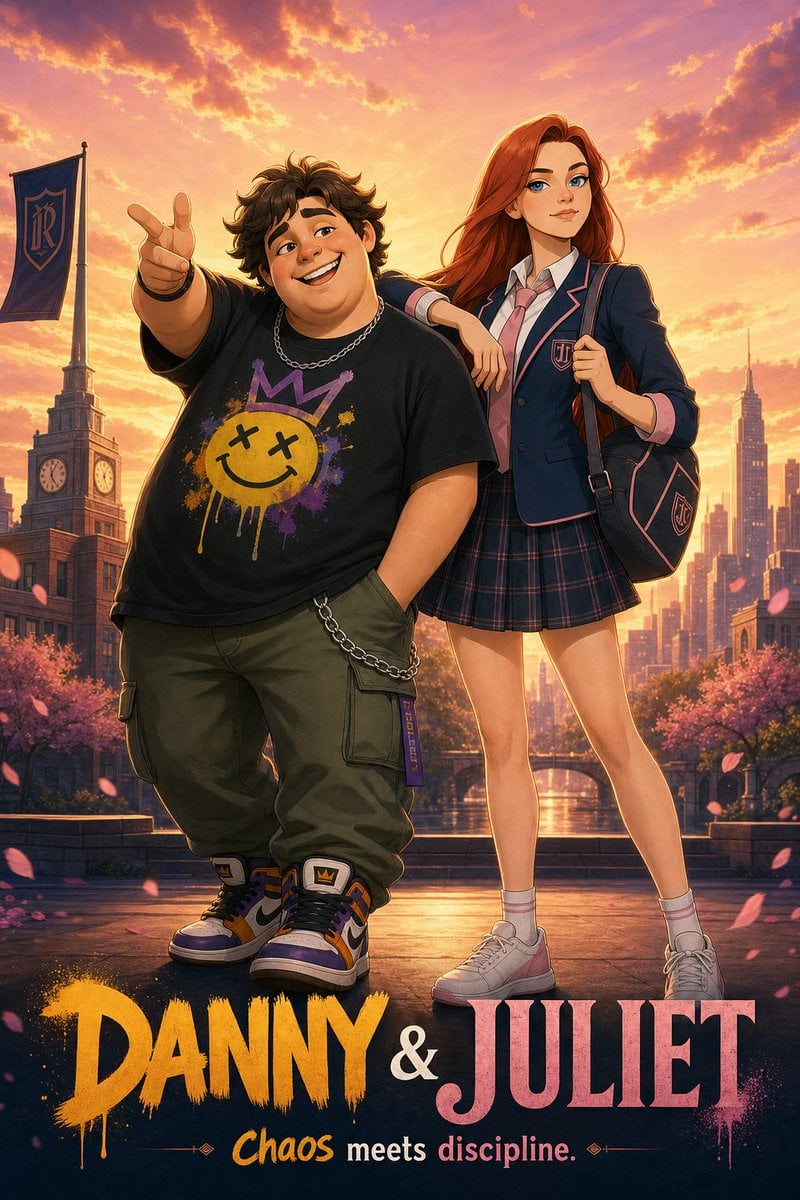
Create a vertical 2D anime-style duo movie poster featuring exactly 2 teenage characters in a dramatic school-universe setting at golden-hour sunset. The first character is {argument name="male character name" default="Danny"}, a short, stocky boy standing on the left in a confident pose, pointing toward the viewer with one hand and keeping the other hand in his pocket; he has messy dark curly hair, a black oversized T-shirt with a colorful graffiti smiley face and crown graphic, olive cargo pants with a chain accessory, chunky high-top sneakers in purple, orange, white, and black, and a silver chain necklace. The second character is {argument name="female character name" default="Juliet"}, a tall slim girl standing on the right with long flowing red hair, one arm casually resting on the boy’s shoulder, wearing a navy private-school blazer with pink piping and crest, white shirt, pink tie, plaid pleated skirt, white socks, white sneakers, and a navy backpack with pink trim and crest. Both faces should be covered by smooth rectangular skin-toned blur masks, as if censored, while the rest of the characters remain highly detailed. Background: a romantic urban academy campus with a clocktower on the left, a school flag bearing an ornate monogram, city skyscrapers in the distance, a canal or river reflecting warm light, cherry blossom trees, and pink petals drifting through the foreground. Lighting and style: cinematic anime illustration, polished poster art, warm orange-pink sunset sky with glowing clouds, rim lighting around the characters, detailed clothing folds, saturated colors, high contrast, soft atmospheric depth, subtle film-poster composition. Bottom typography: include exactly 2 lines of text. The first line is a large title, “{argument name="poster title" default="DANNY & JULIET"}”, with “DANNY” in bold yellow-orange dripping graffiti brush lettering, an ampersand in white, and “JULIET” in large pink serif letters with paint splatter texture. The second line is the tagline “{argument name="tagline" default="Chaos meets discipline."}” in smaller mixed yellow, white, and pink lettering with tiny decorative divider ornaments. Keep the poster clean and centered, no extra characters, no extra logos, no watermark.
Choose the primary action to open PicX Studio with the available template settings. Review the model and format, personalize the creative direction, and generate when ready.
Yes. You can change the subject, setting, lighting, mood, format, and available model controls before creating your image.
This template is free to open and customize. Generation usage is shown in PicX Studio before you create.
Start with GPT Image 2, which is the model associated with this template. You can compare another compatible model for a different finish.
Follow a topic to a crawlable collection of related PicX Studio templates.