How do I use the Anime Rock Duo with Guitar and Sheet Music template?
Choose the primary action to open PicX Studio with the available template settings. Review the model and format, personalize the creative direction, and generate when ready.
A dramatic vertical anime illustration prompt for creating two sharply dressed male musicians performing against a red ink-splattered background.
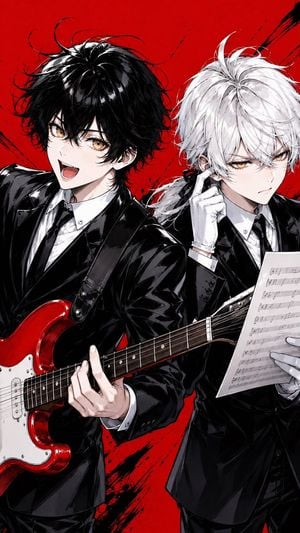
Create a vertical 9:16 high-energy anime illustration of exactly two young male musicians in matching glossy black formal suits, white dress shirts, and black ties, posed tightly together like a dramatic rock duo against a vivid blood-red background with black ink splatters and diagonal brush strokes. The left character is {argument name="left character" default="a cheerful black-haired guitarist"}: messy fluffy black hair with bright highlights, amber-gold eyes, pale skin, an open-mouthed excited smile, leaning forward toward the viewer while playing exactly one red-and-white electric guitar strapped across his body; show his left hand on the fretboard in the foreground and the guitar neck cutting diagonally across the lower half of the image. The right character is {argument name="right character" default="a stern white-haired sheet-music reader"}: tousled white/silver hair tied loosely back with stray strands, amber-gold eyes, pale skin, a serious annoyed expression, wearing white gloves, raising one gloved finger near his ear as if listening critically, and holding exactly one sheet of printed music notation in his other hand at the lower right. Use a polished manga/anime style with sharp line art, dramatic black shadows, glossy suit reflections, detailed hair strands, expressive eyes, dynamic cropped composition, slight Dutch-angle energy, and high contrast red-black-white color design. Keep the image text-free except for the unreadable staff lines and musical notes on the sheet music; no logos, no watermark, no extra characters, no extra instruments.
Choose the primary action to open PicX Studio with the available template settings. Review the model and format, personalize the creative direction, and generate when ready.
Yes. You can change the subject, setting, lighting, mood, format, and available model controls before creating your image.
This template is free to open and customize. Generation usage is shown in PicX Studio before you create.
Start with GPT Image 2, which is the model associated with this template. You can compare another compatible model for a different finish.
Follow a topic to a crawlable collection of related PicX Studio templates.