
Vintage Stove Bunny Creature Sheet
A concept-style character sheet showing five views and poses of a cute rabbit-like creature made from a worn retro oven stove, useful for creature design and whimsical inorganic character generation.
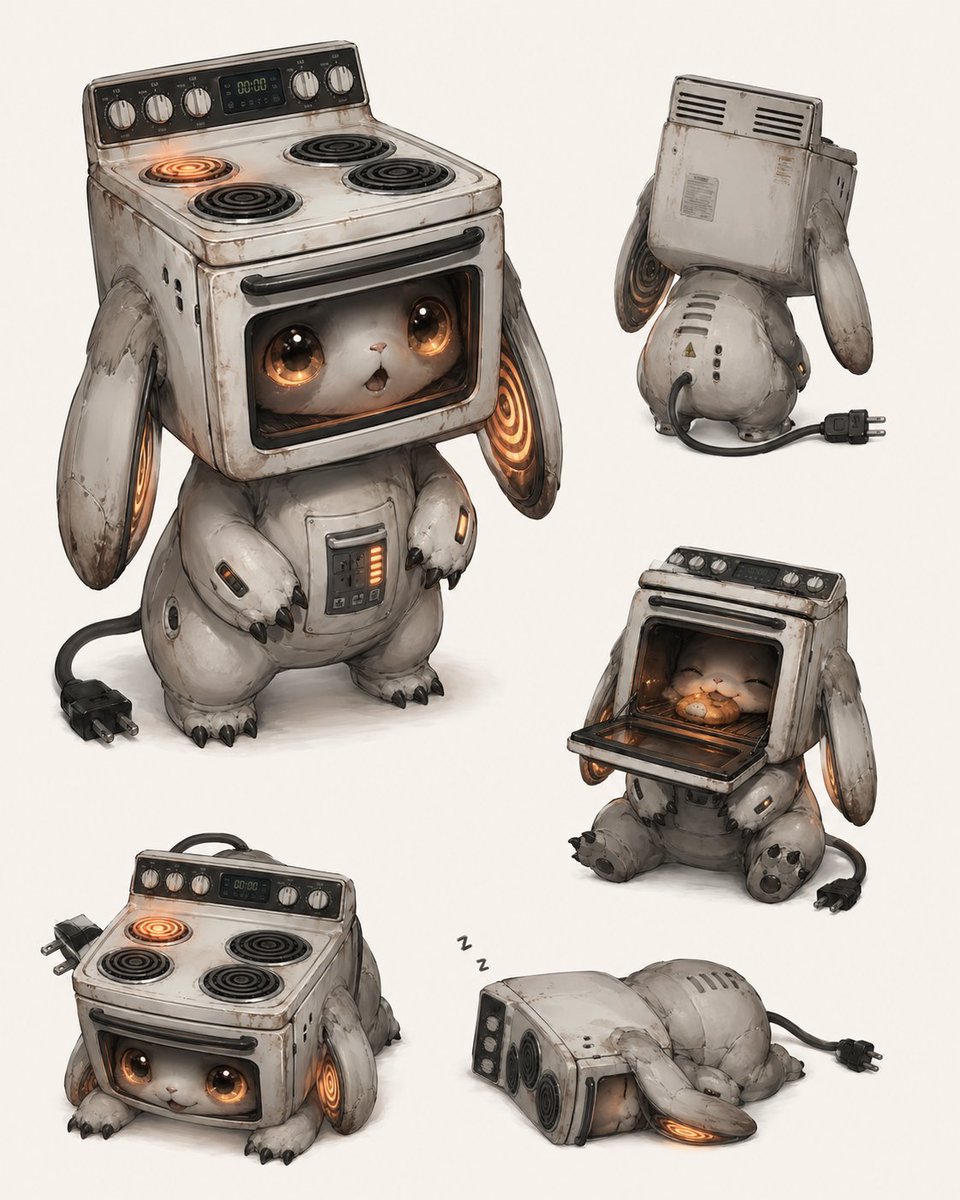
- Prompt included
- Model and format preset
- Free template
The prompt behind this image
Copy the exact prompt behind Vintage Stove Bunny Creature Sheet, or open it in the studio and make it yours.
- Type
- character reference sheet
- Subject
- cute inorganic creature based on an old electric stove and oven
- Style
- high-detail concept art, whimsical industrial creature design, soft painterly rendering, slightly realistic 3D illustration look, clean studio presentation on an off-white background
- Character › Species
- appliance creature
- Character › Silhouette
- round bunny-like body with short legs, small clawed paws, long floppy ears, large head formed by a vintage oven range
- Character › Materials
- worn enamel-painted metal, brushed steel, dark rubber, glass oven door window, glowing electric coil elements
- Character › Primary Color
- aged white with gray shading and brown rust stains
- Character › Accent Color
- warm orange internal glow
- Character › Face
- tiny white animal face inside the oven window, huge glossy amber-brown eyes, tiny nose, tiny mouth, plush and baby-like expression
- Character › Head
- retro freestanding stove with 4 electric burners on top, black control panel, silver knobs, small digital clock display
- Character › Body Details
- rounded mechanical torso with a small front control panel and vertical orange indicator lights, visible seams, scratches, dents, power cable tail ending in a black two-prong plug
- Character › Ears
- 2 long hanging metal ears, one on each side, each with a glowing spiral heating-coil-like inner detail
- Layout › Background
- plain light ivory
- Layout › Sections › 0 › Position
- upper left
- Layout › Sections › 0 › Count
- 1
- Layout › Sections › 0 › Label
- front standing view
- Layout › Sections › 0 › Description
- main full-body hero pose, creature standing upright and facing forward, one top-left stove burner glowing orange, both eyes open and sparkling, mouth slightly open, plug resting on the floor to the left
- Layout › Sections › 1 › Position
- upper right
- Layout › Sections › 1 › Count
- 1
- Layout › Sections › 1 › Label
- back view
- Layout › Sections › 1 › Description
- rear three-quarter view showing the boxy back of the stove head, vent slits, worn metal casing, rounded mechanical back and hips, dangling ears, attached power cord and plug on the floor
- Layout › Sections › 2 › Position
- middle right
- Layout › Sections › 2 › Count
- 1
- Layout › Sections › 2 › Label
- oven open pose
Raw JSON
{"type":"character reference sheet","subject":"cute inorganic creature based on an old electric stove and oven","style":"high-detail concept art, whimsical industrial creature design, soft painterly rendering, slightly realistic 3D illustration look, clean studio presentation on an off-white background","character":{"species":"appliance creature","silhouette":"round bunny-like body with short legs, small clawed paws, long floppy ears, large head formed by a vintage oven range","materials":"worn enamel-painted metal, brushed steel, dark rubber, glass oven door window, glowing electric coil elements","primary color":"aged white with gray shading and brown rust stains","accent color":"warm orange internal glow","face":"tiny white animal face inside the oven window, huge glossy amber-brown eyes, tiny nose, tiny mouth, plush and baby-like expression","head":"retro freestanding stove with 4 electric burners on top, black control panel, silver knobs, small digital clock display","body details":"rounded mechanical torso with a small front control panel and vertical orange indicator lights, visible seams, scratches, dents, power cable tail ending in a black two-prong plug","ears":"2 long hanging metal ears, one on each side, each with a glowing spiral heating-coil-like inner detail"},"layout":{"background":"plain light ivory","sections":[{"position":"upper left","count":1,"label":"front standing view","description":"main full-body hero pose, creature standing upright and facing forward, one top-left stove burner glowing orange, both eyes open and sparkling, mouth slightly open, plug resting on the floor to the left"},{"position":"upper right","count":1,"label":"back view","description":"rear three-quarter view showing the boxy back of the stove head, vent slits, worn metal casing, rounded mechanical back and hips, dangling ears, attached power cord and plug on the floor"},{"position":"middle right","count":1,"label":"oven open pose","description":"seated pose with the oven door folded down, the small animal face nestled warmly inside the oven cavity, eyes closed in a happy expression, orange glow illuminating the interior like a cozy nest"},{"position":"lower left","count":1,"label":"low crawling pose","description":"creature lowered onto all fours so the oven face is near the floor, looking forward from the oven window, stovetop visible above, ears hanging down with glowing inner coils"},{"position":"lower right","count":1,"label":"sleeping pose","description":"creature lying on its side asleep, head tilted down, one eye barely visible through the oven window, small floating sleep marks above, power plug trailing behind"}],"total_views":5},"lighting":"soft diffuse studio lighting with gentle shadows","mood":"adorable, cozy, slightly melancholic, inventive, mechanical yet cuddly","quality":"highly polished concept sheet suitable for creature design exploration","prompt_notes":"emphasize the contrast between shabby old appliance textures and irresistibly cute animal behavior, keep proportions chibi and compact, no text labels, no border, no extra props beyond the attached power cord and plug"}How to use Vintage Stove Bunny Creature Sheet in 3 steps
- 1Upload ImagePNG, JPG or paste
Add your photo
Upload the photo the template builds on. The prompt, model and format are already set.
- 2…a portrait of your subject in softgolden-hour light, 85mm…
Personalize
Edit the subject and creative details for your destination.
- 3Generate
Generate
Press Generate — your image is created in PicX Studio, so you can compare it with the original and refine one variable at a time.
More like this
Templates with the same subject, style or setup. Open one to see its prompt.











Make it yours
Vintage Stove Bunny Creature Sheet works as-is. These are the safest ways to change it without losing the look.
Swap the setting
Keep the rest of the prompt and replace the location block. The current setting is “plain light ivory”.
Swap the light
One lighting change is enough to compare takes. Current light: “soft diffuse studio lighting with gentle shadows”.
Change one field
Copy a single group, rewrite it, and generate again so you can see what that field is doing.
| If the result… | Why | Fix |
|---|---|---|
| The result drifts from the preview | Too many fields changed at once. | Reuse Vintage Stove Bunny Creature Sheet as-is first, then change one group — subject, light, or setting. |
| GPT Image 2 ignores part of the JSON | Some models flatten or skip nested keys. | Keep the same values and paste them as a short paragraph instead. |
More GPT Image 2 templates
Other prompts made for GPT Image 2.

Six VTuber Japanese Logo Sheet

Realistic Portrait of Woman and Deer

The Vista Modular Condo Poster

AI Model Routing Comparison Infographic

2.5D Anime Art Board

Isometric Productivity Desk Scene

New York Double Exposure Poster

Four-Panel AI Landscape Comparison

Japanese Tatami Lifestyle Magazine Cover

NESCAFÉ Coffee Map Poster
More image prompts
Fresh picks from across the catalog.

AI Coding Assistant Promo Infographic

Outdoor Cafe Portrait — White Ruched Top Nano Banana

Fantasy Anime Rock Band Concert
Stunning Photo Prompt for Gemini Nano Banana

Giant Red Balloon Above Misty Mountains
Urban street fashion portrait with AR overlays
Mirror Selfie with Curvy Physique and ControlNet Constraints

Futuristic Samurai Glitch Art Portrait
Japanese Romance App Ad Panels
Ultra-Realistic Macro Photography Miniature Prompt
Browse template categories
Vintage Stove Bunny Creature Sheet questions
How do I use the Vintage Stove Bunny Creature Sheet template?
Add your photo if the template asks for one, edit the prompt if you like — the template's model and format are already selected — and press Generate. Your version opens in PicX Studio.
Can I customize the Vintage Stove Bunny Creature Sheet template?
Yes. You can change the subject, setting, lighting, mood, format, and available model controls before creating your image.
Is the Vintage Stove Bunny Creature Sheet template free?
Opening and editing this template is free. Generating uses credits, shown on the Generate button when you are signed in.
Which AI model should I use?
Start with GPT Image 2, which is the model associated with this template. You can compare another compatible model for a different finish.
Looking for something else? Browse all templates.

Your photo, any look
Thousands of ready templates for every top image and video model, from one credit balance.