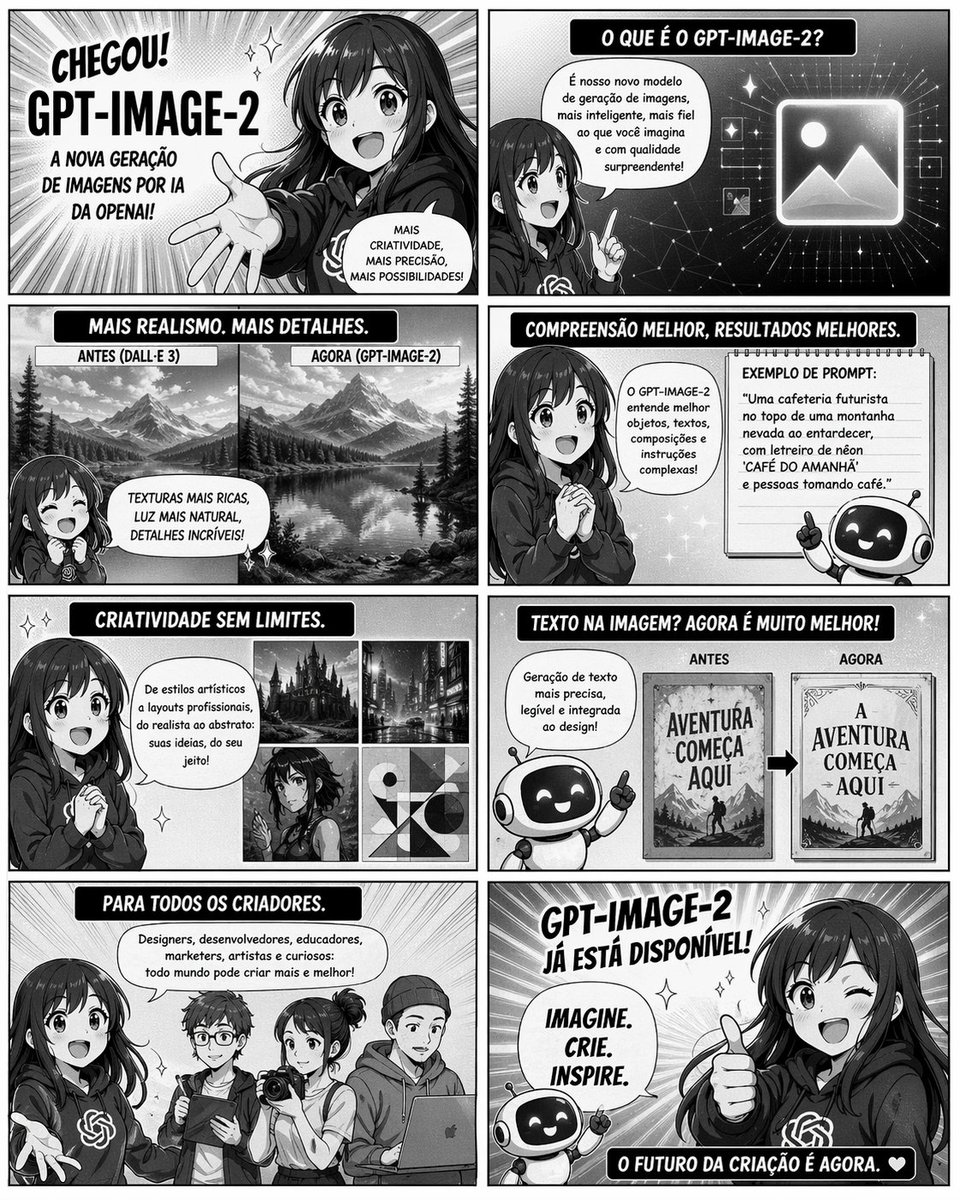
8-Panel GPT-Image-2 Manga Promo
8-panel manga-style promotional comic page · launch announcement for GPT-Image-2 · Portuguese · black-and-white manga with screentone shading, speed lines, glossy highlights, bold inked outlines, clean digital comic finish · exciting, informative, optimistic, tech-forward · single page divided into 8 rectangular panels in a 2-column by 4-row grid with thin gutters · host girl · main presenter · cute anime girl with long dark hair, large expressive eyes, wearing a dark hoodie with the OpenAI knot logo on the chest · 1 · robot mascot · friendly assistant mascot · small round robot with black face screen, glowing eyes, simple white body, tiny arms, cheerful expression · 1 · creator group · audience examples · 4 different young creators: one designer, one developer holding a tablet, one photographer with camera, one person with laptop/hoodie · 4 · CHEGOU! GPT-IMAGE-2 · top-left · 1 · dramatic hero introduction panel with the anime girl reaching one hand toward the viewer, radiant speed lines behind her · CHEGOU!, GPT-IMAGE-2, A NOVA GERAÇÃO DE IMAGENS POR IA DA OPENAI!, MAIS CRIATIVIDADE, MAIS PRECISÃO, MAIS POSSIBILIDADES! · O QUE É O GPT-IMAGE-2? · top-right · 1 · girl in half-body pose pointing upward beside a glowing image icon on a starry tech background · O QUE É O GPT-IMAGE-2?, É nosso novo modelo de geração de imagens, mais inteligente, mais fiel ao que você imagina e com qualidade surpreendente! · MAIS REALISMO. MAIS DETALHES. · middle-left row 2 · 1 · comparison panel showing 2 landscape images side by side, both mountain lake scenes, left labeled older model and right labeled newer model with richer realism · ANTES (DALL·E 3) · 1 · AGORA (GPT-IMAGE-2) · 1 · MAIS REALISMO. MAIS DETALHES., ANTES (DALL·E 3), AGORA (GPT-IMAGE-2), TEXTURAS MAIS RICAS, LUZ MAIS NATURAL, DETALHES INCRÍVEIS! · COMPREENSÃO MELHOR, RESULTADOS MELHORES. · middle-right row 2 · 1 · girl clasping hands beside a framed prompt example and the robot mascot pointing upward · COMPREENSÃO MELHOR, RESULTADOS MELHORES., O GPT-IMAGE-2 entende melhor objetos, textos, composições e instruções complexas!, EXEMPLO DE PROMPT:, "Uma cafeteria futurista no topo de uma montanha nevada ao entardecer, com letreiro de néon ‘CAFÉ DO AMANHÃ’ e pessoas tomando café." · CRIATIVIDADE SEM LIMITES. · lower-left row 3 · 1 · girl speaking beside a 2x2 showcase of 4 generated art variants · gothic castle scene · 1 · modern city street at night · 1 · anime character portrait · 1 · abstract geometric composition · 1 · CRIATIVIDADE SEM LIMITES., De estilos artísticos a layouts profissionais, do realista ao abstrato: suas ideias, do seu jeito! · TEXTO NA IMAGEM? AGORA É MUITO MELHOR! · lower-right row 3 · 1 · robot mascot presenting a before-and-after comparison of poster typography with a bold arrow between the two designs · ANTES · 1 · AGORA · 1 · TEXTO NA IMAGEM? AGORA É MUITO MELHOR!, Geração de texto mais precisa, legível e integrada ao design!, ANTES, AGORA, AVENTURA COMEÇA AQUI, A AVENTURA COMEÇA AQUI · PARA TODOS OS CRIADORES. · bottom-left · 1 · group shot with the host girl and 4 creators standing side by side, representing different professions · PARA TODOS OS CRIADORES., Designers, desenvolvedores, educadores, marketers, artistas e curiosos: todo mundo pode criar mais e melhor! · GPT-IMAGE-2 JÁ ESTÁ DISPONÍVEL! · bottom-right · 1 · closing hero panel with the girl winking and giving a thumbs-up, robot mascot beside her, bright celebratory rays and sparkles · GPT-IMAGE-2 JÁ ESTÁ DISPONÍVEL!, IMAGINE. CRIE. INSPIRE., O FUTURO DA CRIAÇÃO É AGORA. ❤ · 8 · left to right, top to bottom · mix of close-up hero shots, medium presenter shots, comparison graphics, and group shot · speech bubbles, rounded black title banners with white uppercase lettering, sparkles, speed lines, starry tech background, comparison arrows, framed example cards · all caps comic lettering in Portuguese, bold display headers, clear speech bubbles, promotional infographic-comic hybrid · high-resolution editorial comic poster, crisp typography, balanced panel spacing, strong contrast · Create a grayscale manga-style 8-panel promotional comic page announcing {argument name="product name" default="GPT-IMAGE-2"}. Use a single-page 2-column by 4-row layout with exactly 8 distinct panels and Portuguese text throughout. Feature a cheerful anime presenter girl with {argument name="hair color" default="dark brown"} long hair, a dark hoodie with the OpenAI logo, and a friendly small robot mascot. Panel 1: dramatic launch reveal, girl reaching toward camera, radial speed lines, headline "CHEGOU! {argument name="headline name" default="GPT-IMAGE-2"}" and launch copy about a new generation of AI images. Panel 2: explanatory panel with girl pointing beside a glowing image icon on a starry digital background, title "O QUE É O GPT-IMAGE-2?" and a speech bubble describing it as a smarter image generation model. Panel 3: realism comparison with exactly 2 side-by-side mountain lake landscapes labeled "ANTES (DALL·E 3)" and "AGORA (GPT-IMAGE-2)". Panel 4: better understanding panel with girl and robot, include a framed prompt example using {argument name="example prompt" default="Uma cafeteria futurista no topo de uma montanha nevada ao entardecer, com letreiro de néon ‘CAFÉ DO AMANHÃ’ e pessoas tomando café."}. Panel 5: creativity showcase with exactly 4 thumbnails: gothic castle, city at night, anime portrait, abstract geometric art. Panel 6: text rendering comparison with exactly 2 poster variants labeled "ANTES" and "AGORA", showing improved typography and the phrase "AVENTURA COMEÇA AQUI" versus a cleaner corrected version. Panel 7: audience panel with exactly 4 creators from different fields standing together. Panel 8: final celebratory call-to-action with the girl winking and giving thumbs-up, robot mascot cheering, and the closing slogan {argument name="closing slogan" default="IMAGINE. CRIE. INSPIRE."}. Make the page energetic, polished, highly legible, with bold black header bars, white uppercase lettering, speech bubbles, sparkles, screentone shading, and strong manga/comic promotional poster aesthetics.



![Movement Sheet - Dance Reference (Seedance 2.0) — [STYLE]
Monochrome grayscale illustration, 3D-rendered character, clean instructional reference sheet, white b](https://pbs.twimg.com/media/HGzSvcnboAA_bjD.jpg?name=orig)






![Trendy Cafe Drink Promo Poster — Create a trendy 3:2 square promotional poster for "[PRODUCT NAME]" using the uploaded product image or generate a premium reali](/_next/image?url=https%3A%2F%2Fcdn.picxstudio.com%2Fuploads%2F0_908138d6-c2ce-479f-b50d-890fcdc0a491.jpg&w=828&q=100)


![Minimalist Flat Vector Travel Poster — Premium minimalist flat-vector travel poster for {argument name="city name" default="[CITY_NAME]"}, 3:4 vertical format.](https://cms-assets.youmind.com/media/1787917359711_3ug846_HQX205cbMAA6F6S-300x400.jpg)





















![Floating Football Jersey Luxury Editorial — {argument name="brand" default="[BRAND NAME]"}. You are a fashion photographer and creative director producing a lux](https://cms-assets.youmind.com/media/1780650728327_xz5huj_HJ_QntmbkAAG_Qe.jpg)







![Macro Product Photography for Floating Food — [Food] Premium food advertising, white seamless background, high key studio lighting, floating stacked composition](https://pbs.twimg.com/media/G-6l3LuXwAAcPza.jpg)