How do I use the Korean Youth Y2K Classroom Candid template?
Edit the prompt in the box under the preview — the template's model and format are already selected — and press Generate. Your version appears right on this page.
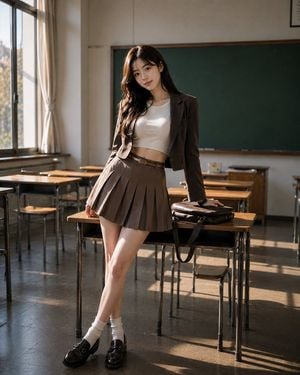
An ultra-realistic 35mm film style portrait of a Korean woman in Y2K fashion sitting in a sunlit classroom, capturing a slice-of-life moment.

Ultra-realistic portrait of a {argument name="character" default="beautiful Korean woman"} seated sideways on top of a wooden desk, legs crossed at the ankle and dangling freely, holding a small convenience store onigiri in both hands, mid-bite — eyes slightly upward, expression softly amused, utterly at ease. Casual and unposed, the energy of a candid moment. Camera at standing eye-level, slightly angled down toward her. Wearing a {argument name="jacket" default="cropped Y2K-aesthetic baby blue zip-up track jacket"} over a white graphic tee with Korean text print, paired with low-rise straight-leg light wash jeans with a slight fray at the hem. {argument name="footwear" default="Platform chunky sneakers in white and blue"}. Butterfly hair clips gathering sections of her dark brown hair loosely. Small silver hoop earrings. A konbini plastic bag with snacks hanging off the corner of the desk. AirPods in, one dangling out. The golden afternoon light softens here — the classroom is in a more relaxed late-afternoon phase. Light falls across the desk, illuminating the onigiri wrapper and her hands, catching the chrome of the track jacket zipper. The lively scene contrasts with the quiet, sunlit classroom stillness around her. 35mm analog film grain, Kodak Portra 400 — baby blue rendered in Portra's characteristic slightly faded softness, light wash denim warm and luminous. Hyper-realistic denim texture, food wrapper detail, hair clip glint. Shallow depth of field. Mood: carefree Gen-Z Y2K nostalgia, slice-of-life editorial, Korean youth culture candid.
Ultra-realistic portrait of a {argument name="character" default="beautiful Korean woman"} seated sideways on top of a wooden desk, legs crossed at the ankle and dangling freely, holding a small convenience store onigiri in both hands, mid-bite — eyes slightly upward, expression softly amused, utterly at ease. Casual and unposed, the energy of a candid moment. Camera at standing eye-level, slightly angled down toward her. Wearing a {argument name="jacket" default="cropped Y2K-aesthetic baby blue zip-up track jacket"} over a white graphic tee with Korean text print, paired with low-rise straight-leg light wash jeans with a slight fray at the hem. {argument name="footwear" default="Platform chunky sneakers in white and blue"}. Butterfly hair clips gathering sections of her dark brown hair loosely. Small silver hoop earrings. A konbini plastic bag with snacks hanging off the corner of the desk. AirPods in, one dangling out. The golden afternoon light softens here — the classroom is in a more relaxed late-afternoon phase. Light falls across the desk, illuminating the onigiri wrapper and her hands, catching the chrome of the track jacket zipper. The lively scene contrasts with the quiet, sunlit classroom stillness around her. 35mm analog film grain, Kodak Portra 400 — baby blue rendered in Portra's characteristic slightly faded softness, light wash denim warm and luminous. Hyper-realistic denim texture, food wrapper detail, hair clip glint. Shallow depth of field. Mood: carefree Gen-Z Y2K nostalgia, slice-of-life editorial, Korean youth culture candid.
Edit the prompt in the box under the preview — the template's model and format are already selected — and press Generate. Your version appears right on this page.
Yes. You can change the subject, setting, lighting, mood, format, and available model controls before creating your image.
Opening and editing this template is free. Generating uses credits, shown on the Generate button when you are signed in.
Start with GPT Image 2, which is the model associated with this template. You can compare another compatible model for a different finish.
Follow a topic to a crawlable collection of related PicX Studio templates.