How do I use the Vintage Beagle Botanical Plate template?
Edit the prompt in the box under the preview — the template's model and format are already selected — and press Generate. Your version appears right on this page.
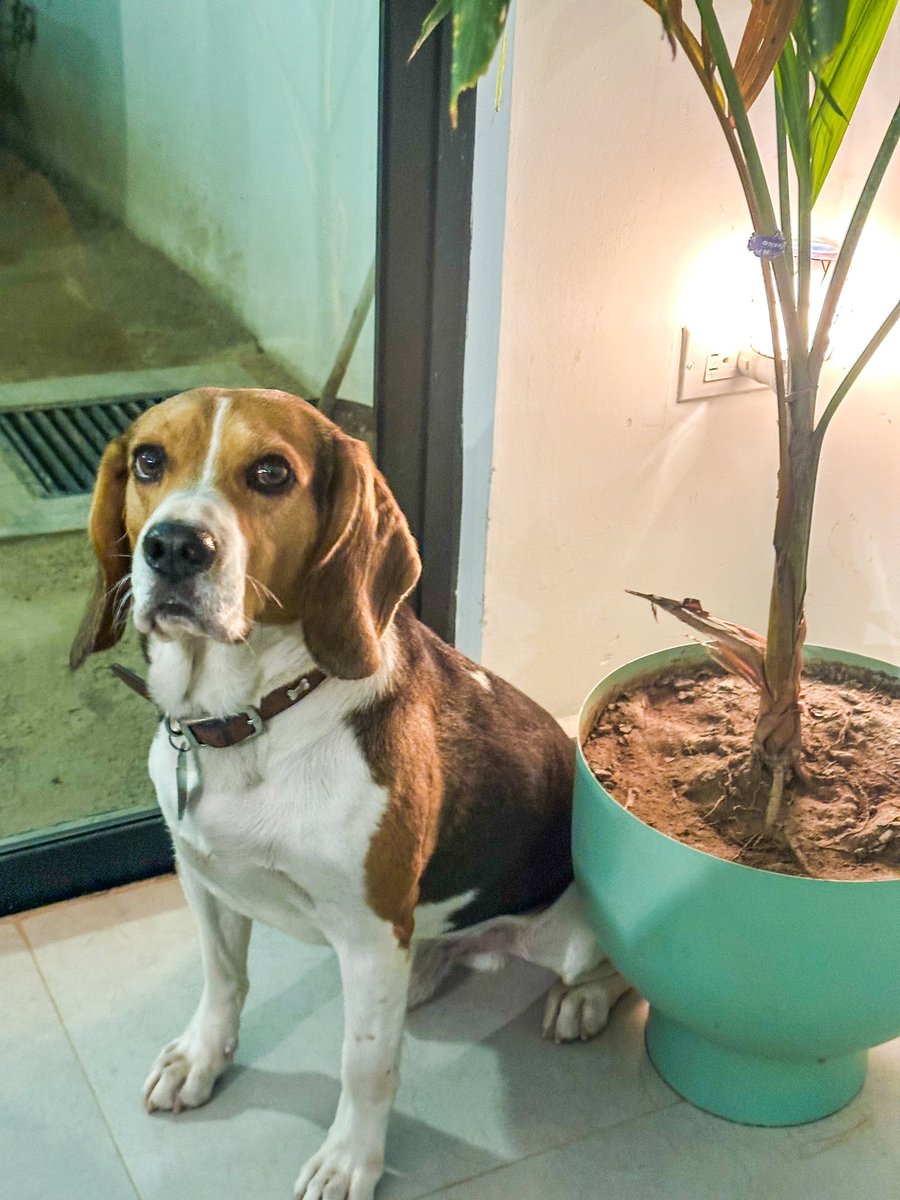
This prompt turns a pet photo with a houseplant into an antique natural-history infographic plate, useful for decorative scientific-style pet portraits.

This template uses your photo — add one with the + button.
Using the provided reference image, transform the photo into a vintage naturalist encyclopedia plate in the style of a 19th-century scientific animal-and-botany illustration. Keep the same beagle and the same potted houseplant from the reference as the main subjects, but redraw them as finely inked and lightly hand-colored specimen illustrations on an aged off-white page. Preserve the dog's seated pose, collar and tag, and the plant's pot and overall structure. Add a formal infographic layout with 8 labeled figure areas total: 1 large central full-body beagle study, 1 large right-side plant study, 4 left-column inset studies labeled “Fig. 1. Head (Frontal View)”, “Fig. 2. Head (Profile View)”, “Fig. 3. Collar & Tag”, and “Fig. 4. Forepaw (Anterior View)”, 3 bottom comparative detail studies labeled “Eye”, “Nose”, and “Leaf (Detail)”, plus 1 bottom-right notes panel. Add delicate dotted annotation callouts around the main dog and plant identifying features such as eyes, ears, nose, chest, legs, paws, coat, leaves, stem, and roots. Include the page title “THE BEAGLE & THE HOUSEPLANT” at the top, the subtitle “Observations on a Domestic Companion and Its Environment”, corner plate markings “PL. I.” and “Tab. 1.”, a central caption “Fig. 5. The Beagle (Canis lupus familiaris) Adult. Seated Position.”, a plant caption “Fig. 6. Houseplant in Pot (Dracaena sp.)”, a bottom section title “Fig. 7. Comparative Study: Details”, and a notes box containing 5 lines: “Location: Indoor”, “Observations: Peaceful coexistence between companion animal and potted plant.”, “Date: May 17, 2024”, “Observer: Naturalist’s Journal”, and “Plate I.” Use clean engraved linework, restrained watercolor washes, subtle paper texture, decorative border corners, and a symmetrical museum-plate composition.
Using the provided reference image, transform the photo into a vintage naturalist encyclopedia plate in the style of a 19th-century scientific animal-and-botany illustration. Keep the same beagle and the same potted houseplant from the reference as the main subjects, but redraw them as finely inked and lightly hand-colored specimen illustrations on an aged off-white page. Preserve the dog's seated pose, collar and tag, and the plant's pot and overall structure. Add a formal infographic layout with 8 labeled figure areas total: 1 large central full-body beagle study, 1 large right-side plant study, 4 left-column inset studies labeled “Fig. 1. Head (Frontal View)”, “Fig. 2. Head (Profile View)”, “Fig. 3. Collar & Tag”, and “Fig. 4. Forepaw (Anterior View)”, 3 bottom comparative detail studies labeled “Eye”, “Nose”, and “Leaf (Detail)”, plus 1 bottom-right notes panel. Add delicate dotted annotation callouts around the main dog and plant identifying features such as eyes, ears, nose, chest, legs, paws, coat, leaves, stem, and roots. Include the page title “THE BEAGLE & THE HOUSEPLANT” at the top, the subtitle “Observations on a Domestic Companion and Its Environment”, corner plate markings “PL. I.” and “Tab. 1.”, a central caption “Fig. 5. The Beagle (Canis lupus familiaris) Adult. Seated Position.”, a plant caption “Fig. 6. Houseplant in Pot (Dracaena sp.)”, a bottom section title “Fig. 7. Comparative Study: Details”, and a notes box containing 5 lines: “Location: Indoor”, “Observations: Peaceful coexistence between companion animal and potted plant.”, “Date: May 17, 2024”, “Observer: Naturalist’s Journal”, and “Plate I.” Use clean engraved linework, restrained watercolor washes, subtle paper texture, decorative border corners, and a symmetrical museum-plate composition.
Vintage Beagle Botanical Plate needs input media to work. Open it in the studio and these load alongside the prompt — pick whichever ones your chosen model can take.
Edit the prompt in the box under the preview — the template's model and format are already selected — and press Generate. Your version appears right on this page.
Yes. You can change the subject, setting, lighting, mood, format, and available model controls before creating your image.
Opening and editing this template is free. Generating uses credits, shown on the Generate button when you are signed in.
Start with GPT Image 2, which is the model associated with this template. You can compare another compatible model for a different finish.
Follow a topic to a crawlable collection of related PicX Studio templates.