
3D SaaS Mascot Brand Guidelines
Generates a comprehensive brand guideline sheet for a 3D mascot, featuring use-case grids, expressions, and color palettes.
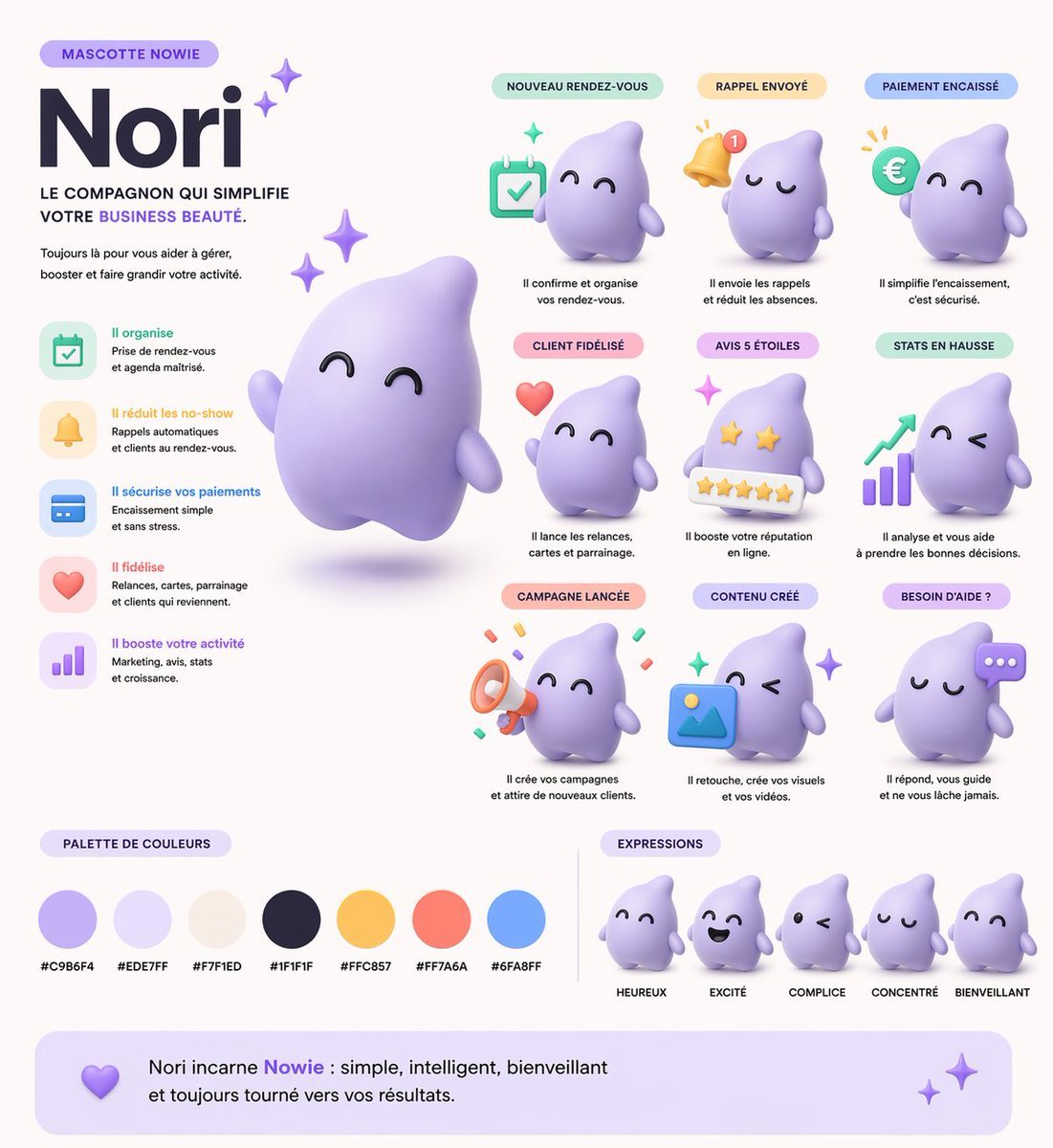
- Prompt included
- Model and format preset
- Free template
The prompt behind this image
Copy the exact prompt behind 3D SaaS Mascot Brand Guidelines, or open it in the studio and make it yours.
- Type
- 3D mascot brand guideline sheet
- Style
- soft 3D render, claymation, pastel UI, clean corporate SaaS aesthetic
- Mascot › Name
- {argument name="mascot name" default="Nori"}
- Mascot › Shape
- {argument name="mascot shape" default="soft teardrop ghost"}
- Mascot › Color
- {argument name="mascot color" default="pastel purple"}
- Mascot › Texture
- matte plastic, soft clay
- Layout › Header Left › Tag
- MASCOTTE {argument name="brand name" default="NOWIE"}
- Layout › Header Left › Title
- {argument name="mascot name" default="Nori"}
- Layout › Header Left › Subtitle
- LE COMPAGNON QUI SIMPLIFIE VOTRE {argument name="business type" default="BUSINESS BEAUTÉ"}.
- Layout › Header Left › Main Image
- large 3D render of mascot floating with sparkles
- Layout › Features List › Position
- mid-left
- Layout › Features List › Count
- 5
- Layout › Features List › Items › 0 › Icon
- calendar
- Layout › Features List › Items › 0 › Title
- Il organise
- Layout › Features List › Items › 1 › Icon
- bell
- Layout › Features List › Items › 1 › Title
- Il réduit les no-show
- Layout › Features List › Items › 2 › Icon
- credit card
- Layout › Features List › Items › 2 › Title
- Il sécurise vos paiements
- Layout › Features List › Items › 3 › Icon
- heart
- Layout › Features List › Items › 3 › Title
- Il fidélise
- Layout › Features List › Items › 4 › Icon
- bar chart
- Layout › Features List › Items › 4 › Title
- Il booste votre activité
- Layout › Use Cases Grid › Position
- top-right to mid-right
- Layout › Use Cases Grid › Layout
- 3x3 grid
Raw JSON
{
  "type": "3D mascot brand guideline sheet",
  "style": "soft 3D render, claymation, pastel UI, clean corporate SaaS aesthetic",
  "mascot": {
    "name": "{argument name=\"mascot name\" default=\"Nori\"}",
    "shape": "{argument name=\"mascot shape\" default=\"soft teardrop ghost\"}",
    "color": "{argument name=\"mascot color\" default=\"pastel purple\"}",
    "texture": "matte plastic, soft clay"
  },
  "layout": {
    "header_left": {
      "tag": "MASCOTTE {argument name=\"brand name\" default=\"NOWIE\"}",
      "title": "{argument name=\"mascot name\" default=\"Nori\"}",
      "subtitle": "LE COMPAGNON QUI SIMPLIFIE VOTRE {argument name=\"business type\" default=\"BUSINESS BEAUTÉ\"}.",
      "main_image": "large 3D render of mascot floating with sparkles"
    },
    "features_list": {
      "position": "mid-left",
      "count": 5,
      "items": [
        { "icon": "calendar", "title": "Il organise" },
        { "icon": "bell", "title": "Il réduit les no-show" },
        { "icon": "credit card", "title": "Il sécurise vos paiements" },
        { "icon": "heart", "title": "Il fidélise" },
        { "icon": "bar chart", "title": "Il booste votre activité" }
      ]
    },
    "use_cases_grid": {
      "position": "top-right to mid-right",
      "layout": "3x3 grid",
      "count": 9,
      "items": [
        { "label": "NOUVEAU RENDEZ-VOUS", "prop": "calendar" },
        { "label": "RAPPEL ENVOYÉ", "prop": "notification bell" },
        { "label": "PAIEMENT ENCAISSÉ", "prop": "euro coin" },
        { "label": "CLIENT FIDÉLISÉ", "prop": "floating heart" },
        { "label": "AVIS 5 ÉTOILES", "prop": "5-star rating bar" },
        { "label": "STATS EN HAUSSE", "prop": "bar chart with upward arrow" },
        { "label": "CAMPAGNE LANCÉE", "prop": "megaphone" },
        { "label": "CONTENU CRÉÉ", "prop": "image placeholder icon" },
        { "label": "BESOIN D'AIDE ?", "prop": "chat bubble" }
      ]
    },
    "color_palette": {
      "title": "PALETTE DE COULEURS",
      "position": "bottom-left",
      "count": 7,
      "swatches": ["#C9B6F4", "#EDE7FF", "#F7F1ED", "#1F1F1F", "#FFC857", "#FF7A6A", "#6FA8FF"]
    },
    "expressions": {
      "title": "EXPRESSIONS",
      "position": "bottom-right",
      "count": 5,
      "labels": ["HEUREUX", "EXCITÉ", "COMPLICE", "CONCENTRÉ", "BIENVEILLANT"]
    },
    "footer": {
      "text": "{argument name=\"mascot name\" default=\"Nori\"} incarne {argument name=\"brand name\" default=\"Nowie\"} : simple, intelligent, bienveillant et toujours tourné vers vos résultats."
    }
  }
}Reference images included
3D SaaS Mascot Brand Guidelines needs input media to work. They load alongside the prompt when you open it in the studio.
How to use 3D SaaS Mascot Brand Guidelines in 3 steps
- 1Upload ImagePNG, JPG or paste
Add your photo
Upload the photo the template builds on. The prompt, model and format are already set.
- 2…a portrait of your subject in softgolden-hour light, 85mm…
Personalize
Edit the subject and creative details for your destination.
- 3Generate
Generate
Press Generate — your image is created in PicX Studio, so you can compare it with the original and refine one variable at a time.
More like this
Templates with the same subject, style or setup. Open one to see its prompt.
Make it yours
3D SaaS Mascot Brand Guidelines works as-is. These are the safest ways to change it without losing the look.
Change one field
Copy a single group, rewrite it, and generate again so you can see what that field is doing.
Keep the frame, change the subject
Hold the composition and light of 3D SaaS Mascot Brand Guidelines, then swap wardrobe, props or the person for a new take.
| If the result… | Why | Fix |
|---|---|---|
| The result drifts from the preview | Too many fields changed at once. | Reuse 3D SaaS Mascot Brand Guidelines as-is first, then change one group — subject, light, or setting. |
| GPT Image 2 ignores part of the JSON | Some models flatten or skip nested keys. | Keep the same values and paste them as a short paragraph instead. |
More GPT Image 2 templates
Other prompts made for GPT Image 2.

Six VTuber Japanese Logo Sheet

Realistic Portrait of Woman and Deer

The Vista Modular Condo Poster

AI Model Routing Comparison Infographic

2.5D Anime Art Board

Isometric Productivity Desk Scene

New York Double Exposure Poster

Four-Panel AI Landscape Comparison

Japanese Tatami Lifestyle Magazine Cover

NESCAFÉ Coffee Map Poster
More image prompts
Fresh picks from across the catalog.
Luxury Fashion Magazine Cover Prompt

Ultra-Photorealistic Winter Portrait Sequence with Identity Lock
Magical Creature Bestiary Plates
Travel Snapshot Collage Prompt
Monochrome Anime Gothic Dress Girl
Casual Lifestyle Portrait at Outdoor Café
New Chinese Aesthetics Style Chart
Character-Based Brand Identity Design

Cherry Blossom Street Kanji Poster
Citrus Product Photography
Browse template categories
3D SaaS Mascot Brand Guidelines questions
How do I use the 3D SaaS Mascot Brand Guidelines template?
Add your photo if the template asks for one, edit the prompt if you like — the template's model and format are already selected — and press Generate. Your version opens in PicX Studio.
Can I customize the 3D SaaS Mascot Brand Guidelines template?
Yes. You can change the subject, setting, lighting, mood, format, and available model controls before creating your image.
Is the 3D SaaS Mascot Brand Guidelines template free?
Opening and editing this template is free. Generating uses credits, shown on the Generate button when you are signed in.
Which AI model should I use?
Start with GPT Image 2, which is the model associated with this template. You can compare another compatible model for a different finish.
Looking for something else? Browse all templates.

Your photo, any look
Thousands of ready templates for every top image and video model, from one credit balance.