How do I use the Pink Twin-Tail Anime Girl on Chair template?
Choose the primary action to open PicX Studio with the available template settings. Review the model and format, personalize the creative direction, and generate when ready.
This prompt generates a polished full-body anime girl portrait seated backward on a chair, useful for character art, fashion-style illustrations, or soft studio pin-up compositions. Change the subject, setting, or lighting one variable at a time.
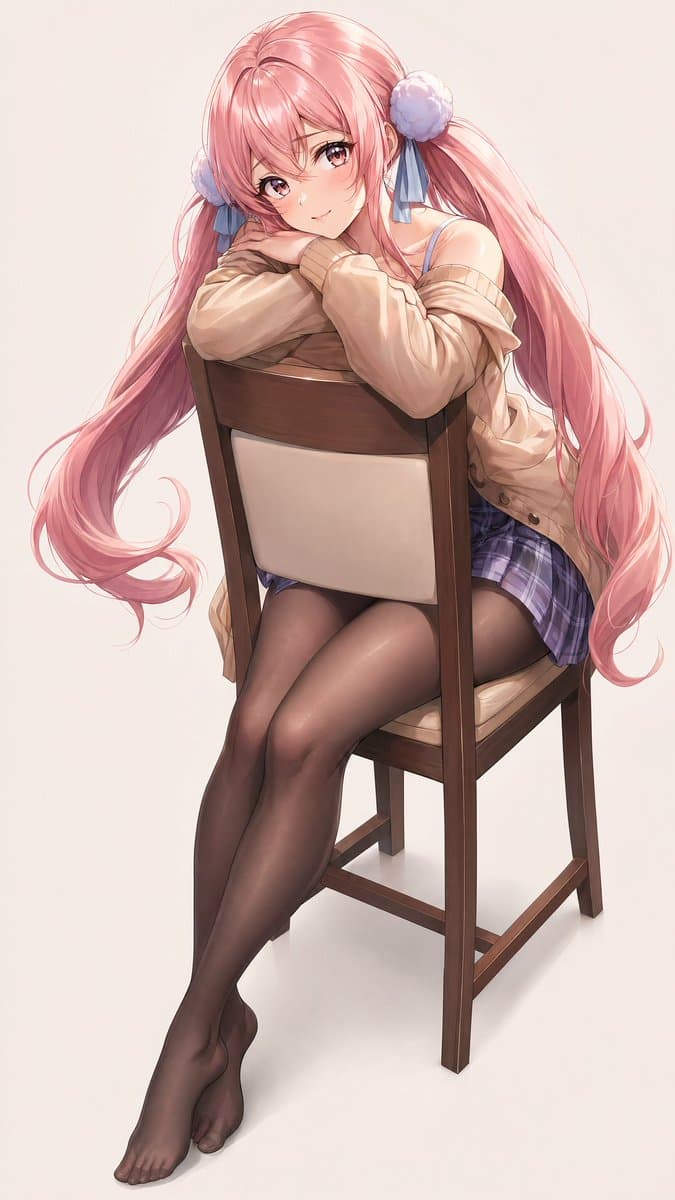
A full-body anime illustration of a cute young woman seated backward on a wooden dining chair in a clean studio setting with a soft off-white background. She has very long flowing {argument name="hair color" default="pastel pink"} hair styled in 2 low twin tails, each tied with 1 fluffy pom-pom hair accessory and 1 blue ribbon, for a total of 2 pom-poms and 2 ribbon bows. Her pose is shy and slightly flirtatious: she straddles the chair facing its backrest, leans forward with both arms folded on top of the chair back, and rests her face on her arms while looking toward the viewer. Her legs are elongated and elegant, extending diagonally forward with the ankles crossed and bare feet visible. She wears an oversized loose {argument name="cardigan color" default="beige"} cardigan slipping off one shoulder, a short {argument name="skirt pattern" default="purple plaid"} pleated mini skirt, a visible thin-strap camisole or bra top underneath, and sheer black pantyhose. Emphasize glossy, silky hair strands, delicate skin shading, subtle fabric folds, and semi-realistic anime rendering with polished soft lighting. The chair is a medium-brown wooden chair with a cushioned beige back panel and seat. Composition is vertical, centered, and fashion-illustration-like, showing the entire chair and full legs and feet, with a minimalist background and no extra objects.
Choose the primary action to open PicX Studio with the available template settings. Review the model and format, personalize the creative direction, and generate when ready.
Yes. You can change the subject, setting, lighting, mood, format, and available model controls before creating your image.
This template is free to open and customize. Generation usage is shown in PicX Studio before you create.
Start with GPT Image 2, which is the model associated with this template. You can compare another compatible model for a different finish.
Follow a topic to a crawlable collection of related PicX Studio templates.
43,474 public templates available. Verified via the PicX Studio public templates API; refreshed hourly.














![Minimalist Flat Vector Travel Poster — Premium minimalist flat-vector travel poster for {argument name="city name" default="[CITY_NAME]"}, 3:4 vertical format.](https://cms-assets.youmind.com/media/1787917359711_3ug846_HQX205cbMAA6F6S-300x400.jpg)
























![Custom Character Latte Art Generation Prompt — [キャラクター設定部分]
※以下の【 】内を書き換えてください
【キャラクターの外見的特徴】:
(例:ウィンクをして笑っている、明るい茶色のロングヘアのアニメ風の少女)
{argument name="キャラクターの外見的特](https://pbs.twimg.com/media/G-ONAG1bcAApk2a.jpg)

![Hyper-Realistic Sculpture Carved from Banana Flesh — Imagine a hyper-realistic sculpture of a majestic {argument name="subject" default="[SUBJECT]"}, carved ent](https://pbs.twimg.com/media/G8ZuZ4Ha8AAVSEH.jpg)


![Minimalist 3D Clay Render — A minimalist 3D render of a {argument name="subject" default="[SUBJECT]"}, featuring a soft, smooth clay-like texture, centered and](https://cms-assets.youmind.com/media/1777280760968_ve2bdc_HG1WfiDaEAAxRJl.jpg)