
Brutalist Architecture Rotring Product Commercial
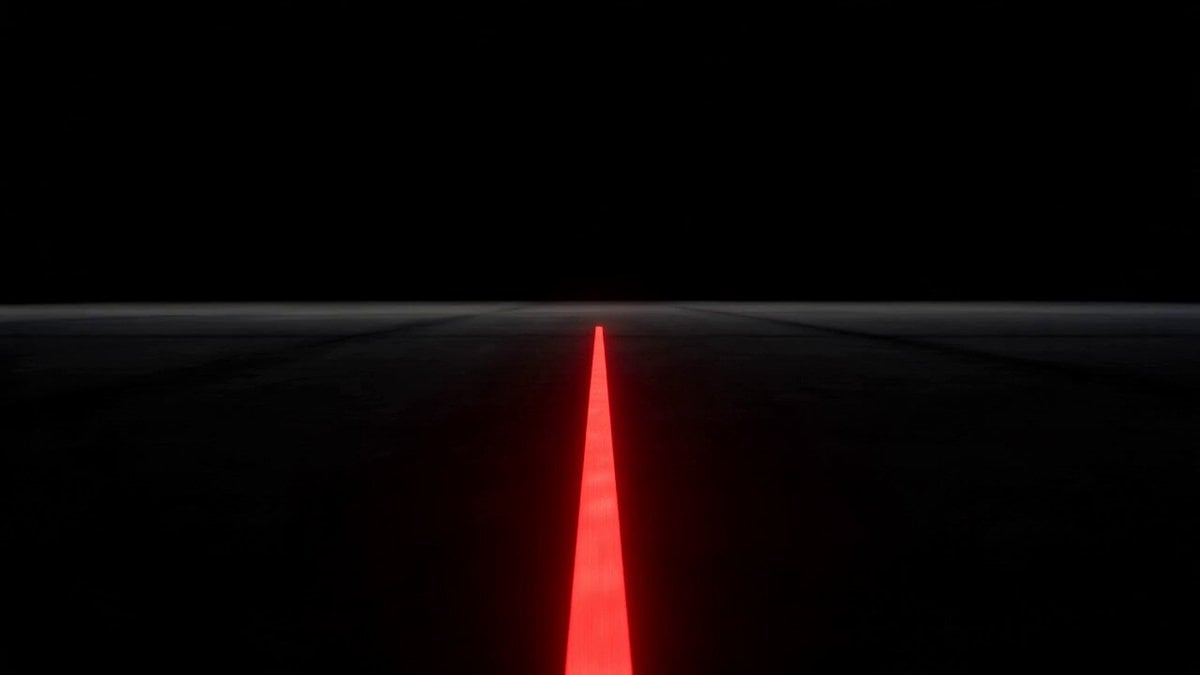
A sophisticated brutalist-themed commercial for a Rotring pencil, featuring architectural visualization, massive concrete structures, and realistic lighting.
- Prompt included
- Model and format preset
- Free template
The prompt behind this video
Copy the exact prompt behind Brutalist Architecture Rotring Product Commercial, or open it in the studio and make it yours.
Use the attached image for the pencil reference. Style: Brutalist architecture, luxury product commercial, architectural visualization, ultra-realistic cinematography, raw concrete, exposed rebar, monumental scale, Porsche Design precision, Apple-level minimalism, cinematic lighting, volumetric dust, photoreal VFX. 0:00–0:03 Pure black. A single red line appears in darkness. The line glows softly. The camera follows it. As it moves forward, enormous concrete walls begin rising from the ground. Massive slabs. Raw geometry. Monolithic forms. The line is literally building architecture. SFX: Deep architectural bass, concrete resonance, heavy structural impacts, distant industrial ambience. VOICEOVER: "Every structure begins with a line." 0:03–0:06 The camera accelerates through a sprawling brutalist megacity. Towering concrete masses. Suspended walkways. Exposed steel reinforcement. Gigantic voids and shadows. The red line snakes through the city like an artery. Unnoticed by the viewer, the city's geometry subtly mirrors the proportions of a Rotring. MUSIC: Minimal industrial pulse, mechanical rhythm, slow cinematic build. VOICEOVER: "A line becomes a wall." "A wall becomes a city." 0:06–0:10 The camera rises thousands of feet above the metropolis. The full scale is revealed. A breathtaking brutalist world stretching to the horizon. Then the impossible happens. The entire city begins lifting from the ground. Buildings detach. Bridges separate. Concrete fragments float upward. The audience realizes the city was never a city. It was a product. SFX: Structural groans, concrete fractures, low-frequency shockwaves, massive whooshes. 0:10–0:13 Millions of concrete particles and rusted steel elements spiral inward. Everything converges. The megastructure collapses into a single object. Your brutalist Rotring emerges. Raw. Scarred. Unbreakable. Floating in white space. MUSIC: Full orchestral rise, massive cinematic hit. VOICEOVER: "Some tools create architecture." "This one became it." 0:13–0:15 Hero shot. The Rotring slowly rotates. Dust falls from the concrete surface. The red ring catches the light. Silence. A precise mechanical click. VOICEOVER: "Rotring." Pause. "Drawn from concrete." END FRAME ROTRING DRAWN FROM CONCRETE
How to use Brutalist Architecture Rotring Product Commercial in 3 steps
- 1Upload ImagePNG, JPG or paste
Add your photo
Upload the photo the template builds on. The prompt, model and format are already set.
- 2…a portrait of your subject in softgolden-hour light, 85mm…
Personalize
Edit the subject and creative details for your destination.
- 3Generate
Generate
Press Generate — your video is created in PicX Studio, so you can compare it with the original and refine one variable at a time.
More like this
Templates with the same subject, style or setup. Open one to see its prompt.

Sneaker Product Commercial

Skincare Product Commercial 3
Cinematic Portrait Study 3
Product UGC Commercial

Cinematic Portrait Study
Skincare Product Commercial

Fruit Cookie Commercial

Silk Road Pomegranate Folk Animation
Mechanical Flower Bloom Brand Film
Crystal Ball Match-Cut Brand Film

Multi Panel Storyboard Sheet

Iced Coffee Dog Good-News Montage
Make it yours
Brutalist Architecture Rotring Product Commercial works as-is. These are the safest ways to change it without losing the look.
Change one field
Copy a single group, rewrite it, and generate again so you can see what that field is doing.
Keep the frame, change the subject
Hold the composition and light of Brutalist Architecture Rotring Product Commercial, then swap wardrobe, props or the person for a new take.
| If the result… | Why | Fix |
|---|---|---|
| The result drifts from the preview | Too many fields changed at once. | Reuse Brutalist Architecture Rotring Product Commercial as-is first, then change one group — subject, light, or setting. |
| The model over-stylizes the scene | The prose prompt leaves finish and camera underspecified. | Add one camera or lighting sentence and stay on Seedance 2.0. |
More Seedance 2.0 templates
Other prompts made for Seedance 2.0.

Comical Martial Arts Punch Scene

Maglev Train Action Sequence

Martial Arts Fight Sequence

Wuxia Protection and Trust Script

Vintage Korean Arcade MiniDV Vlog

Mercedes 190 SL Luxury Ad

Rainy Night Supernatural Reverse Comedy Video Script

Amazon Civilization Discovery

Futuristic South Asian City Transformation

Cozy Luxury Cafe Commercial
More video prompts
Fresh picks from across the catalog.
Musical Face Close-up Video Prompt

Summarize AI Discourse in a Chaotic Meme
One-Shot Rooms With Shifting Worlds

1980s Sitcom Nostalgia Scene

Childhood Memory of an Orange Fireball

Singing Woman Character Reference Prompt
OKX Alien Creature Cinematic Video Prompt for Seedance 2.0

Dynamic FPV Motocross Chase Video Prompt

Ancient Stargazer 2D/3D Hybrid Comedy

19th Century Paris Anime Market
Browse template categories
Brutalist Architecture Rotring Product Commercial questions
How do I use the Brutalist Architecture Rotring Product Commercial template?
Add your photo if the template asks for one, edit the prompt if you like — the template's model and format are already selected — and press Generate. Your version opens in PicX Studio.
Can I customize the Brutalist Architecture Rotring Product Commercial template?
Yes. You can change the subject, setting, lighting, mood, format, and available model controls before creating your video.
Is the Brutalist Architecture Rotring Product Commercial template free?
Opening and editing this template is free. Generating uses credits, shown on the Generate button when you are signed in.
Which AI model should I use?
Start with Seedance 2.0, which is the model associated with this template. You can compare another compatible model for a different finish.
Looking for something else? Browse all templates.

Your photo, any look
Thousands of ready templates for every top image and video model, from one credit balance.