How do I use the Mixed Media Artist Studio Display template?
Choose the primary action to open PicX Studio with the available template settings. Review the model and format, personalize the creative direction, and generate when ready.
A sophisticated prompt for a studio workspace scene featuring a side-by-side comparison of a photo and its paper-cut interpretation.
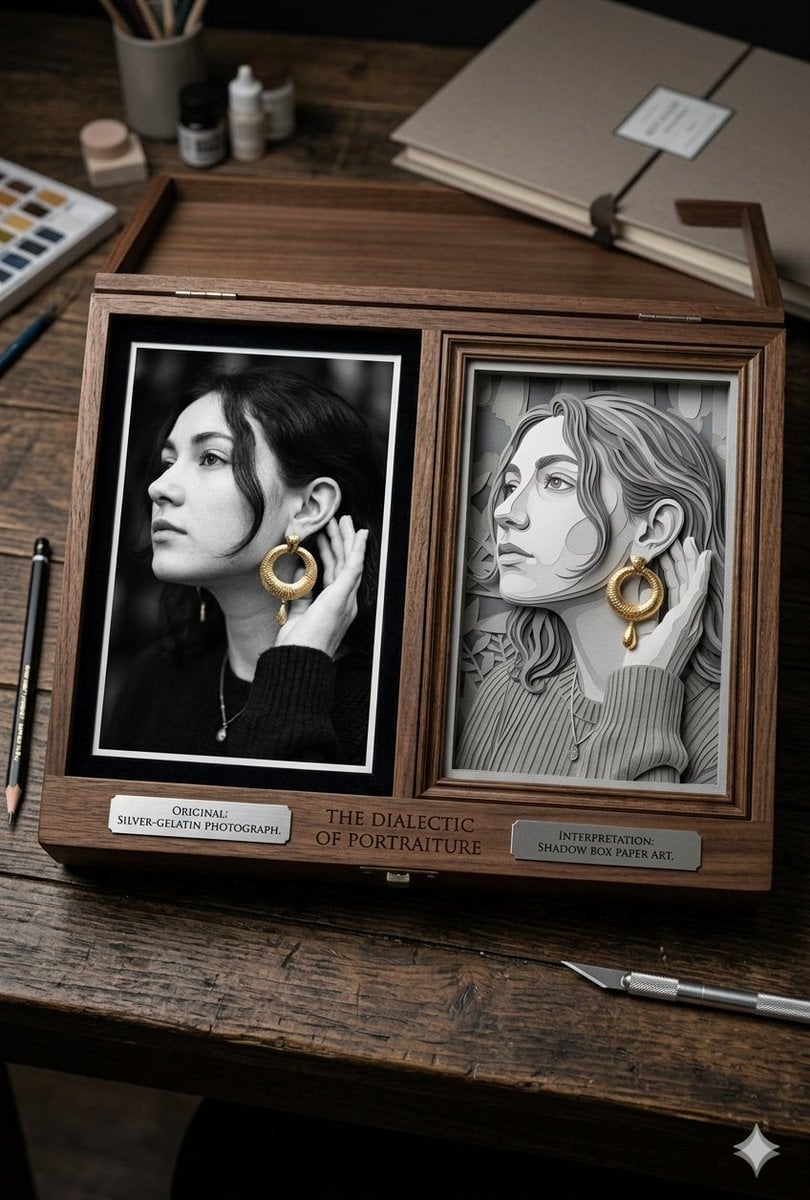
A high-angle, top-down photograph of an artist's wooden workspace. In the center sits an elegant, open dark wood display box with two side-by-side portrait panels. The left panel shows a crisp, {argument name="photo style" default="black-and-white silver-gelatin photograph"} of a young woman looking off to the side in profile, wearing a black knit sweater, a delicate necklace, and a {argument name="accent color" default="vibrant, textured gold hoop earring"} with a droplet charm that provides the only color in the image. The right panel features a meticulous, multi-layered paper-cut art interpretation of the exact same portrait, crafted from layered shades of grey cardstock to create depth, complete with the same textured gold earring. Small metallic plaques are mounted beneath each image, reading "ORIGINAL: SILVER-GELATIN PHOTOGRAPH" and "INTERPRETATION: SHADOW BOX PAPER ART" respectively, with the central title "{argument name="title text" default="THE DIALECTIC OF PORTRAITURE"}" engraved in the wood. Scattered around the box on the weathered wooden table are artist tools, including a precision craft knife, a pencil, ink bottles, and a closed sketchbook, creating an authentic studio atmosphere.
Choose the primary action to open PicX Studio with the available template settings. Review the model and format, personalize the creative direction, and generate when ready.
Yes. You can change the subject, setting, lighting, mood, format, and available model controls before creating your image.
This template is free to open and customize. Generation usage is shown in PicX Studio before you create.
Start with Nano Banana 2, which is the model associated with this template. You can compare another compatible model for a different finish.
Follow a topic to a crawlable collection of related PicX Studio templates.