How do I use the Nursery Fashion Style Blueprint Infographic template?
Choose the primary action to open PicX Studio with the available template settings. Review the model and format, personalize the creative direction, and generate when ready.
Creative concept posters for children's fashion, featuring whimsical and functional nursery styles in infographic format.
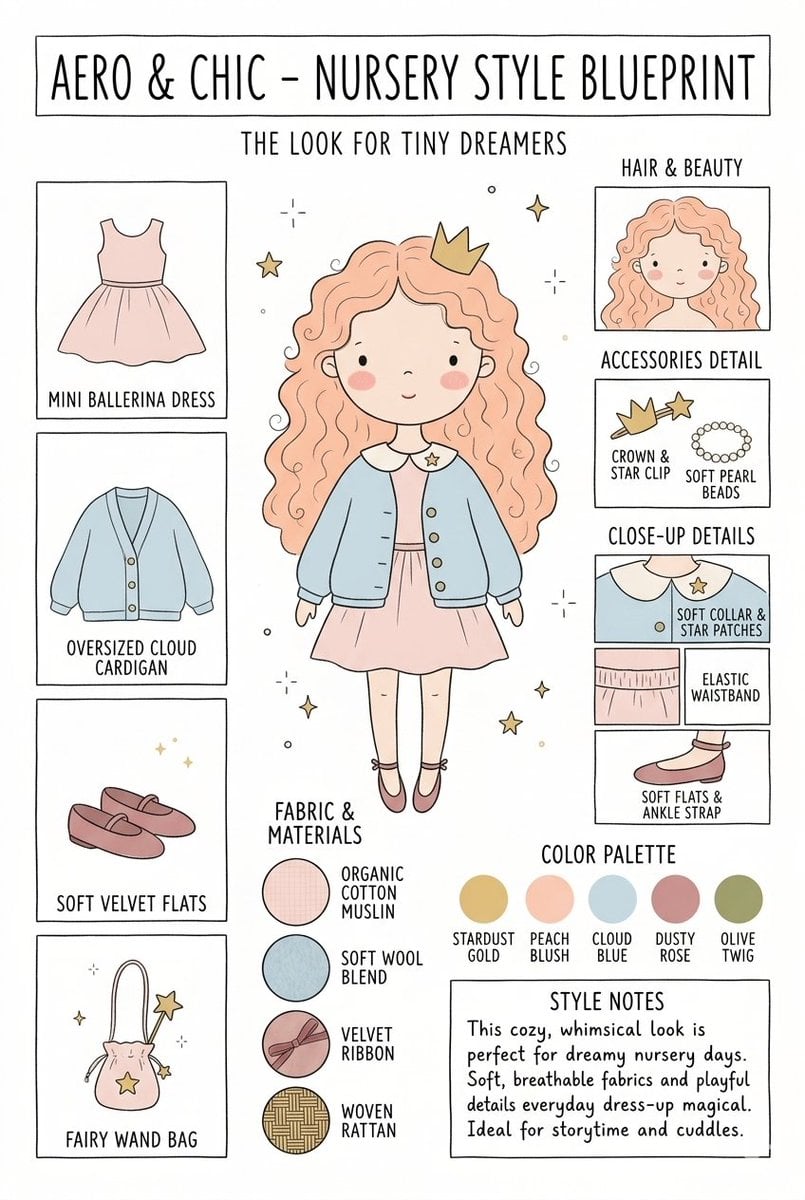
Create a matching pair of "{argument name="title" default="Aero & Chic - Nursery Style Blueprint"}" infographic concept posters, each featuring a full-body cartoon child in a curated outfit surrounded by illustrated fashion breakdowns. The first poster, titled "The Look for Tiny Dreamers," showcases a whimsical style with a girl wearing a {argument name="outfit 1" default="peach ballerina dress"} under an oversized cloud blue cardigan, complete with soft velvet flats, a crown clip, and a fairy wand bag, using a pastel color palette (stardust gold, peach blush, cloud blue, dusty rose, and olive twig). The second poster, titled "The Look for Tiny Artists," showcases a creative, functional style with a boy wearing a {argument name="outfit 2" default="splattered mustard paint smock"} over a striped studio shirt and green trousers, paired with leather ankle boots and a cat canvas tote bag, utilizing an earthy color palette (forest green, mushroom brown, slate blue, cream beige, and rust orange). Both posters must feature identical structural layouts, including side panels for clothing items, close-up details, accessories like beads, fabric swatches (such as organic cotton and wool blends), a color palette row, and a "Style Notes" text box at the bottom.
Choose the primary action to open PicX Studio with the available template settings. Review the model and format, personalize the creative direction, and generate when ready.
Yes. You can change the subject, setting, lighting, mood, format, and available model controls before creating your image.
This template is free to open and customize. Generation usage is shown in PicX Studio before you create.
Start with Nano Banana 2, which is the model associated with this template. You can compare another compatible model for a different finish.
Follow a topic to a crawlable collection of related PicX Studio templates.






![Nano Banana — One Day In [CITY] Travel Route](https://cdn.picxstudio.com/cdn-cgi/image/format=auto,quality=100,fit=scale-down,onerror=redirect,width=828,dpr=2,metadata=none/uploads/ai_gezgini_travel_d9a86f2e-c1f5-41a8-a4ef-5d96a8a7a023.jpg)