

How do I use the Police Cosplay Underground Garage Portrait template?
Choose the primary action to open PicX Studio with the available template settings. Review the model and format, personalize the creative direction, and generate when ready.
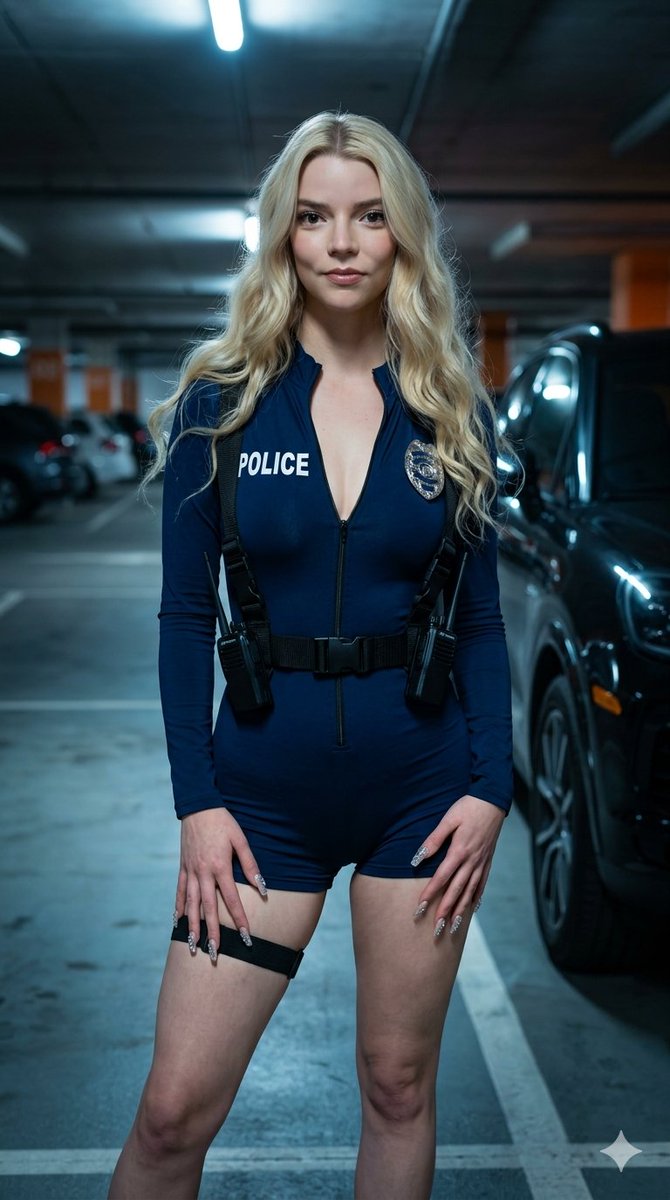
A detailed hyper-realistic portrait of a woman in a stylized police costume within a moody underground garage setting. (free to use) — Free AI image template on PicX Studio.
{ "type": "image_prompt", "aspect_ratio": "9:16", "description": { "subject": { "identity": "[NAME]", "appearance": { "hair": "Long, voluminous wavy hair", "expression": "Soft and subtle smile", "gaze": "Looking directly at the camera", "makeup": "Minimal makeup", "lips": "Subtle lip gloss", "nails": "Long acrylic nails heavily decorated with rhinestone details" } }, "clothing": { "outfit": "Tight long-sleeve navy blue romper designed as a stylized police costume", "details": [ "Partially open black front zipper down to the chest", "'POLICE' printed in bold white letters on the left chest", "Silver police badge attached on the right chest" ], "accessories": [ "Black tactical harness with nylon straps over the shoulders and around the waist", "Plastic side-release buckles", "Single black elastic garter strap around the upper left thigh" ] }, "pose": { "stance": "Standing upright with a relaxed yet confident posture", "body_position": "Facing the camera with a slight torso tilt", "arms": "Arms lowered naturally", "hands": "Both hands resting softly in front of the upper thighs", "legs": "Left leg positioned slightly forward" }, "setting": { "location": "Indoor underground garage", "background": [ "Front left portion of a modern black SUV visible beside her on the right side" ] }, "props": [ "Two black walkie-talkies attached to the waist harness straps" ], "lighting": { "style": "Moody low-key lighting", "details": [ "Dramatic nighttime parking lot illumination", "Strong contrast between bright pools of light and deep shadows", "Long harsh shadows", "Cool blue ambient fill", "Orange sodium-vapor accents", "Cinematic rim light", "High contrast filmic night atmosphere" ] }, "mood": "Confident, soft, approachable cosplay atmosphere", "technical": { "camera": "Medium-wide shot framed from mid-thigh upward", "lens": "85mm portrait lens", "depth_of_field": "Shallow depth of field with blurred background elements", "style": "Hyper-realistic, photorealistic portrait", "quality": "Highly detailed, sharp focus on subject, 8k resolution" } } }
Use Police Cosplay Underground Garage Portrait to plan an AI image around nano-banana-2 generation. Match the preview's composition first, then personalize the subject, setting, and mood for your own project.
Use the primary action to load the template settings in PicX Studio.
Adjust the subject and creative details for your destination.
Create the image, compare the result with the preview, and refine one variable at a time.
A continuous mix — similar concepts first, woven with same-model prompts and fresh picks from the catalog.
Choose the primary action to open PicX Studio with the available template settings. Review the model and format, personalize the creative direction, and generate when ready.
Yes. You can change the subject, setting, lighting, mood, format, and available model controls before creating your image.
This template is free to open and customize. Generation usage is shown in PicX Studio before you create.
Start with nano-banana-2, which is the model associated with this template. You can compare another compatible model for a different finish.
A continuous mix — similar concepts first, woven with same-model prompts and fresh picks from the catalog.
Follow a topic to a crawlable collection of related PicX Studio templates.
32,032 public templates available. Verified via the PicX Studio public templates API; refreshed hourly.


