Star-Key Magica Trickster Poster
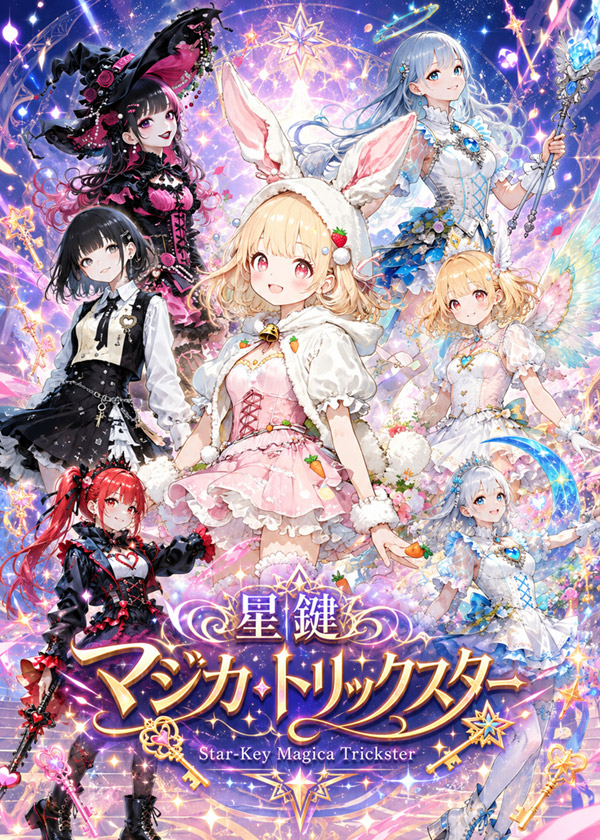
Goal: Create a highly detailed vertical anime key visual poster for a fictional magical-girl cosplay event and fantasy idol series titled {argument name="series title" default="星鍵 マジカ・トリックスター"}, with a sparkling celestial magic theme and ornate Japanese game-poster composition.
Canvas: Vertical 3:4 poster, dense full-bleed illustration, ultra colorful, high saturation, luminous fantasy lighting, no borders. Background is a cosmic pastel galaxy filled with star trails, magic circles, glowing constellations, fireworks-like sparkles, floating keys, ribbons, flowers, and prismatic light effects.
Main layout: Arrange exactly 7 anime magical-girl characters in a dramatic ensemble around a central heroine, all with softly blank/obscured faces as if anonymized, while their costumes and poses remain detailed. The central figure is largest and in front; the other six surround her in layered depth. Use ornate visual effects to create a premium Japanese fantasy mobile-game promotional illustration.
Character count and details: 1) Center heroine: a blonde bunny-ear magical girl wearing a pink-and-white frilly dress, fluffy white rabbit hood with tall ears, strawberry and carrot accessories, white puff sleeves, ribbon corset lacing, pom-pom cuffs, soft pastel skirt, holding a small carrot-like wand or charm; she is turned slightly sideways with an elegant idol-poster pose. 2) Upper left: a gothic witch magical girl with long black hair fading into hot pink curls, huge black witch hat with bat-wing shapes and pink roses, black-and-pink lace dress, corset details, dramatic dark magical aura. 3) Left middle: a monochrome gothic lolita magical girl with short black bob hair, white blouse, black vest, black layered skirt, chains, cross-like accessories, and a subdued mysterious pose. 4) Lower left: a red twin-tail devilish magical girl in a black-and-red punk outfit, heart motif on the chest, black gloves, red ribbons, small horn-like styling, holding a dark wand or weapon with red accents. 5) Upper right: an elegant ice-blue celestial sorceress with very long pale blue hair, white-and-blue dress with crystalline trim, blue jewel brooch, ornate staff topped with icy wings and crystals, calm regal pose. 6) Right middle: a blonde angel/fairy magical girl in a white pastel dress with blue, pink, and gold details, translucent rainbow wings, floral decorations, floating ribbons, gentle pose. 7) Lower right: a small blue-and-white fairy idol magical girl with pale hair, white frilly dress with blue ribbons, crescent-moon or arc-shaped blue accessory, soft magical glow, seated or floating near the title.
Title and typography: At the bottom center, place a large ornate Japanese logo reading {argument name="Japanese logo text" default="星鍵 マジカ・トリックスター"}. Use gold, violet, and white gradients, thick decorative outlines, starbursts, curls, and gem-like highlights. Below it, add the English subtitle {argument name="English subtitle" default="Star-Key Magica Trickster"} in a smaller elegant serif style. Include decorative golden keys, stars, crescent flourishes, and a compass/star emblem integrated into the logo.
Visual style: Premium anime fantasy illustration, intricate lace and fabric rendering, glossy magical-girl costume design, layered character silhouettes, sparkly bokeh, glowing particles, pastel pink/blue/purple palette with black/red accents, high-detail hair strands, jewel highlights, ornate staff and accessory design, energetic but balanced composition.
Constraints: Use exactly 7 characters and exactly the two title lines specified. Keep all faces intentionally blank or softly obscured, without facial features. Do not add extra readable text, watermarks, signatures, or logos beyond the title and subtitle. Preserve the dense celebratory poster look for a fictional {argument name="event name" default="AI Cosplay Expo 2026"}.












![118-google-nano-banana-pro-skincare-product- — A professional skincare shot of a [product container] with [cap/lid], labeled [brand, product, descriptor, volume](/_next/image?url=https%3A%2F%2Fcdn.picxstudio.com%2Fuploads%2Fpost118_img0_332898b8-29ea-42a9-87ab-9ed746a3f944.jpg&w=828&q=100)




![69-untitled — FORMAT: 15s / 145 BPM / 14 SHOTS
SUBJECT: @[image1]
WARDROBE: Clean modern outfit
ENVIRONMENT: Street / indoor transitions
MOOD: Discovery → contr](/_next/image?url=https%3A%2F%2Fcdn.picxstudio.com%2Fuploads%2Fpost69_img0_d45faecf-38c3-4bcb-81a4-f6eb1cf42bb2.jpg&w=828&q=100)








![Minimalist Flat Vector Travel Poster — Premium minimalist flat-vector travel poster for {argument name="city name" default="[CITY_NAME]"}, 3:4 vertical format.](https://cms-assets.youmind.com/media/1787917359711_3ug846_HQX205cbMAA6F6S-300x400.jpg)