How do I use the Real-Life and Anime Character Composite template?
Choose the primary action to open PicX Studio with the available template settings. Review the model and format, personalize the creative direction, and generate when ready.
A hyper-realistic cinematic composite prompt blending a real person in streetwear with the anime character Yuji Itadori.
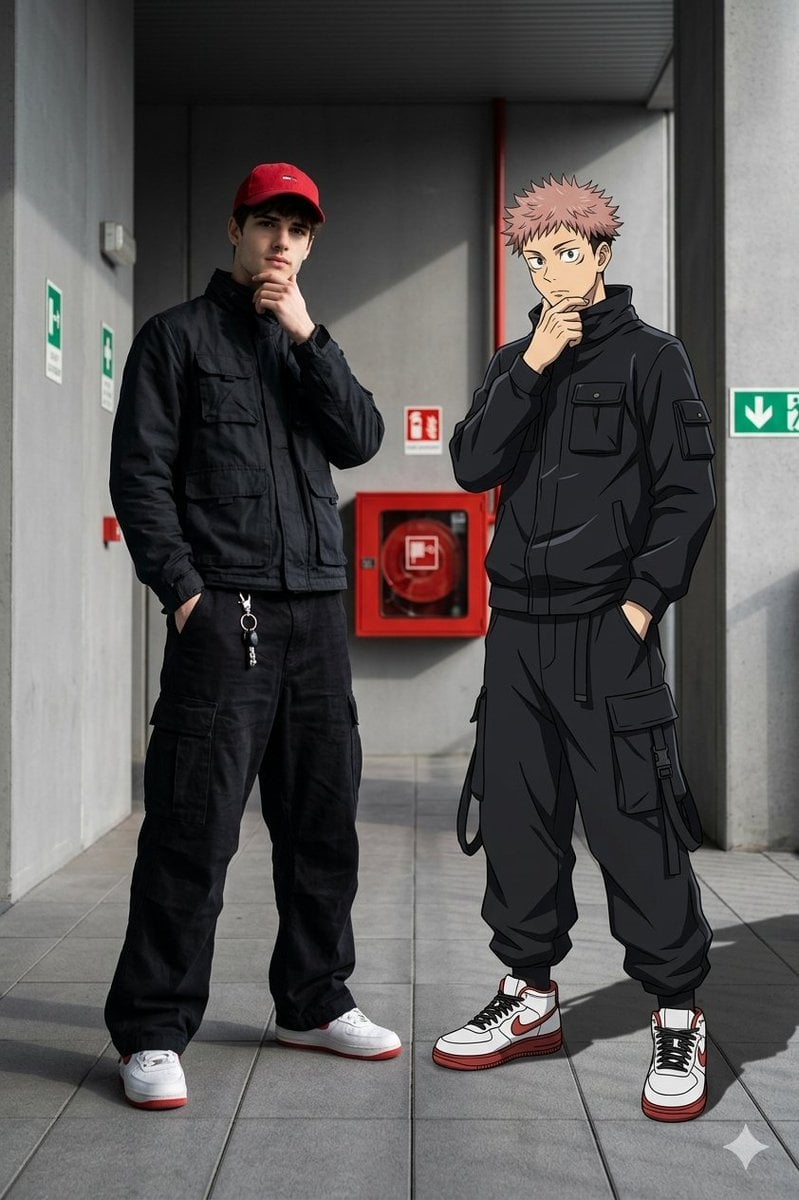
A hyper-realistic, 8k cinematic composite image blending a {argument name="real subject" default="real young man wearing urban streetwear"} with a {argument name="anime subject" default="2D anime character Yuji Itadori from Jujutsu Kaisen"}. On the left stands the real man wearing: a red baseball cap, a dark black utility jacket, extremely baggy black cargo pants with a silver keychain on the belt loop, and white sneakers with red accents. He is striking a dynamic pose with his left hand in pocket and his right hand brought up near his chin. Ensure the man's face remains 100% visible, clear, and recognizable; do not cover or obscure his face. On the right stands Yuji Itadori, wearing his dark black utility jacket, extremely baggy black cargo pants Jujutsu High uniform with and white sneakers with red accents. Yuji is mirroring the vibe with his right hand near his chin and left hand in pocket. Yuji is perfectly integrated into the real-world scene with realistic cast shadows on the ground. The background is an {argument name="location" default="industrial, modern outdoor corridor"} with flat grey walls, grey tiled flooring, a red fire equipment cabinet, and green utility signs. Shot with a 35mm lens, sharp focus, chiaroscuro lighting, 100% my face same
Choose the primary action to open PicX Studio with the available template settings. Review the model and format, personalize the creative direction, and generate when ready.
Yes. You can change the subject, setting, lighting, mood, format, and available model controls before creating your image.
This template is free to open and customize. Generation usage is shown in PicX Studio before you create.
Start with Nano Banana 2, which is the model associated with this template. You can compare another compatible model for a different finish.
Follow a topic to a crawlable collection of related PicX Studio templates.