How do I use the Western Editorial Magazine Portrait template?
Choose the primary action to open PicX Studio with the available template settings. Review the model and format, personalize the creative direction, and generate when ready.
Generates a moody high-fashion magazine cover featuring a reclining woman in an olive utility dress holding a white cowboy hat.
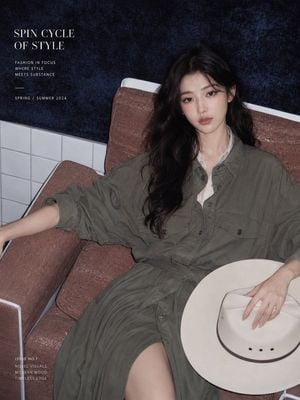
Create a high-fashion editorial magazine cover portrait. Canvas: vertical 3:4 fashion cover, flash-photography look, slightly cinematic and moody. Subject: a young mature East Asian woman with {argument name="hair color and style" default="long black wavy hair"}, pale natural makeup, cool restrained expression, quiet tired confidence, looking directly at the camera. She reclines lazily in a modern lounge chair, body angled diagonally across the frame, left arm stretched along the chair arm, right hand resting on a large white western cowboy hat in her lap. Outfit: {argument name="outfit" default="oversized military-olive utility shirt dress with rolled sleeves, button front, tie waist, and subtle pleated skirt"}, with a hint of white inner blouse at the collar; soft utility meets quiet luxury and western editorial styling. Setting: indoor fashion set with a rust-brown textured lounge chair with white metal frame, white square tiled wall behind the lower half, and a dark navy-black mottled textured backdrop above. Lighting and style: direct on-camera flash, realistic glossy magazine photography, muted colors, high-end editorial composition, slightly grainy texture, sharp face, soft shadows, elegant restrained mood. Layout: place the model on the right and center, filling most of the frame; leave negative space in the upper left for magazine typography. Text content: include exactly 4 discrete typography blocks, all in clean white serif/sans-serif editorial type. Block 1, top left large serif title: "{argument name="headline text" default="SPIN CYCLE\nOF STYLE"}". Block 2, below it small uppercase sans-serif, 3 lines: "FASHION IN FOCUS", "WHERE STYLE", "MEETS SUBSTANCE". Block 3, below a thin horizontal divider line: "{argument name="season text" default="SPRING / SUMMER 2024"}". Block 4, bottom left small uppercase issue copy, 5 lines: "{argument name="issue text" default="ISSUE NO.1\nNOVEL VISUALS\nMODERN MOOD\nTIMELESS EDGE"}". Constraints: do not add extra text, logos, barcodes, or watermarks; keep the hat plain cream-white with a dark thin band and three small ventilation holes; maintain a calm western-fashion editorial atmosphere.
Choose the primary action to open PicX Studio with the available template settings. Review the model and format, personalize the creative direction, and generate when ready.
Yes. You can change the subject, setting, lighting, mood, format, and available model controls before creating your image.
This template is free to open and customize. Generation usage is shown in PicX Studio before you create.
Start with GPT Image 2, which is the model associated with this template. You can compare another compatible model for a different finish.
Follow a topic to a crawlable collection of related PicX Studio templates.