How do I use the Anime Bubble Samurai in Bar Lounge template?
Choose the primary action to open PicX Studio with the available template settings. Review the model and format, personalize the creative direction, and generate when ready.
A detailed anime fantasy scene of a lolita-style girl inside a giant soap bubble holding a cherry-blossom katana in a warm bar lounge.
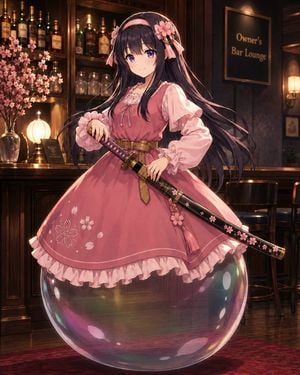
Create a polished anime-style fantasy illustration of one cute young woman standing inside one oversized transparent soap bubble while holding one sheathed katana. The character has {argument name="hair color" default="very long black hair with purple highlights"}, large violet eyes, a soft confident smile, and a sweet lolita-inspired outfit: one dusty-pink pinafore dress over one pale-pink puff-sleeve blouse, one wide tan leather belt, frilled cuffs, a ruffled hem, and white cherry-blossom embroidery on the skirt. Add exactly 2 visible pink flower hair ornaments with ribbon accents, one on each side of her head. She holds exactly 1 katana diagonally across her waist; the sword has a black scabbard decorated with pink cherry blossoms, gold fittings, a purple diamond-wrapped handle, and one dangling pink tassel charm. The soap bubble is huge, glossy, perfectly round, and semi-transparent, enclosing her lower body like a floating sphere, with strong iridescent rainbow reflections and several bright white oval highlights on its surface. Set the scene in {argument name="setting" default="a warm, elegant private bar lounge"}: dark polished wood, a bar counter, shelves of liquor bottles and glassware behind her, cherry blossom branches in a vase on the left, one glowing round table lamp, one wall sconce on the right, two dark bar stools in the background, and a red patterned carpet at the bottom. Include one framed wall sign on the right reading {argument name="sign text" default="Owner's Bar Lounge"}. Use warm amber lighting, rich shadows, cinematic depth of field, detailed fabric folds, glossy reflections on the bubble and floor, and high-quality Japanese anime rendering. Vertical composition, full-body view, centered character, whimsical but elegant mood, no watermark, no extra characters.
Choose the primary action to open PicX Studio with the available template settings. Review the model and format, personalize the creative direction, and generate when ready.
Yes. You can change the subject, setting, lighting, mood, format, and available model controls before creating your image.
This template is free to open and customize. Generation usage is shown in PicX Studio before you create.
Start with GPT Image 2, which is the model associated with this template. You can compare another compatible model for a different finish.
Follow a topic to a crawlable collection of related PicX Studio templates.