How do I use the Romantic Beach Sunset Couple template?
Edit the prompt in the box under the preview — the template's model and format are already selected — and press Generate. Your version appears right on this page.
A photorealistic prompt for creating a romantic barefoot couple portrait on a beach at sunset with warm cinematic lighting.

This template uses your photo — add one with the + button.
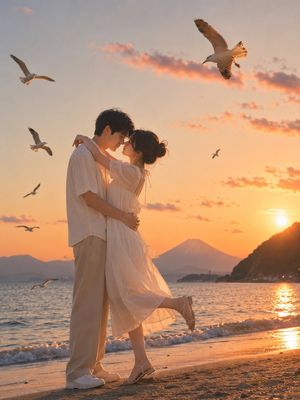
Create a photorealistic romantic full-body portrait of a couple standing barefoot on a sandy beach at golden-hour sunset. The man stands in the foreground facing the camera with a natural warm smile, wearing a {argument name="shirt color" default="mustard yellow"} casual cotton button-up shirt with sleeves rolled to the forearms and black pants rolled above the ankles. The woman stands directly behind him, gently hugging him from behind, resting her head on his shoulder, and holding her hands around his waist while he holds her hands. She wears a flowing {argument name="woman's outfit color" default="dusty rose pink"} traditional embroidered dress or sari-style outfit with a sheer draped dupatta, delicate border details, and subtle sparkling embellishments. Both are barefoot near the shoreline with small waves washing onto wet sand. Compose the couple centered vertically, full length, with warm backlighting from the low sun on the right, glowing reflections on the ocean, soft orange clouds, and a distant cargo ship silhouette on the left horizon. Use shallow depth of field, cinematic natural light, realistic skin and fabric texture, warm romantic color grading, and a professional couple photoshoot aesthetic. Keep the scene intimate and serene, with no extra people, no text, and no watermark.
Create a photorealistic romantic full-body portrait of a couple standing barefoot on a sandy beach at golden-hour sunset. The man stands in the foreground facing the camera with a natural warm smile, wearing a {argument name="shirt color" default="mustard yellow"} casual cotton button-up shirt with sleeves rolled to the forearms and black pants rolled above the ankles. The woman stands directly behind him, gently hugging him from behind, resting her head on his shoulder, and holding her hands around his waist while he holds her hands. She wears a flowing {argument name="woman's outfit color" default="dusty rose pink"} traditional embroidered dress or sari-style outfit with a sheer draped dupatta, delicate border details, and subtle sparkling embellishments. Both are barefoot near the shoreline with small waves washing onto wet sand. Compose the couple centered vertically, full length, with warm backlighting from the low sun on the right, glowing reflections on the ocean, soft orange clouds, and a distant cargo ship silhouette on the left horizon. Use shallow depth of field, cinematic natural light, realistic skin and fabric texture, warm romantic color grading, and a professional couple photoshoot aesthetic. Keep the scene intimate and serene, with no extra people, no text, and no watermark.
Edit the prompt in the box under the preview — the template's model and format are already selected — and press Generate. Your version appears right on this page.
Yes. You can change the subject, setting, lighting, mood, format, and available model controls before creating your image.
Opening and editing this template is free. Generating uses credits, shown on the Generate button when you are signed in.
Start with GPT Image 2, which is the model associated with this template. You can compare another compatible model for a different finish.
Follow a topic to a crawlable collection of related PicX Studio templates.