How do I use the Black Wind Fashion Portrait template?
Choose the primary action to open PicX Studio with the available template settings. Review the model and format, personalize the creative direction, and generate when ready.
A vertical cinematic wind-swept fashion portrait with storm clouds, dramatic hair movement, blurred grass, and minimalist campaign typography.
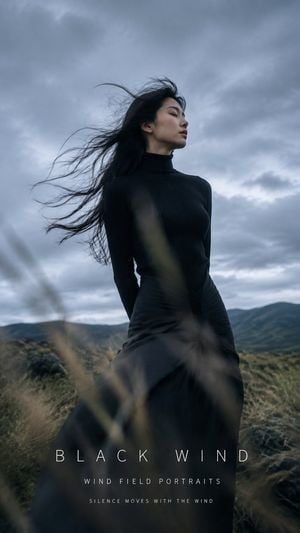
Create a vertical cinematic fashion campaign portrait titled {argument name="headline text" default="BLACK WIND"}. A solitary {argument name="subject" default="East Asian woman"} stands in a windswept open grassland under a heavy overcast sky, framed from mid-thigh upward in a low-angle editorial composition. She wears a fitted black ribbed turtleneck top and a long flowing black skirt or dress, with her hands held behind her back; her head is turned in profile to the right, eyes closed, calm and introspective. Her very long black hair is blown dramatically to the left by strong wind, with many fine strands trailing across the cloudy sky. The background shows dark rolling hills and moody moorland, with tall dry grasses in the extreme foreground blurred by shallow depth of field and motion, partially crossing the lower center of the image. Use muted cool film tones, blue-gray clouds, soft natural diffused light, subtle grain, realistic skin, high-fashion editorial styling, atmospheric wind movement, and a slightly underexposed dramatic look. Add minimalist thin white typography centered near the bottom: large widely spaced text “{argument name="headline text" default="BLACK WIND"}”, below it smaller spaced text “{argument name="series title" default="WIND FIELD PORTRAITS"}”, and a third tiny line “{argument name="tagline" default="SILENCE MOVES WITH THE WIND"}”. Keep the design clean with no logos or watermarks, portrait aspect ratio 9:16, photographic realism, and ensure the wind, hair, grasses, and clouds define the mood.
Choose the primary action to open PicX Studio with the available template settings. Review the model and format, personalize the creative direction, and generate when ready.
Yes. You can change the subject, setting, lighting, mood, format, and available model controls before creating your image.
This template is free to open and customize. Generation usage is shown in PicX Studio before you create.
Start with GPT Image 2, which is the model associated with this template. You can compare another compatible model for a different finish.
Follow a topic to a crawlable collection of related PicX Studio templates.