How do I use the Rainbow Princess Lake Fantasy template?
Choose the primary action to open PicX Studio with the available template settings. Review the model and format, personalize the creative direction, and generate when ready.
Generates a vibrant vertical anime fantasy illustration of a jeweled rainbow princess walking across a magical lake under a rainbow sky.
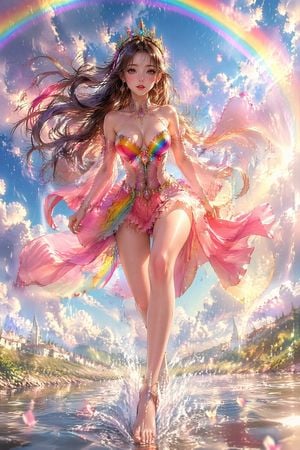
Create a highly detailed vertical fantasy anime illustration of a beautiful rainbow princess walking barefoot across a sparkling lake, centered full body from head to toe. She has long flowing {argument name="hair color" default="chestnut brown"} hair whipping dramatically in the wind, large expressive eyes, soft rosy makeup, and a jeweled golden crown with rainbow gemstones. Her outfit is an ornate magical princess bodice and short flowing skirt made of translucent silk, petals, and crystal embroidery, with vivid rainbow gradients across the bust and waist, a pink chiffon train streaming around her, delicate gold jewelry, dangling earrings, jeweled choker, arm ornaments, and ankle jewelry. Emphasize an elegant glamorous fantasy aesthetic with iridescent gems, glittering fabric, luminous skin, and dynamic windblown ribbons. She steps forward on the surface of the water, creating bright splashes around her feet and mirrored reflections below. The setting is a dreamy fairytale valley lake with distant white village houses and church spires on both shores, green hills, glowing flowers, and drifting pink petals. Above her, a huge complete rainbow arcs across a vivid blue sky filled with fluffy clouds, sunlit mist, sparkling particles, lens flare, and magical rain-like glints. Use a dramatic low-angle composition, cinematic lighting, ultra-polished digital painting, vibrant pastel rainbow palette, high detail, sharp face and costume details, ethereal atmosphere, no text, no watermark.
Choose the primary action to open PicX Studio with the available template settings. Review the model and format, personalize the creative direction, and generate when ready.
Yes. You can change the subject, setting, lighting, mood, format, and available model controls before creating your image.
This template is free to open and customize. Generation usage is shown in PicX Studio before you create.
Start with GPT Image 2, which is the model associated with this template. You can compare another compatible model for a different finish.
Follow a topic to a crawlable collection of related PicX Studio templates.