How do I use the Cinematic Apartment Night Portrait template?
Choose the primary action to open PicX Studio with the available template settings. Review the model and format, personalize the creative direction, and generate when ready.
A melancholic black and white portrait of a young woman sitting by a window at night, focusing on natural textures and emotional lighting for a cinematic feel.
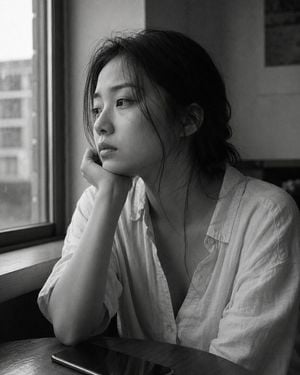
Medium close-up portrait, 85mm, {argument name="subject" default="a young East Asian woman in her early 20s"} sits at a {argument name="setting" default="small table near the apartment window"}, elbow resting on table surface, chin supported on the back of her hand, looking toward window, authentic daily life photography, natural candid moment. Almond-shaped eyes with a distant, inward focus, not tracking anything outside the glass. Clean jawline, softly round face, natural brows with slight arch. Straight black hair loosely gathered behind head with several strands falling free across cheek and neck. Skin with natural texture, visible pore detail, faint undereye shadow from tiredness, subsurface scattering visible under directional side light. She wears a loose cotton shirt with button placket, slightly open at collar. Phone placed flat on the table surface, face-up but screen dark. Two or three stray hairs drift naturally across her jaw, not neatly arranged. {argument name="color mode" default="Black and white rendering"}. Late afternoon directional side light from window, soft gradient from illuminated left side to gentle shadow on right, mid-tone range preserved, no crushed blacks, shadow areas retain fine detail — luminous and diffuse rather than hard contrast. Subtle ISO 400 film grain in shadow areas, photographic texture not CG render smoothness. Aspect ratio 4:5. No watermark, no text overlay, not cartoon, not digitally painted, not illustration, not anime.
Choose the primary action to open PicX Studio with the available template settings. Review the model and format, personalize the creative direction, and generate when ready.
Yes. You can change the subject, setting, lighting, mood, format, and available model controls before creating your image.
This template is free to open and customize. Generation usage is shown in PicX Studio before you create.
Start with GPT Image 2, which is the model associated with this template. You can compare another compatible model for a different finish.
Follow a topic to a crawlable collection of related PicX Studio templates.